

WordPress icon
-
Hello the word press icon is not showing on the post it shows in the preview but when I log out it is not on the site and I have saved it.
https://orioleparkcommunitygarden.wordpress.com/The blog I need help with is: (visible only to logged in users)
-
Hi –
Please send me a link to the post you’re inquiring about. Happy to take a look at it :)
-
-
Hi there, are you talking about the dark colored admin bar at the top of your site that you see when you are logged into WordPress.com and visit your site?
If not, can you explain what you are meaning by the WordPress icon?
-
Hello the added share icon for the post are WordPress, twitter and facebook and the rest as more the WordPress share icon shows in the preview and in editing mode but not on the published posts
On the events page, I check the sharing tab and the icon is not showing
Also, how can I add a search icon in the menu tab?
https://orioleparkcommunitygarden.wordpress.com/ -
Hi there, on this post, https://orioleparkcommunitygarden.wordpress.com/2018/06/26/a-warm-welcome-to-our-new-members/, this is what I see for the sharing buttons at the bottom.
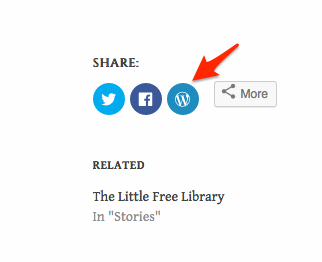
If I click the WordPress logo, it opens my blog post editor and sets your post for a Reblog on my site.
Can you see that icon on that post? If you press that button, it should open an window so that you can Reblog that particular post.
-
At the bottom of the post there is share: FB, Twitter and more icons.
How I set it up is FB, Twitter and WordPress icon to show and it shows on the post when I log in but not on the published post
https://orioleparkcommunitygarden.wordpress.com/ -
If you are not logged into WordPress, the Reblog button (WordPress “W”) will not show. That is a feature that will only appear to logged in WordPress.com users.
Anyone who is logged into WordPress.com will see that Reblog button.
-
ok
On the events page, I check the sharing tab and the icon is not showing
https://orioleparkcommunitygarden.wordpress.com/events/ -
Hi there,
For the sharing buttons to appear on your pages you need to first enable it. Go to My Site > Sharing > Sharing Button and check the Pages option under the Show sharing buttons on. Here’s a screenshot to make things easier:
Let me know if there’s anything else I can do for you. I’m happy to help.
-
-
Enable that option and then turn it off or on for individual pages from the page editor’s sidebar. Here’s where you can find the option:


- The topic ‘WordPress icon’ is closed to new replies.
 WordPress.com Forums