

WordPress is spamming through my linked in account
-
The spamming via my Linked in account is professionally embarassing and something I do not recall actively agreeing to. There seems no way to delete the link so I therefore want this account and domain closed.
The blog I need help with is: (visible only to logged in users)
-
Hello there,
I’m happy to help further, if you can explain where the spam is originating from on your WordPress.com site. You can also send me a screenshot of your LinkedIn page where you’re seeing the spam. If there is anything at all I can assist with, please let me know. The more information I receive about this issue, the better I can troubleshoot for you.
However, I’m also happy to help with your original request. Please see below:
If we cancel your domain, it can take up to several weeks for our domain registrar to release the domain, and we can’t guarantee that your domain will be available to you again once canceled.
If you want to keep using your domain but you don’t want to use WordPress.com anymore, you don’t have to cancel it. Instead, you can move the domain to another site, using the Domain Administration tool under Store > My Domains in your dashboard.
For more information on using the domain elsewhere, please see:
http://en.support.wordpress.com/domains/move-domain/However, if you don’t want this domain at all, I can begin the cancellation process once you give me permission to do so. This cannot be undone, so I wanted to warn you before we got the ball rolling.
Looking forward to hearing from you. Thanks very much.
-
I can’t see the spam from my Linked In account but I will get someone to send a screen shot. They are the WordPress updates from WordPress themselves and yesterdays one started with the words “We’re back….” and something to do with 5 top updates – you can maybe find it from that? Thanks
-
I’ve found it on the news page on my wordpress and it was from Mark Armstrong and it was the Longreads Vol 5, started with
“We’re back with another collection of our favorite stories from across all of WordPress! You can find our past collections here — and you can follow Longreads on WordPress.com for more daily reading recommendations.”
There’s more than one per day though but all from your end so I would assume you could stop them
-
Hi there! Those screenshots will be very helpful to me. I can work to traceback the unwanted posts if I have those.
Since I cannot access your news page, can you either send me a link or send me screenshots of that as well?
Are the two locations that you’ve mentioned the only areas on which you’re seeing these? Or are you receiving email notification as well?
Let’s also make sure you’re not inadvertently following WordPress or Longreads on LinkedIn. Go to LinkedIn.com and hover over the Profile link in the menu. Click on the sub-menu link for Edit Profile. In your Edit Profile page, scroll all the way to the bottom of the page to see who you’re following.
Since we don’t send out spam to anyone’s social networking sites, I am wondering if you’re stuck in a feed that you don’t want. I’m trying to determine where that feed is originating and how you might be on the recipient list.
Thanks for the additional information. We’ll get to the bottom of this, as we certainly don’t want you getting unwanted posts. Thanks much.
-
Hi
I have a screen grab that i can send to you but it would need to be via email – do you have an accessible email address
You say you dont spam peoples accounts but I certainly am having my account hijacked for unwanted posts with no way of switching them off and they are all from WordPress suggested links so I’m not sure why you can’t find it when I have given you details of one a few days ago
anyway if you send me the email address I will forward you the screen grab
thanks
-
This was an update from my account today – a contact of mine sent it to me in an email and it was under the heading What your network is saying – I am absolutely furious. This is the link that it goes to http://en.blog.wordpress.com/2014/09/30/grand-meetup-reflections/?utm_source=twitterfeed&utm_medium=linkedin
and this is the extract on MY UPDATE apparently – this needs to be sorted now and i can’t see how you need more information as it is coming from your updates
Audrey Macnaughton Automattic is a distributed company — we all work from wherever we are. Right now, “where we are” is 197 cities around the world: New Orleans, USA. Montevideo, Uruguay. Tokyo, Japan. Vilnius, Lithuania. Once a year, we get together somewhere in the world to meet, work alongside, learn from, and laugh with one another in an exhilarating, exhausting week called the Grand Meetup. This year, 277 Automatticians descended on Park City, Utah, for seven days in mid-September. I flew across the country to spend time in a mountain lodge with a bunch of strangers I met on the Internet. And they …Engaged, Inspired, and Ready to Build a Better Web
Like
•
Comment -
Hi Audrey,
I don’t blame you for being angry. We’ll get this figured out.
I am going to send you a private email, you can reply to it with those screenshots, and I’ll get them directly.
Also, if possible, if you can forward me ALL the email text that your contact received, or copy and paste it into the email, I’d like to delve into that asap. I don’t want to see just the extract, but rather, the entire notification that makes it appear as if it’s coming from your account.
Please keep an eye out for my email.
Thanks much.
-
I havent received your email and I’m now going beyond furious. This needs to be sorted now
-
Audrey,
I sent that email immediately after contacting you here. I’m going to try once again. Sending an email to your administrative contact information listed for your website.
Thanks.
-
Audrey,
While we are working on this, could you please take a look at your LinkedIn account and let me know what applications you have connected?
The following is a link that would display how to connect a WordPress.com app to your LinkedIn account. Can you do the reverse, and if there is one connected, disconnect?
http://www.vtldesign.com/inbound-marketing/blogs/how-to-add-blog-posts-to-your-linkedin-profile/2/Our developers are looking into this situation for you.
Thanks much.
-
Robyn
I have sent the update and the screen shot
I checked on my linked in and there is no Applications section in my profile so I can’t do what you suggest
I hope your developers get it sorted
audrey
-
Audrey,
Thanks so much for the screenshot and looking into apps on LinkedIn.
One thing I cannot test on my end, that I’d like to know:
Do you use any third-party service that relays RSS feeds to your LinkedIn profile? Even if it’s not a connection you’ve created from WordPress.com, it’d be helpful for us to know if anything is setup to auto-publish to your LinkedIn page.
We’re wondering if this is the case, since we’re not seeing any direct connection between WordPress.com and your LinkedIn site. We’re digging everywhere, and cannot locate a link.
Our developers asked that you reach out to LinkedIn support to disable access to whatever service is posting to your profile. Additionally it’d be helpful if you could ask them what the source of those posts are. If it is a WordPress.com connection that we’re not able to locate, they can name it for us, and we can target (and eradicate) the issue directly.
Thank you very much.
-
This is getting ridiculous – I don’t use any other service and surely if they are coming from wordpress you can find it at your end.
I have contacted Linked In through their helpcenter but am not hopeful
I’m thinking my only recourse is to cancel both accounts and lose my 1,000+ connections on LInked In
-
This is the update today from WordPress hot off the press
-
-
Audrey,
I don’t want you to lose any followers, and I understand why your patience is being tested.
If you can hang in there through just a bit more testing, there is a crew of people here trying to figure out this issue for you. We really want to get things settled.
When you have time, please go to this link:
https://www.linkedin.com/secure/settings?userAgree=&goback=%2Enas_*1_*1_*1When I click on it, I am asked to log into my LinkedIn account, and then I am taken to a page that looks like this:
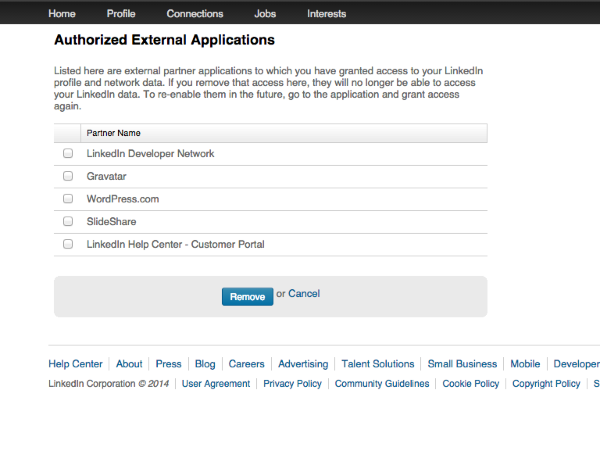
If you have any trouble finding that page, one of our developers made you this video, so you can see how to find it on your own:
https://cloudup.com/chCtORxb_PII need you to get to take a screenshot for me, and upload the image to your Media Library, so I can take a look. If you’re not sure how to upload to your Media Library, here is a link. Simply click Add New. Then let me know when there’s something I can look at.
We are eager to seeing this list. If there is any connection set up from WordPress.com to LinkedIn, it will appear on this page.
Thanks again, Audrey.


- The topic ‘WordPress is spamming through my linked in account’ is closed to new replies.


 WordPress.com Forums