

WordPress Version
-
Hello,
I have 2 questions.
1. Can you please tell me which WordPress Version am I running on http://www.dajanaomerdic.com?
2. I have to edit the text in the excerpt box, but the box disappeared from the Page Editor in my WP Admin. When I open the filed group “show on screen” the box is not there either. Where can I find this box again?
Thank you!
Regards, Dajana
The blog I need help with is: (visible only to logged in users)
-
Hi Dajana!
On WordPress.com you’re always running the latest stable release of the WordPress software. Right now that version is 4.1 .
I have to edit the text in the excerpt box, but the box disappeared from the Page Editor in my WP Admin. When I open the filed group “show on screen” the box is not there either. Where can I find this box again?
Pages do not have excerpt options, but Posts do. Excerpts are meant to be short versions of posts for when they appear in feeds or lists of multiple posts.
When services like social media or search engines need an excerpt from a Page, WordPress metadata point them to your body content to generate one.
-
Hi Alex,
thank you for reply. I´m running a Theme Promenade and while I was creating a page, I had excerpt box shown where I also added a content which I have to edit.But the excerpt box is not on the editor page, nor in the field group “shown on screen”. When I was trying to post the link of my blog on Facebook, the page preview was showing the excerpt I typed into that excerpt box and mysteriously an old featured photo which I replaced by a new featured photo and completely deleted out of my media library, ….but still the old featured photo is shown in a preview. How can I change this? I want to or edit the excerpt I typed into the box or completely delete it and I want my acctual featured photo to be shown in preview when shared via social media.
Thank you a lot.
Regards, Dajana
-
Hi Dajana,
Could you let me know which page (and what text) you’re needing to edit? That would help me recommend how to fix it. Could it be this text on your About page?
Dajana Omerdić is a student
of life, music and spiritual guidance,
mom of two and a lover of mystery.
Born on 24th of July 1980 in Tuzla, Bosnia and Herzegovina, she discovered her love for music at an early age […]That text is saved in a Text widget. You can edit it by opening your blog’sCustomizer, click to the About page, then open the Widget tab. Select the Text Widget and edit it there. Save changes.
—
When I was trying to post the link of my blog on Facebook, the page preview was showing the excerpt I typed into that excerpt box and mysteriously an old featured photo which I replaced by a new featured photo and completely deleted out of my media library, ….but still the old featured photo is shown in a preview. How can I change this?
Facebook caches link previews to make them appear faster the next time anyone shares that URL. You’ll often see old photos and text appear there even after you’ve adjusted them on your site.
They have a tool to reset any link’s preview information. Enter the URL for the page here:
https://developers.facebook.com/tools/debug/og/object/
When you click “Fetch new scrape information,” Facebook will recrawl your site and attempt to find the best photo/text possible for its preview.
-Alex G.
-
Hallo Alex,
Yes, that is the page.
Text of that page is written in the page editor and the footer text is added via text widget.
Can you try to post the link dajanaomerdic.com on Facebook and see what happens? When I try to post it I get in the preview old featured photo and this mysterious excerpt?!
This excerpt I did write in an excerpt box which was shown and then disappeared. And that text is only written there. All other text contents do not contain that sentence that was written in the excerpt box.
Thank you! Regards,Dajana
-
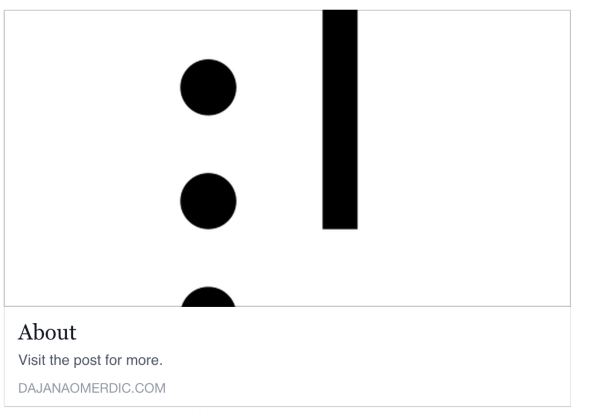
Here is what Facebook is currently sharing for your About page:
I ran it through Facebook’s tool I mentioned before and it will now share this:
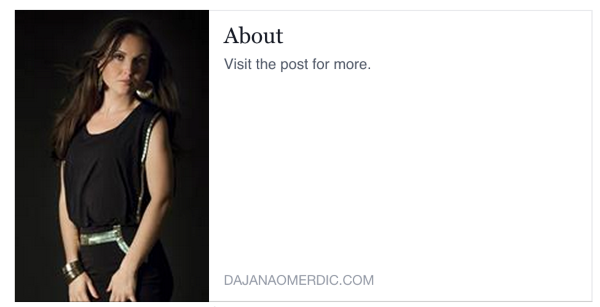
The reason Facebook is displaying “Visit the post for more.” is because no text is being found in the body of your page. Facebook treats the text found in widgets different from text found in the body of the page. The only text you have on the About page is held in that text widget.
To change that message from appearing on Facebook, you’ll need to add text to the body of the page, along with the photo, here:
https://dajanaomerdic.wordpress.com/wp-admin/post.php?post=209&action=edit
-
Hello Alex,
thank you very much for your support. This issue has been successfully resolved.Kind regards, Dajana


- The topic ‘WordPress Version’ is closed to new replies.


 WordPress.com Forums