

WP Beginner Moving Blog
-
Hi,
I am new to wp and I plan to move my old blog to wordpress..com. Where should I begin? I recently set up my wp blog with wordpress.com. I created a new domain on wp different from my old blogspot. I want to upgrade to premium to customize my wordpress.com blog. I haven’t moved my old content and blog posts to wordpress yet. Does it make difference if I go premium first before moving my old blog to wordpress? I would like some help. I don’t have much experience using this site. I read about import/transfer domain but nothing about purchasing a plan before moving to wordpress.
The blog I need help with is: (visible only to logged in users)
-
Hi there, welcome to WordPress.com!
If you talking about moving your self-hosted WordPress.org site over to WordPress.com, you can follow the guidance on the following pages:
https://en.support.wordpress.com/moving-a-blog/
https://en.support.wordpress.com/moving-from-self-hosted-wordpress-to-wordpress-com/If you want to connect your domain name from your old site to your new WordPress.com site with Domain Mapping, please follow this URL: https://en.support.wordpress.com/domains/map-existing-domain/
Does it make difference if I go premium first before moving my old blog to wordpress?
Actually, this is up to you to decide, if you see the Premium plan is suitable for you, then go ahead :)
https://wordpress.com/pricingI read about import/transfer domain but nothing about purchasing a plan before moving to WordPress.
For importing from your self-hosted WordPress.org site over to WordPress.com, you can also do it with Free plan.
Hope this helps!
-
Thank you for answering my question. I have several questions and kept creating threads because I wasn’t sure if I was commenting in the right place. I asked a question about comment avatar in the twenty seventeen theme. I don’t see the option to change the avatar when I go to settings > click on discussion. I don’t get the option to use the default avatar list:
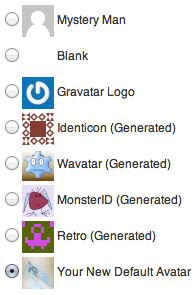
Why is that? I am currently using the free wordpress.com and I am just getting started.
-
Please do not make a duplicate thread with the same questions. You have two other threads about Avatar.
WordPress.com associates an Avatar with your email address. Gravatar powers the user avatars on WordPress.com. Your WordPress.com and Gravatar accounts are linked automatically. Please follow the instructions here to create your Avatar:
-


- The topic ‘WP Beginner Moving Blog’ is closed to new replies.
 WordPress.com Forums