

wp displaying pics on post that aren't even uploaded to the blog…
-
Hi, I just switched themes and some of the post summaries are displaying photos that aren’t actually uploaded to the post…ie. they should display pics from that particular post, but instead some of images are being taken from the general image library, images that have never actually been uploaded to the blog…
The blog I need help with is: (visible only to logged in users)
-
Hi there!
That is very strange. Can you provide me the URL for the post that is doing this? I’d be more than happy to take a further look.
Cheers!
-
The actual post (when you click from the home page) deosn’t do it, it’s the summary link, the pic display on the home page- the asparagus- notice the pic isn’t in the actual post post- http://thespoonandapron.com/2014/05/12/the-feast-weekend-get-away-recipes-asparagus-potato-omelet-rosemary-chicken-and-much-more/
The chocolate cupcake pic is in the summary, but not in the post for peanut butter brownies- http://thespoonandapron.com/2014/05/07/peanut-butter-brownies-grain-gluten-dairy-free/And this recipe post for Yuca Fries does not have a pic in the summary at all- http://thespoonandapron.com/2014/04/30/rosemary-garlic-yucca-fries-or-how-to-make-yucca-fries/
Also, is there a general email with a suggestion box? I find sometimes wp to be a little difficult to navigate, etc…I would like to send comments if possible :-) THANKS!
-
Hi there,
Thanks for the links! So, I looked into the posts you provided and it seems like the images are attached to the posts even though they are not linked within the post. For example if you look at this post:
you will see that the asparagus image in the Posts page is uploaded to that post:
https://spoonandapron.wordpress.com/wp-admin/upload.php?item=700
Here is the link to the two images in your Media > Library Page:
https://spoonandapron.wordpress.com/wp-admin/upload.php?item=700
and
https://spoonandapron.wordpress.com/wp-admin/upload.php?item=699
Try deleting those images and see if that works.
In addition, this post also has the same issue:
http://thespoonandapron.com/2014/05/07/peanut-butter-brownies-grain-gluten-dairy-free/
As seen the cupcake image is uploaded to that post:
https://spoonandapron.wordpress.com/wp-admin/upload.php?item=686
Please delete the image and see if that still happens.
As for this last post, I did not see any images on the Posts page as seen here:
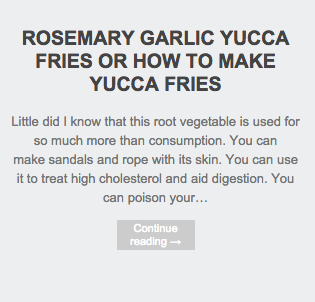
Let me know if you have any questions with this!
-
Grace, I have another question. Is there a way to take out the subscription count from the ‘follow my blog’ link? I only have 57 subscribers, it’s embarrassing. Seriously.
-
Hi there,
Sure! You can remove this by editing the Follow Blog widget. Go to your widgets page and open up the widget. Here’s a direct link:
https://spoonandapron.wordpress.com/wp-admin/widgets.php
When you open up the widget, there’s a check box at the bottom to show the number of subscribers. You can remove it by unchecking it as seen here:
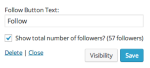
Let me know if you have any questions with this!
-
Hi Grace…I’m having another problem with wp. I have three blogs but only one is active…whenever I post to this blog and it automatically uploads the post to facebook, it posts as a different blog…it automatically chooses from the 3 blogs that I have instead of choosing the blog I am actually posting from. Does that make sense? Ugh.
-
When you do to Users > Personal Settings in your Dashboard, is the primary blog correct?
Also make sure that the Website under Account Details is correct as well. If you make changes to this please note that this will only take place for changes from here on out. It will not change it for posts shared in the past. Let me know if you have any questions with this!
-
Thanks Grace. That is all set to the correct settings…which is weird because three of the fb posts now have been ‘posted’ from the wrong blog. Weird! I haven’t ever changed it…
-
Can you take a screenshot of the error and upload it to your Media > Library page? I can take a further look and see what’s going on.
Thank you!
-
Hi Grace…just took a screen shot from fb from my latest up- see where it says ‘confection oven” at the bottom, that should actually be from thespoonandapron my main site…ok I’ll try to up load it…
-
-
Hi there!
Thank you for the screenshot! So, I pasted your site into the Open Graph Object Debugger at Facebook and it did have the incorrect title, but I have updated it and the title is now correct. If you paste your site name: thespoonandapron.com here:
https://developers.facebook.com/tools/debug/og/object/
you will see that everything is up to date.
I tried sharing your post on Facebook and got the correct title as seen here:
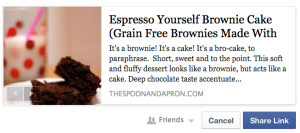
Please note that this will not fix posts retroactively, but from here on out all posts shared on Facebook should have the correct title.
Please let me know if you have any questions!
-
Ah thanks Grace! Much appreciated. I always have more questions :-)
If I want, is it possible to export my site to wp.org so that I can start using ads? Second- is wp hiring? I’m not a techy but I love working with people, trying out new stuff on the site ie. seeing ways that it would be easier to use etc. and I love writing :-)Thanks for all your help over the weeks!
-
If I want, is it possible to export my site to wp.org so that I can start using ads?
Yes! This guide will step you through the process of moving your site to a WordPress.org instance:
http://en.support.wordpress.com/moving-a-blog/#moving-to-wordpress-org
As we only support sites hosted here at WordPress.com, all issues with the new site – including the importing of the file – must be taken to the WordPress.org support community:
If you’d like assistance moving your WordPress.com site to WordPress.org, we have a service called Guided Transfer that does all the work for you. Check it out to see if itâs right for you:
http://en.support.wordpress.com/guided-transfer/
Please note that we do have our own Ad program called: WordAds that you can apply for here:
Second- is wp hiring?
Yes! Take a look here for more information:
-
Guh…Hi Grace. I have yet another issue! My most recent post is not appearing on the header, as they usually do, when I check the box for stick to the front page…instead it just goes into the gallery with the other posts. Does that make sense? Am I doing it wrong? It’s worked for all the other posts until now…here is the post I’m having trouble with-
http://thespoonandapron.com/2014/10/14/big-apple-molasses-scones-grain-gluten-free/Thanks!
-
Hi there,
I see that you did not add a Featured Image to that post. Please note that the Post Slider will only work if you set a featured image that is at lease 950 px wide as seen in the Triton-Lite support guide:
http://theme.wordpress.com/themes/triton-lite/
It states this:
The theme has a dynamic featured post area (shown just below the site title on the home page) which is a snap to use: just add big featured images—at least 950 pixels in width and 270 pixels in height—to your Sticky Posts and you are good to go.
Cheers!


- The topic ‘wp displaying pics on post that aren't even uploaded to the blog…’ is closed to new replies.


 WordPress.com Forums