

Writr theme – LaTeX support is broken.
-
I changed to the writr theme but all my LaTeX annotation are now broken. All the images produced by the $latex$ tags, has a yellow foreground with black background.
For example the code
$latex 2 times 10^{20}$produce the following imagehttp://s0.wp.com/latex.php?latex=2+times+1020&bg=303030&fg=Headings&s=0
The blog I need help with is: (visible only to logged in users)
-
I’ll tag this thread for Staff assistance. Please subscribe to the thread so you are notified when they respond and please be patient while waiting.
-
Thanks for the answer. I hope that the staff fix this issue soon, I really like this theme.
Best.
-
Thanks for the report. I think this might have something to do with the colour scheme you chose, since the same code looks OK on my test site with Writr active:
I’ll report this issue to our developers and will keep you posted here.
-
Thanks for your answer,
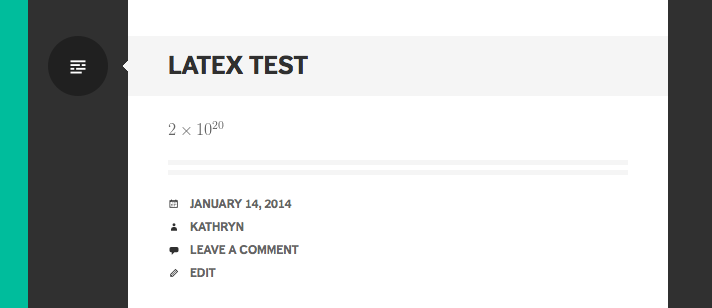
Sorry but I don’t have the same behavior. I changed to all the color schemes, tried to make a fresh post and nothing works.
I made a dummy test post with this code
$latex 2times 10^{20}$
$latex sin^2 theta + cos^2 theta = 1$
$latex e^{ipi} + 1 = 0$
Here is the result
http://maikolsolis.wordpress.com/2014/01/14/test-latex/I haven’t any CSS customization upgrade, so I can’t change the colors.
Best.
-
Hi there, you’ll need to use this technique to change the foreground and background colours of your formulas:
Our developers are looking at a long-term change in how LaTeX colours are determined but I don’t have an ETA. The technique above is the best way to ensure consistent display of your formulas.
-
Hi.
Yes, I know about changing the foreground and background in Latex formulas. Unfortunately 90% of my posts are about mathematics and change all of them, in my opinion, it’s not worth it.The only solution for me now, it’s change to another theme. Maybe I could revisit it in the future to see if something has changed.
Regards.
-


- The topic ‘Writr theme – LaTeX support is broken.’ is closed to new replies.
 WordPress.com Forums