WRONG APPEARANCE OF THE THEME: RESPONSIVE
-
I bought the domain: http://www.thetravelersparrow.com, and i chose the responsive theme but when I look for the website, i see this message: Nothing Found
Don’t panic, we’ll get through this together. Let’s explore our options here.
It seems we can’t find what you’re looking for. Perhaps searching can help.
MEANING I DONT SEE THE THEME, SEEMS IT APPEARS WRONGLY, WHAT CAN i DO?
The blog I need help with is: (visible only to logged in users)
-
Hi there!
I just visited your site thetravelersparrow.com and it looks like you’re using a different theme now. I’m happy to help you get the Responsive theme working if you’d like to do that!
Go ahead and change your theme back to Responsive and let me know if you’re still having trouble accessing your site. Leave the theme there so I can see what’s going on!
-
thank you very much! ive put it back to responsive but it seems there are parts missing. I would like to use all the tools available in order to do the best website possible, is there a video you could advise to do the best with this template? is there a way I can add pluggins, for example to add the website in 2 more languages (with flags) etc?
thanks again!
-
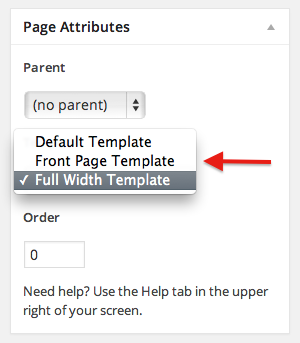
To setup your front page to looks like the demo site, create a new page and assign it the Home template under Page Attributes. Give it some content and set a Featured Image to have them appear in the content area, and then set that page to be your Static Front Page.
If you would like to display a custom call-to-action button in your Home template content area, in the Customizer, under Theme Options, set “Homepage Call to Action” to yes and enter a custom URL and button text (defaults to: “Read more ›”).
You can read more about the settings you’ll need for the Responsive theme here:
http://theme.wordpress.com/themes/responsive/
As for multiple languages, we currently don’t have any plugins that would do this natively. Many people create a copy of each page. You can create separate menus for the different languages this way.
Or since you own the domain thetravelersparrow.com you could create a set of sites like thetravelersparrow.com and es.thetravelersparrow.com. This would involve having multiple WordPress.com sites. If you’d like to go this route, just let me know and I can give you some more specific instructions for setting this up!
Let me know how I can help further!
-
Cool! thank you, tomorrow morning I will go step by step Reading your email again. (here in spain is quite late now..;-))
-
Hello,
About this:
1.- “To setup your front page to looks like the demo site, create a new page and assign it the Home template under Page Attributes. Give it some content and set a Featured Image to have them appear in the content area, and then set that page to be your Static Front Page.”I have done the static front page, following the instruction but I did not understand nor find the page attributes option, meaning it doesnt look as the demo site as I was not able to assign it the home template (where can i find it
2.-” If you would like to display a custom call-to-action button in your Home template content area, in the Customizer, under Theme Options, set “Homepage Call to Action” to yes and enter a custom URL and button text (defaults to: “Read more ›”).
I have done it as well, and I will use it for the french and english translation, meaning I will add a link to the french and/or english translation of the website…what do you think?
3.- “You can read more about the settings you’ll need for the Responsive theme here:
http://theme.wordpress.com/themes/responsive/
“
I am still Reading this….4.- “As for multiple languages, we currently don’t have any plugins that would do this natively. Many people create a copy of each page. You can create separate menus for the different languages this way.
Or since you own the domain thetravelersparrow.com you could create a set of sites like thetravelersparrow.com and es.thetravelersparrow.com. This would involve having multiple WordPress.com sites. If you’d like to go this route, just let me know and I can give you some more specific instructions for setting this up!”
For now on I will go for the: call-to-action , see how it looks…
Is there any good videos I could follow to learn what it is to learn about this theme? thank you again!
-
Hello shawnajroberts, I did not receive an answer to the questions above, is there maybe something unclear?
thanks a lot!
-
Hello shawnajroberts, I did not receive an answer to the questions above, is there maybe something unclear?
thanks a lot!
-
Hi there!
Sorry for the delay!
- You can find the Page Attributes module under the Publish settings:
- That sounds great!
- Let me know if you have questions!
- We don’t have any walk throughs for this specific theme, but let me know if I can answer any other questions you have!
-
Well yes I do have a question, I am trying to find where to edit themes in order to add a logo. In all the videos I found, for example:
https://www.youtube.com/watch?v=rEQU0FIqhZs
they show:
Appearance
Themes
Widgets
Menus
Header
Background
EditorBUT IN MY MENU I HAVE:
themes
customize
widgets
menus
backgroud
custom design
mobileWhere is the editor on my dashboard…
Thanks a million!!!!
-
It sounds like you’re looking at videos for WordPress.org. There is no Editor menu on WordPress.com. You can read more about the differences here:
I would suggest uploading your logo as a a header like you can see here:
Let me know if I can help with that!
-
Ok, I will do so.
I changed the theme to twenty Twelve and I cannot find the call-to-action button. I guess this theme doesnt include it…
About this:
“As for multiple languages, …Or since you own the domain thetravelersparrow.com you could create a set of sites like thetravelersparrow.com and es.thetravelersparrow.com. This would involve having multiple WordPress.com sites. If you’d like to go this route, just let me know and I can give you some more specific instructions for setting this up!”Yes I will do so, do I have to pay again the domain for french and english? or can I use the one already I have registered in order to create 2 new websites? or even 3, for french, english and italian…
thanks a lot….!!!
-
That’s right, the Twenty Twelve theme does not have a call-to-action feature.
Here’s a quick guide for setting up a multilingual site:
In order to set up the domains on the other two or three sites, you’ll need Domain Mapping upgrades on those sites which are $13.
You can see an example of a multilingual site using multiple WordPress.com sites here:
Let me know if I can help further setting up your sites! :)
-
Ok I like it how it looks
So I guess that my translated website would be:
http://fr.thetravelersparrow.com/
http://en.thetravelersparrow.com/
http://it.thetravelersparrow.com/right?
And where can I find the Mapping upgrades option? I was searching in the Store menú (My domaine, My upgrades..) but I did not find it.
And to end this post, $13 I guess would be for each language domaine, meaning I will have to pay: 39 $ right?
thanks a million again!
-
Yep! Those would be your domains! And the total cost of the Domain Mapping upgrades will be $39.
Sorry for not giving you better directions! You can add these upgrades through Store > My Domains. This can get a little confusing, so just let me know if I can help out!
You’ll want to select ‘Register a New Domain Name’ and enter one of your domain like
fr.thetravelersparrow.com. Once you are certain you have typed the domain correctly, check “I already own fr.thetravelersparrow.com and would like to map it to WordPress.com”.Make sure you set your new domain as your primary domain under Store > My Domains.
Let me know if you have any trouble setting these up! :)


- The topic ‘WRONG APPEARANCE OF THE THEME: RESPONSIVE’ is closed to new replies.
 WordPress.com Forums