

wrong author name
-
Hi there,
if I go to the blog – all the post are written by one author only, me – Andrzej Wisniewski.
In fact, many posts are written by another author – Aleksandra Tofil, and i can see that correctly in the Dashboard area. But on the blog itself, it displays Andrzej Wisniewski ( take 3 last posts for example).Also if i edit post and i want to change the author, it actually displays correctly – Aleksandra Tofil.
What could be the reason?
Thx,
AndrzejThe blog I need help with is: (visible only to logged in users)
-
Andrzej, Fascinating!
A few questions:
- Is Aleksandra logged in as herself when she publishes?
- Has her byline ever appeared correctly under her post title?
- Do you publish from the same computer? If so, please have her clear the browser’s cache before she logs in next time.
http://en.support.wordpress.com/browser-issues/#clearing-your-browser-cache
- If she uses a separate computer, is it a PC or Mac? What browser/browser version is she running?
- Has Aleksandra filled in all her information at My Profile in her Dashboard?
- Does Aleksandra have a Gravatar? If not, can she generate one?
Thanks very much. We’ll get to the bottom of this!
-
Hi,
Please see my answers below:
1. Yes, always.
2. Yes, before posts were under hare name correctly. Only recently all her old posts changed into my name.
3. No, she uses her own laptop.
4. PC, Windows Vista, Chrome.
5. I’d say so, we can double check.
6. Yes.:(
-
Andrej, I notice a difference between your two accounts in the Tools → Sharing section of your Dashboard. You have a Google + account set up for wiadomoscisingapurskie.wordpress.com/, but Aleksandra does not. Can she please connect a Google + author account? Let’s see if that helps.
Could you also ask Aleksandra if “Display name publicly as” is set in her Personal Settings?
Please get back to me and let me know how this goes. Thank you!
-
Hi,
She had already correct name under: “Display name publicly as”
I also now connected her G+ account.Now, we both always had this problem – every time we want to publish a new post – Dashboard asks us to REFRESH the Facebook and Google+ connection. And even if we do – after the blog is posted – it is NOT shared on our FB profiles. We cannot fix it, despite the Personal Setting saying there is FB connection. Very confusing.
So, after all this – i try to test post from Aleksandra account, and preview it – but it shows my name. Doggone it….
All her previous posts show under my name, even though in Dashboard Post window – it shows correctly her name…
Help? -
I remember there was this one field before, that i could choose that other posts are published on behalf of my name, something like that.
Was i just dreaming, coz i cant’ find it anymore.
Could that be the case? -
All right, I think I’ve discovered what might be causing the interference.
Take a look at this link, and watch the action that is taken:
https://cloudup.com/c2HLta0U0eX
When Aleksandra creates her next post, have her disable the Google + share.
Let me know if the solves the issue for you. Many thanks for your patience!
-
Yaay! That fixed it. I disconnected by G+ Profile from displaying in posts.
thanks!Now, the other question with FB connection – we’re asked to refresh it everytime we log in. Refreshing doesn’t help – we need to cancel connection and add it again. Any fix for this one?
Andrzej -
Whew! Glad we found a solution for that Google +/Author issue.
Regarding the Facebook publicize issue: I am sorry to hear about this inconvenience! I have forwarded a bug report to our team and will let you know as soon as we have a resolution.
Thanks for your patience. We’ll be in touch!
-
Hello there. I would like to follow up with your regarding the Facebook connection trouble you were experiencing.
If the Facebook connection is working, lovely. Please let me know if you get a chance.
If you’re still having to disconnect/reconnect constantly, our staff had a couple questions for you:
- Is it a different user refreshing than the one who originally set up the Facebook account?
- Do you both have access to the account that needs refreshing?
Looking forward to hearing from you. Thank you so much.
-
Hi, thanks a lot for reaching out to check the latest.
It is still an issue, and for both of us. We are both admins and login to wp.com separately, from different machines. So our FB accounts are connected separately, via separate wp.com accounts, but yes – to the same wordpress website address.
We just gave up, and post links manually after we create a blog post.Is an issue that we are trying to have 2 FB connections? again – we use 2 different wp.com logins to access the blog.
Thanks, i’m impressed with your customer service!
A. -
Hello there! Thank you so much for these details!
While I am glad you have the option to publish to Facebook manually, I know this is not ideal.
I noticed that you only have your Facebook Publicize connection setup on your account, but Aleksandra has both your Facebook accounts connected. See:
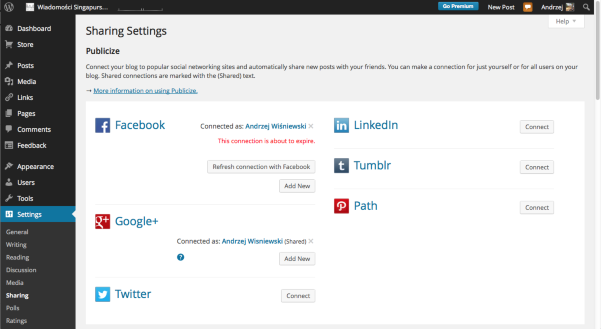
https://cloudup.com/iLbuK1ScXukPlease try the following:
1. Both of you disconnect your Facebook accounts from Publicize in WordPress.com
2. Both of you sign out of your Facebook accounts.
3. Both of you log back into WordPress.com and re-add your personal Facebook connections to Publicize. You will be asked to log into your Facebook accounts during this process. That’s fine, please do this.
4. Once your connection is set up, return to Facebook and sign out of your accounts.
5. Return to WordPress.com and add a new Facebook publicize connection. This is where you will add each other’s Facebook accounts. When you are asked to sign into Facebook, you will have to sign in with each other’s administrative user names/passwords for your Facebook accounts.
6. Once that new connection is setup, return to Facebook and sign out of each other’s accounts.You should both now have two Facebook publicize connections when you look at your sharing settings. When you next publish a post, please let me know if you are forced to disconnect/reconnect the Facebook connection. If so, before you do so, please try to logout of your Facebook accounts before you publish and let me know if that alleviates the issue.
Thank you so much for your patience. Looking forward to getting to the bottom of the issue!
-
Hi there,
We just tried the entire process, and it worked well with cleaning up the connections. Now, when we created a new post – both Facebook connections (plus two Google connections) show nicely in Publicize option, within the post details.
We hit Publish, aaaaand… fail. No Facebook link is posted automatically, though Google+ is published ok.
:(
A. -
Hi Andrzej,
Thanks for checking in and letting me know your current Publicize status.
I need to discuss your issue further with our team that specializes in the Publicize feature. I’ll get back to you the moment I have some answers. We will find a resolution to your problem as soon as possible.
Thanks much.
-
Thanks a lot for looking into it. Seems like a pesky bug.
I don;t know if I should open another ticket, but I’ve noticed this issue below.
We’re happy users of the Blissful theme for quite a while now.
Recently we added an option to Google Translate our posts from Polish to English. It;s a simple link to the Google Translate page, where our post page is translated automatically.It works fine for the time being (i know full Google Translate is not available on WP.com), but there’s just one problem – the menus on the top page, in the translated version, get all garbled. Therefore further navigation, while you are in translated world – is not possible.
Is there any chance that this Theme creator could look into this issue? Maybe it;s a simple fix, and that would save the world! (almost. At least ours. :))
Here’s original page example:
http://wiadomoscisingapurskie.com/2014/06/17/plywajaca-wioska/And translated link:
http://translate.google.com/translate?hl=pl&langpair=pl|en&u=http://wiadomoscisingapurskie.com/2014/06/17/plywajaca-wioska/I could also attach the screenshot, but you’ll surely will spot the difference.
Thx.
Andrzej -
Hi Andrzej,
It looks like the Google Translate issue is indeed an issue with the Blissful Blog theme. I’ve reported this to our theme developers. I’ll let you know as soon as I know more!
-
Hi Jeremy,
I also contacted the theme developers, and they advised below solution. I don’t think i could change CSS of the menu section, could i?
I believe that part belong to you guys.
Would you be able to do so?
Please do let me know. thanks!That said, you might be able to fix this with the following CSS:
.main-navigation ul li span {
width: auto;
}Or if not, that’s the sort of thing you’d need to look into. A tool like Firebug or Chrome’s Inspect will help you discern what CSS selectors need to be edited. You’ll also need the ‘Custom Design’ or ‘Custom CSS’ add-on.
-
Hi Andrzej,
I’ve passed this along to our theme developers for consideration regarding adding this to the theme as a whole (all versions across WordPress.com). I gave this a quick test, and it does appear to help correct the issue (although it doesn’t look perfect). I’ll keep you updated as I hear more from our theme developers.
If you would like to implement this on your side in the meantime, you would need to purchase the Custom Design upgrade shown here:
http://en.support.wordpress.com/custom-design/
Then, you could input the CSS under Appearance -> Customize -> CSS.
-
Thanks Jeremy,
I woudo consider Custom Design in the future, but at the moment the current template design and functionality works perfect for us.
It would be Greta it developers could fix it in the meantime. That would help all other folks having similar issue.
What do you think would be developers’ estimated time of completion?Thanks
A. -
HI!
I don’t have an estimated timeframe yet. Since the issue is a bit of an edge case (not that many readers will use Google Translate for entire web pages), there may be more pressing issues that need to be addressed first. Either way, it’s on our radar. We’ll get it fixed as soon as we can! I’ll keep you updated in this thread.


- The topic ‘wrong author name’ is closed to new replies.
 WordPress.com Forums