

Your instructions read: Now head to Settings >> Reading and scroll until you see
-
Your instructions read:
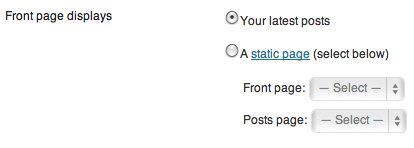
Now head to Settings >> Reading and scroll until you see “Fromt page displays”: this is where you’ll find the option to switch your homepage from showing your latest posts to the new, static page you just created. Click the button next to “A static page” and select both the page you decided to use as your homepage, and the blank one you created to house your blog. You should have something that looks like this:
I cannot find any of these places.
ThanksThe blog I need help with is: (visible only to logged in users)
-
Your instructions read:
Now head to Settings >> Reading and scroll until you see “Front page displays”: this is where you’ll find the option to switch your homepage from showing your latest posts to the new, static page you just created. Click the button next to “A static page” and select both the page you decided to use as your homepage, and the blank one you created to house your blog. You should have something that looks like this:
I cannot find any of these places.
Thanks -
-
OK thanks
I go to settings>reading but cannot find ‘fromt page displays’ anywhere on that page. Where exactly are these words?
Again many thanks for your reply -
-
OK I see that when I click on your answer in the blog but not when I click on settings>reading. When I do that I have (cut and pasted) the following.(again many thanks)
Blog pages show at most posts
Syndication feeds show the most recent items
For each article in a feed, show
For each article in a feed, showFull text
Summary
Site Visibility
Site Visibility Allow search engines to index this site
Discourage search engines from indexing this siteNote: Neither of these options blocks access to your site — it is up to search engines to honor your request.
I would like my site to be private, visible only to users I choose
To infinity and beyond We’ve disabled this option for you since you have footer widgets in Appearance → Widgets, or because your theme does not support infinite scroll.
Enhanced Feeds
Add to each article in your feed: Categories
Tags
Comment count
SharingChanges may not appear until you create a new post or your news reader refreshes.
Follower Settings
These settings change emails sent from your blog to followers.
Logged out users Show follow button to logged out users.Checking this will present a follow button to logged out users in the bottom corner of their screen.
Blog follow email text Howdy. You recently signed up to follow this blog’s posts. This means once you confirm below, you will receive each new post by email. To activate, click Confirm Follow. If you believe this is an error, ignore this message and nothing more will happen.Introduction text sent when someone follows your blog. (Site and confirmation details will be automatically added for you.)
Comment follow email text Howdy. You recently signed up to follow one of my posts. This means once you confirm below, you will receive an email when new comments are posted. To activate, click confirm below. If you believe this is an error, ignore this message and nothing more will happen.Introduction text sent when someone follows a post on your blog. (Site and confirmation details will be automatically added for you.)
-
This means you haven’t created any static pages yet, or the pages you created are private.


- The topic ‘Your instructions read: Now head to Settings >> Reading and scroll until you see’ is closed to new replies.
 WordPress.com Forums