

your new editing mode
-
I don’t like your new editing mode. And worse still, when I tried to switch back to classic mode, I lost my latest edits. There was nothing wrong with what you now call the classic mode. Why did you change it?
The blog I need help with is: (visible only to logged in users)
-
Another problem is that, when editing in the classic mode, you sometimes switch to the new mode. Very irritating.
How do I dispense with the new mode completely, instead of starting with it and having to switch?
-
Hi Lew,
We’ve changed the style of the new post editor. This should ultimately be an improvement, bringing more of the options that you typically use when publishing to the post editor and displaying them in a more accessible way.
We welcome any feedback you have on these changes, and certainly if anything about the new editor isn’t working properly, please let me know!
The more specific you can be about exactly what is going wrong, the better we’re able to look into it.
Screenshots are particularly helpful because they let us see exactly what you’re seeing without you having to describe it. Here are instructions for how to make a screenshot: http://en.support.wordpress.com/make-a-screenshot/
You can upload any screenshots to your blog’s Media Library and I can look at them there.
I see you have a draft post in your post list here:
https://patandlewtravel.wordpress.com/wp-admin/edit.phpIs that the post you lost?
You can always get to the old Dashboard by hovering over your site title in the admin bar and clicking on “Dashboard” in the menu that drops down below:
https://cloudup.com/cRfPIXLSwg4Then, go to Posts->All Posts or Pages->All Pages to find and edit your existing posts and pages in the dashboard.
-
Your new system has many flaws and no new virtues that I can see.
One example: When I create a new post and save it, then try to see a preview, it doesn't.
Another: sometimes when I try to switch back to the original mode, things get lost.
How can I simply use the original mode and not be bothered at all with the new one?
************************************ Lewis M. Weinstein … read about Lew's novels at … http://lewweinsteinauthorblog.com/ & http://www.amazon.com/Lewis-M.-Weinstein
-
also … every time I pass through th enew version, I lose the link option to Facebook. I have to then do to Dashboard and re-install it. A royal pain.
Why did you fix something that wasn't broken?
ARE YOU GOING TO TAKE CARE OF THE ISSUES I HAVE RAISED?
An unhappy customer.
************************************Lewis M. Weinstein … read about Lew's novels at … http://lewweinsteinauthorblog.com/ & http://www.amazon.com/Lewis-M.-Weinstein -
it keeps getting worse. now I cannot re-set the FB link. This is infuriating.************************************Lewis M. Weinstein … read about Lew's novels at … http://lewweinsteinauthorblog.com/ & http://www.amazon.com/Lewis-M.-Weinstein
-
Hi Lew,
One example: When I create a new post and save it, then try to see a preview, it doesn’t.
The preview opens in a new window, so if you have pop-ups blocked in Chrome, you won’t see it.
You don’t need to unblock popups for all sites. You can enable popups just for WordPress.com in Chrome by going here in your browser:
chrome://settings/contentExceptions#popups
Then, please add “https://[*.]wordpress.com:443” and set it to allow.
To exit the preview and return to your draft post, just close out the preview window.
Another: sometimes when I try to switch back to the original mode, things get lost.
You can review all saved drafts in your Posts->All Posts list in the classic dashboard here:
https://patandlewtravel.wordpress.com/wp-admin/edit.phpIf that doesn’t help, can you please provide a bit more detail about this problem? A step-by-step of exactly what happens on your end when you notice this would best help me understand.
How can I simply use the original mode and not be bothered at all with the new one?
You can always get to the old Dashboard by hovering over your site title in the admin bar and clicking on “Dashboard” in the menu that drops down below: https://cloudup.com/cRfPIXLSwg4
Then, go to Posts->All Posts or Pages->All Pages to find and edit your existing posts and pages in the dashboard.
every time I pass through th enew version, I lose the link option to Facebook. I have to then do to Dashboard and re-install it. A royal pain.
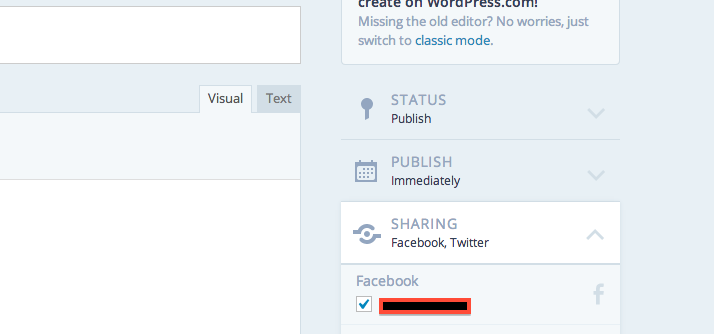
There’s a bug right now where previewing or saving a post in the new editor unchecks the publicize boxes under “Sharing” to the right of the post editor. This is something we’re working to fix. If you do publish from the new editor, make sure that you check that the Facebook box under “Sharing” is checked before you click publish:


- The topic ‘your new editing mode’ is closed to new replies.


 WordPress.com Forums