

youtube metadata
-
youtube not posting
here we go again. WHY isn’t youtube video posting to my blog. someone please help and is there a final fix for this issue. thank you
current post @
The blog I need help with is: (visible only to logged in users)
-
Hi there,
I clicked the link and it took me to the front of your blog here: http://newjerusalemcoming.com/
I looked some of your recent posts, and I see videos embedded in these two posts:
http://newjerusalemcoming.com/2014/06/04/jack-van-impe-2/
http://newjerusalemcoming.com/2014/06/04/jonathan-cahn-the-harbinger/
Is one of those posts the one you’re having trouble with? The videos in those posts are working for me — if you’re not seeing those videos can you make a screenshot of what you see? You can upload screenshots to your Media Library under Media > Add New in your dashboard, or you can use an online service like Snaggy.
That will help me understand the issue that you’re seeing on the blog.
-
Thank you helping. I did a screen shot and uploaded to media as power point screenshot. My problem is once again I cannot even see the videos at my end. This is an ongoing issue. I insert YouTube vids via YouTube media where we embed the code and it suppose to post to your blog….I’m at a loose why this keeps happening and I don’t make them highlighted….Thank you the file name is jackvanimpe
-
Here’s what I see when I visit that post:

Can you make sure that your browser is up to date and clear your cache and cookies?
Let me know if the videos still aren’t displaying.
-
I have the most current browser for ie 11 and cleared all cache and cookies. I still can’t see videos at my end; so I do not know what the deal is. All I know is it keeps occurring over and over.
thank you -
Is there anyone who can help solve this on going issue of you tube videos not posting correctly in relation to me not being able to see them at my end???
-
Can you check if you’re having this issue in another browser like Firefox or Google Chrome?
Can you also check that the following settings? Open your Internet Options and select the Advanced tab.
Scroll down to the Multimedia section.
Make sure the following options are checked:- Enable alternative codecs in HTML 5 media elements
- Play animations in webpages
- Play sounds in webpages
- Show pictures
If they aren’t, check them and then click Apply and OK, and restart your computer.
You’ll also need Flash enabled in Internet Explorer. Here’s a guide on how to check that:
https://forums.adobe.com/thread/885448
Let me know if any of that helps!
-
Internet explorer is the only browser I have installed on my pc. I checked all the above you suggested and all in order and the flash works perfectly. Now what? thank you
-
It would be really helpful to know if you’re having this issue in another browser or not, so I can tell if it’s specifically related to Internet Explorer or may be a system-wide setting on your computer. I understand if you’d prefer not to install another browser for testing.
Can you try disabling Active X? Here’s some steps on how to do that:
http://windows.microsoft.com/en-us/windows/help/genuine/ie-activex
Let me know if that helps.
-
Is there anyone who can get this resolved about youtube videos not posting at my end ( I cant see them period)
-
Hi there!
Did you try disabling Active X control with the directions I linked to above? And can you try installing another browser such as Chrome or Firefox just to test it out so I can know if this is directly related to Internet Explorer?
-
Hi there!
I see you weren’t happy with my responses. Were you able to disable Active X Controls? Or check in another browser?
I’d really like to get this working for you!
-
I tried all suggestions and have disabled ActiveX control. IE 11 is the only browser I use as past issues with google/firefox always end up crashing. I appreciate all your effort; it just very frustrating at my end not to be able to preview blog with videos before posting. Often I go back and watch them myself. But I don’t have that option. So, the youtube videos are not visible at my end either in admin mode or in viewing mode.
-
Friends, wordpress , people; could you please put a final solution on why You tube and wordpress “is not” a happy marriage. Now the You tube URL will not even post!!! Still not seeing any video at my end either in admin mode or viewing mode.
-
Hi there!
I understand that you’ve had issues with other browsers in the past. I’ve gone through all of the most common Internet Explorer specific reasons that could be causing this. It would really help me identify where to look for more solutions if I knew whether these videos are working in another browser. You don’t have to keep the browser after checking.
If I knew whether this is an issue with specifically Internet Explorer or with your entire computer, I would be able to find you some more suggestions about why this might be happening.
Can you also visit this site just to confirm that you’re running IE 11? Our system shows that you were running IE10 when you posted this thread.
https://www.whatismybrowser.com/
And can you tell me what extensions you have enabled in your browser? You can find the list by selecting the Internet Explorer icon on the taskbar. Then select the Tools button, and then Manage add-ons. Under Show, choose All add-ons.
-
I took some screen shots for you that cover your requests and more. Hope it helps. uploaded as power point under name “you tube issues 62214” thank you
-
Thanks for all of those screenshots!
Here’s a test page I set up with a video from Youtube, Vimeo, and Hulu. Let me know if its only the Youtube one you can’t see.
The only thing I see that would possibly be causing this is AdBlock. Could you try disabling that extension, clearing your cache and cookies, and refreshing the link I gave you above?
The last thing I can think to have you try is completely uninstall IE11 and install a fresh version. You can uninstall in Windows 8 by right clicking on the pane for IE in the metro view:
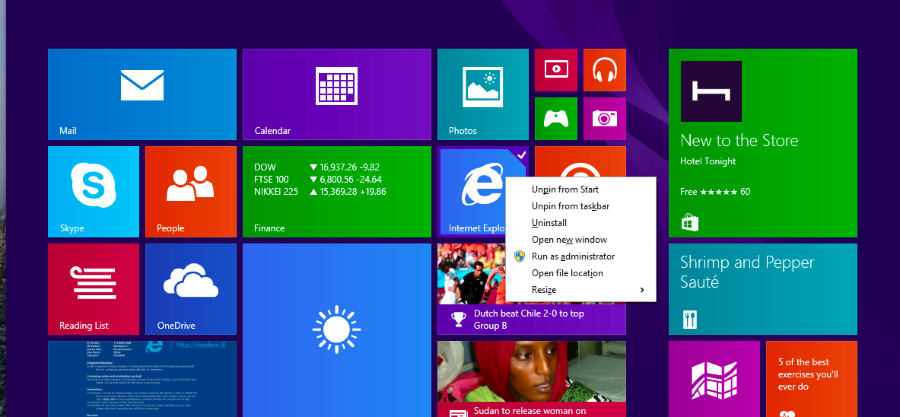
Then head over to the Microsoft site to download the program again:
http://windows.microsoft.com/en-us/internet-explorer/ie-11-worldwide-languages
And last test that page up there again.
Let me know if either of those suggestions work.
-
I disabled adblock; no change; tried others suggestions; no change
I give up!!!
I have no other issues with videos playing on my pc; I watch youtube and others with no problem. It only on wordpress that I can’t see the video I post. It a shame to! I appreciate help; but I’m just disgusted with it. I paid for upgrade would enjoy the benefits therein. I wish I could remember what the one support person at your end did in the past that made it work. If you have access to my support logs say last 3-4 months perhaps you can find the solutions there. Good night -
Hi there,
I see that in one of your past support requests the hyperlink to your YouTube video wasn’t disabled, which can keep the video from showing up correctly:
https://en.forums.wordpress.com/private-support/embedding-youtube-video-and-wordpress-search-engine
You can also view your past support requests from your support forum profile here:
https://en.forums.wordpress.com/profile/ladyinwaiting2012
However, that doesn’t seem to be the issue now, since that would affect anyone trying to view the videos on your blog. In this case, Shawna and I are able to view your videos, which suggests that something else is going on in your browser or on your computer.
Can you please try temporarily using another browser to see if the problem continues there? You don’t have to keep using that browser, but testing it will help us determine if there’s another setting in Internet Explorer that needs to be adjusted or if the problem pops up in any browser. You can download the latest versions of popular browsers here: http://browsehappy.com/


- The topic ‘youtube metadata’ is closed to new replies.
 WordPress.com Forums