

Zuki Theme – customising colors
-
Hi,
In the Zuki customization menu there is meant to be a drop-down menu called ‘Colors’ (under ‘Site Title & Tagline’) to be able to edit the header text color, background color & link color – but my page is missing that menu. Could you please tell me how I can access that menu?
Many thanks,
EliThe blog I need help with is: (visible only to logged in users)
-
You can access Custom Colors via the Customizer:
https://greenchichi.wordpress.com/wp-admin/customize.php
Further modification may require the use of CSS.
To learn more about how CSS editing works at WordPress.com, see these helpful pages:
http://en.support.wordpress.com/custom-design/css-basics/
https://cssworkshop.wordpress.com/
If you have additional questions, please let us know.
-
Thanks very much for the suggestions above.
However, in this particular case I am wondering specifically with regard to the Zuki theme: In the vimeo demonstration for the Zuki theme, Ellen shows how it is possible to choose a color to go in the background of selected widget areas – but I don’t have that option in my customization menu.
Hope that makes my question clearer?!
Thanks,
Eli -
All of the areas demonstrated in the video are in the Customizer:
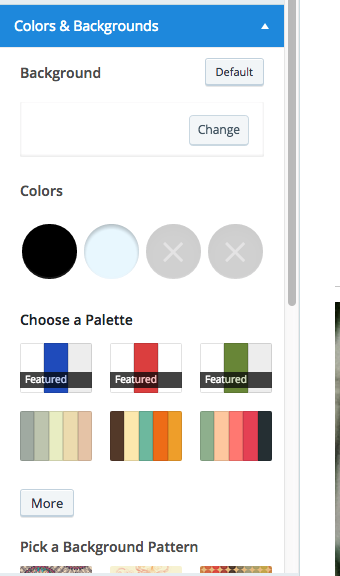
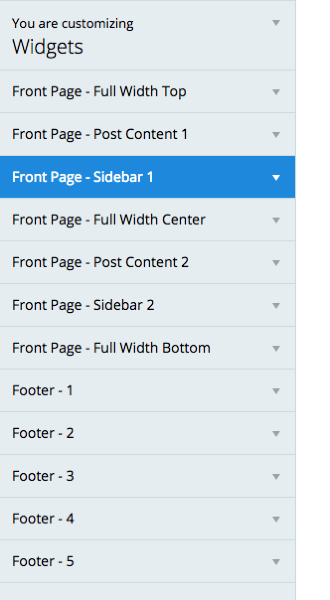
If you’d like, you can reach out to Zuki’s developers here for clarification:
https://premium-themes.forums.wordpress.com/forum/zuki
Try creating a post and they should respond to you shortly.
Let us know if you have any more questions.


- The topic ‘Zuki Theme – customising colors’ is closed to new replies.
 WordPress.com Forums