

Have you recently registered, connected, or transferred a domain name to use with your WordPress.com website, but your URL still shows WordPress.com in the address? This guide will explain the steps to remove .wordpress.com from your site address and change it to your custom domain name instead.
This feature is available on sites with the WordPress.com Personal, Premium, Business, and Commerce plans. For free sites, upgrade your plan to access this feature.
In this guide
Have a question?
Ask our AI assistantTake the following steps to change your domain name from displaying “WordPress” (ex: yourgroovysite.wordpress.com) to showing your actual domain name:
- Ensure your site has a WordPress.com plan.
- Visit your site’s dashboard.
- Navigate to Upgrades → Domains.
- The primary site address will be identified at the top of the page. The primary site address will also be indicated in the list of domain names below with a green label reading “Primary domain.”
- Click on the drop-down menu in the “Primary site address” box and select the domain name you want to replace the WordPress.com address with.
- Click the button labeled “Set as primary.”
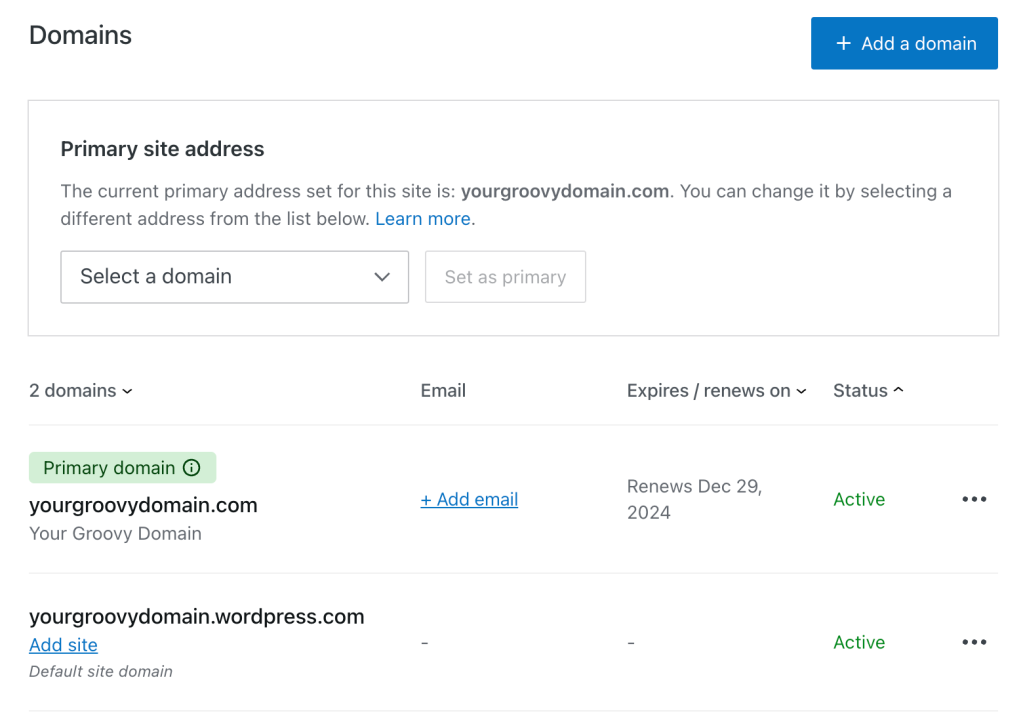
Now, when people visit your website, they will not see the WordPress.com in your site address. Instead, they’ll see your domain name in their website’s address bar.
When you set a domain name as the primary site address, your visitors will see that domain name and not the .wordpress.com site address.
The admin URL (what you see when editing your site, such as example.wordpress.com/wp-admin) will show the example.wordpress.com address and not your custom domain name. This is expected and only visible to you, not your site’s public visitors.
However, the admin URL on sites with plugins installed will show the custom domain name (for example: yourgroovydomain.com/wp-admin).
In order to set a domain as the primary address of your website, the site needs to have an active, paid plan. This feature is included with all of our plans.
