

‘How to Exclude Tags’ explanation not working (maybe not updated?)
-
I am trying to make some of my tags ‘not visible’ in my tag cloud. The explanation on the support page https://en.support.wordpress.com/widgets/tag-cloud-widget/ shows the tag cloud widget different from the one I have (one that was included, not downloaded by me).

(the widget as shown on the support page)
The text says to: ‘Go to Posts → Tags in your WP Adming dashboard. Click on the name of the tag you want to exclude. In your browser’s address bar, look for the number after tag_ID=. Copy the tag ID and go back to your Customizer → Widgets. Click on the tag cloud widget to open the widget settings, and paste the tag ID into the Exclude box.’
This doesn’t apply, because my cloud tag widget has different input fields than the one on the support page.
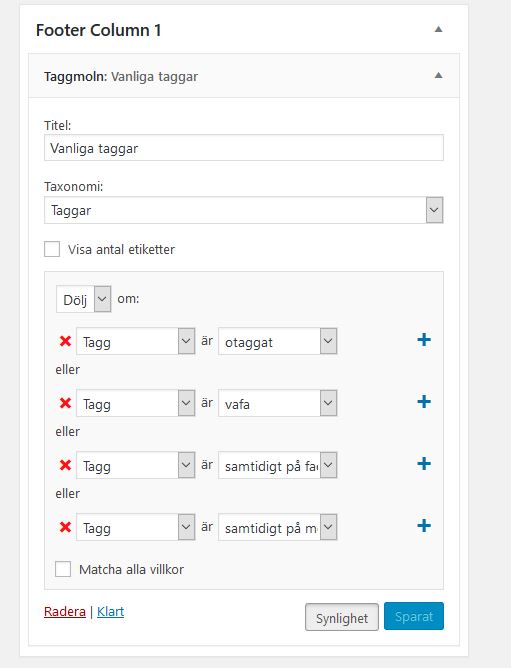
(my widget looks like this)
And it doesn’t work.

(the tags I marked as ‘hide if tag is X’ are still showing)
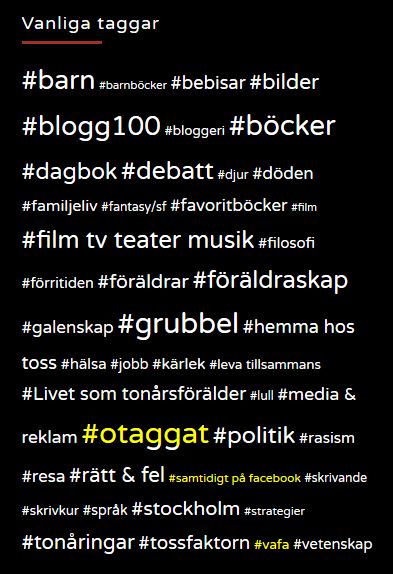
(in yellow, for clarity)
What do I do?
The blog I need help with is http://annatoss.se/ (not my old blog annatoss.wordpress.com, as it says here under).
Den blogg jag behöver hjälp med är (synlig endast för inloggade användare).


- Ämnet ’‘How to Exclude Tags’ explanation not working (maybe not updated?)’ är stängd för nya svar.
 Swedish WordPress.com Forums