
SMTPPai – Multi Mail SMTP & API with Amazon SES & More
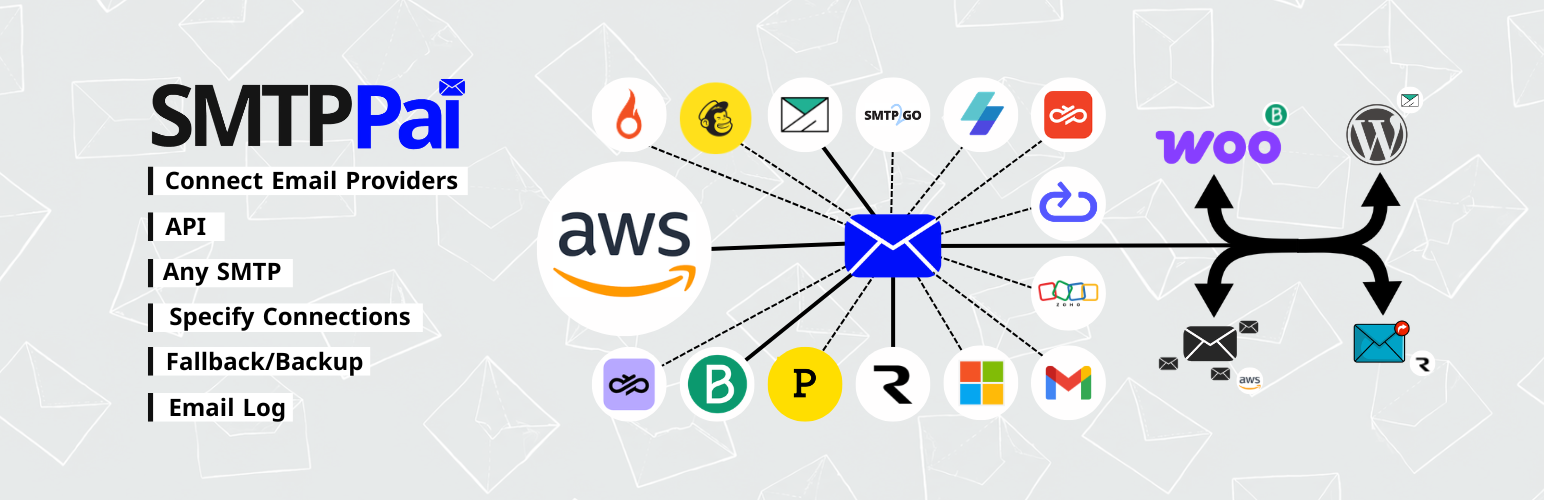
Free Multi-route WordPress Mail SMTP Plugin with Amazon SES, Resend, SendGrid, Postmark, SparkPost, Gmail, Outlook, Microsoft 365, Zoho and more.
Free WordPress SMTP Plugin for Amazon SES & Other Mail Provider
At a glance: SMTPPai is a free WordPress SMTP plugin that fixes WordPress not sending email by routing wp_mail() through Amazon SES (native API), SendGrid, Gmail, Microsoft 365, Resend, Postmark, SparkPost, Mailgun, Brevo, and other transactional email providers. Multi-route mail splitting for WordPress, WooCommerce, newsletter, and outreach; backup SMTP failover; email log with retry. First connection auto-routes all mail. No paid tier. Optional Freemius analytics (opt-in only).
Best for: Sites that need multiple SMTP connections, per-route routing, free native Amazon SES API (not SMTP-only), or better email deliverability without a Pro license.
Not for: Sites that only need one Gmail SMTP connection with minimal setup (simpler single-connection SMTP plugins may suffice).
SMTPPai is a free WordPress mail SMTP plugin that fixes broken wp_mail() delivery. Connect Amazon SES, Mailgun, Postmark, Resend, SendGrid, Brevo, Mailjet, Gmail, Microsoft 365, or any SMTP server from wp-admin—with test email, an email log, and inline setup help on each connection screen.
Many hosts block or spam-filter PHP mail(). SMTPPai routes WooCommerce orders, password resets, contact forms, and admin notices through your provider instead.
Why SMTPPai instead of another SMTP plugin?
Most SMTP plugins in the directory offer one connection and SMTP relay only. SMTPPai is built for sites that need more control without a paid license:
- Unlimited connections (free) — run SES for transactional mail, Mailgun for WooCommerce, and Gmail for admin alerts at the same time
- Native API mailers — Amazon SES, Mailgun, Postmark, Resend, SendGrid, Brevo, and others use each provider’s HTTP API, not a generic SMTP shim
- Specify Connections — assign WordPress, WooCommerce, newsletter, and outreach mail to different providers from one screen
- Backup failover — if the primary connection fails, SMTPPai retries through a second provider automatically
- OAuth that works on local and staging sites — Gmail and Microsoft sign-in use a fixed HTTPS redirect relay so you do not need a public production URL in Google Cloud or Entra
- Secrets in wp-config.php — optional constants keep API keys out of the database
- Email log with retry — see delivery status, server responses, and resend failed messages from wp-admin
- Developer route API — send or check readiness per route (
wordpress,woocommerce,newsletter,outreach) - Optional analytics — Freemius Insights is opt-in only; core delivery never requires Freemius or a MailPai account
What you get (free):
- Unlimited connections—native API mailers plus OAuth for Google and Microsoft
- Specify Connections to split WordPress, WooCommerce, newsletter, and outreach mail
- Backup when your primary provider fails
- Email log with sent/failed status, server response, and retry
- Encrypted secrets in the database or storage in
wp-config.phponly
Supported mailers: Amazon SES, Mailgun, Postmark, Brevo, Resend, SendGrid (by Twilio), MailerSend, Mailjet, Elastic Email, Mailchimp Transactional (Mandrill), SparkPost, Zepto Mail, SMTP2GO, SMTP.com, Google Workspace/Gmail, Microsoft 365/Outlook, and Other SMTP (Zoho, cPanel, custom relays).
Quick start: Install → SMTPPai → Dashboard → Add connection → save and Test. Your first connection is auto-assigned to One for Everything, so WordPress mail works immediately. Use Specify Connections only when you want separate providers per route. Optional Backup under SMTPPai → Backup.
Gmail and Microsoft OAuth use your own Google Cloud or Microsoft Entra app. Sign-in may briefly visit auth.mailpai.com (HTTPS redirect relay); OAuth tokens stay on your WordPress site. You may get a Google or Microsoft security alert on your phone—normal account protection; approve only if you started sign-in in wp-admin. See FAQ for details.
MailPai (optional, upcoming) will handle newsletter and outreach campaigns; SMTPPai delivers the mail. Routes for newsletter and outreach are already available in Specify Connections.
Developer hooks: mailpai_smtp_send_for_route(), mailpai_smtp_is_route_ready(), and related functions—see FAQ.
Note: Messages with file attachments may still use default WordPress mail until a future update adds full attachment routing.
Per-provider setup steps (Amazon SES, Mailgun, OAuth, and others) are in FAQ below and in the setup guide inside each connection form in wp-admin.
External services
SMTPPai contacts external servers only when you configure a feature that needs them, or when you explicitly opt in to Freemius Insights. SMTPPai does not send site data to MailPai for marketing or licensing during normal mail delivery.
Freemius (optional analytics)
After activation you may see an opt-in screen. If you choose Allow / Continue, SMTPPai may share non-sensitive site and plugin usage data with Freemius (for example site URL, WordPress/PHP versions, plugin version, and admin email) so we can improve SMTPPai and understand installs, deactivations, and uninstall feedback. You can skip opt-in; the plugin works fully either way.
Service: https://freemius.com/ Privacy: https://freemius.com/privacy/ Terms: https://freemius.com/terms/
What data email providers receive
When you save a connection, SMTPPai stores your API keys, OAuth tokens, or SMTP credentials on your WordPress server only. When WordPress sends mail through that connection (including test emails you trigger in wp-admin), SMTPPai transmits sender address, recipient address(es), subject, message body, and optional headers (for example Reply-To or CC) to the provider’s API or SMTP server over HTTPS/TLS. Nothing is sent to a provider until you configure that connection and mail is sent through it.
OAuth redirect relay (auth.mailpai.com)
Used when you connect Google Workspace/Gmail or Microsoft 365/Outlook with OAuth.
- You click authorize in WordPress admin (SMTPPai).
- Google or Microsoft shows a consent screen for send-mail access.
- After you approve, the provider redirects the browser to a fixed HTTPS relay:
- https://auth.mailpai.com/google
- https://auth.mailpai.com/microsoft
- The relay immediately sends you back to your site’s wp-admin with a one-time authorization code.
- Your WordPress site exchanges the code for OAuth tokens using the Client ID and Secret you entered in the connection form. Tokens are saved on your server (encrypted in the database or in wp-config.php constants).
The relay forwards the authorization code only. It does not store OAuth refresh tokens or read your mailbox.
Service: https://auth.mailpai.com/ Terms: https://mailpai.com/terms-conditions/ Privacy: https://mailpai.com/privacy-policy/
Google (OAuth and Gmail API)
Used when you connect Google Workspace/Gmail with OAuth. Your WordPress site contacts accounts.google.com, oauth2.googleapis.com, and www.googleapis.com to complete sign-in and refresh tokens. After authorization, mail is sent using the Gmail API scope you approve.
Data sent: OAuth authorization codes and token requests during setup; your Google account email during sign-in; sender, recipients, subject, and message body when WordPress sends mail through the Gmail connection.
Terms: https://policies.google.com/terms Privacy: https://policies.google.com/privacy
Microsoft (OAuth and Microsoft 365 / Outlook)
Used when you connect Microsoft 365/Outlook with OAuth. Your WordPress site contacts login.microsoftonline.com to complete sign-in and refresh tokens, then sends mail through Microsoft mail services.
Data sent: OAuth authorization codes and token requests during setup; your Microsoft account email during sign-in; sender, recipients, subject, and message body when WordPress sends mail through the Microsoft connection.
Terms: https://www.microsoft.com/en-us/servicesagreement/ Privacy: https://privacy.microsoft.com/privacystatement
Amazon SES
Used when you add an Amazon SES connection. SMTPPai signs requests to the regional SES API endpoint (for example email.us-east-1.amazonaws.com) using the IAM keys you provide.
Data sent: IAM access key ID and request signature with each API call; sender, recipients, subject, and message body when mail is sent.
Terms: https://aws.amazon.com/service-terms/ Privacy: https://aws.amazon.com/privacy/
Mailgun
Used when you add a Mailgun connection. SMTPPai calls api.mailgun.net or api.eu.mailgun.net.
Data sent: Mailgun API key with each request; sender, recipients, subject, and message body when mail is sent.
Terms: https://www.mailgun.com/legal/terms-of-service/ Privacy: https://www.mailgun.com/legal/privacy-policy/
Postmark
Used when you add a Postmark connection. SMTPPai calls api.postmarkapp.com.
Data sent: Postmark Server API token with each request; sender, recipients, subject, message body, and message stream ID when mail is sent.
Terms: https://postmarkapp.com/terms-of-service Privacy: https://postmarkapp.com/privacy-policy
Brevo
Used when you add a Brevo connection. SMTPPai calls api.brevo.com.
Data sent: Brevo API key with each request; sender, recipients, subject, and message body when mail is sent.
Terms: https://www.brevo.com/legal/termsofuse/ Privacy: https://www.brevo.com/legal/privacypolicy
Resend
Used when you add a Resend connection. SMTPPai calls api.resend.com.
Data sent: Resend API key with each request; sender, recipients, subject, and message body when mail is sent.
Terms: https://resend.com/legal/terms-of-service Privacy: https://resend.com/legal/privacy-policy
SendGrid (by Twilio)
Used when you add a SendGrid connection. SMTPPai calls api.sendgrid.com or api.eu.sendgrid.com when EU region is selected.
Data sent: SendGrid API key with each request; sender, recipients, subject, and message body when mail is sent.
Terms: https://www.twilio.com/en-us/legal/tos Privacy: https://www.twilio.com/en-us/legal/privacy
MailerSend
Used when you add a MailerSend connection. SMTPPai calls api.mailersend.com.
Data sent: MailerSend API token with each request; sender, recipients, subject, and message body when mail is sent.
Terms: https://www.mailersend.com/legal/terms-of-use Privacy: https://www.mailersend.com/legal/privacy-policy
Mailjet
Used when you add a Mailjet connection. SMTPPai calls api.mailjet.com.
Data sent: Mailjet API key and secret with each request; sender, recipients, subject, and message body when mail is sent.
Terms: https://www.mailjet.com/legal/terms/ Privacy: https://www.mailjet.com/legal/privacy-policy/
Elastic Email
Used when you add an Elastic Email connection. SMTPPai calls api.elasticemail.com.
Data sent: Elastic Email API key with each request; sender, recipients, subject, and message body when mail is sent.
Terms: https://elasticemail.com/legal/terms-of-use/ Privacy: https://elasticemail.com/legal/privacy-policy/
Mailchimp Transactional (Mandrill)
Used when you add a Mailchimp Transactional (Mandrill) connection. SMTPPai calls mandrillapp.com.
Data sent: Mandrill API key with each request; sender, recipients, subject, and message body when mail is sent.
Terms: https://mailchimp.com/legal/terms/ Privacy: https://mailchimp.com/legal/privacy/
SparkPost
Used when you add a SparkPost connection. SMTPPai calls api.sparkpost.com or api.eu.sparkpost.com.
Data sent: SparkPost API key with each request; sender, recipients, subject, and message body when mail is sent.
Terms: https://www.sparkpost.com/policies/tos/ Privacy: https://www.sparkpost.com/policies/privacy/
Zepto Mail (Zoho)
Used when you add a Zepto Mail connection. SMTPPai calls api.zeptomail.com, api.zeptomail.eu, or api.zeptomail.in depending on the region you select.
Data sent: Zepto Mail Send Mail token with each request; sender, recipients, subject, and message body when mail is sent.
Terms: https://www.zoho.com/terms.html Privacy: https://www.zoho.com/privacy.html
SMTP2GO
Used when you add an SMTP2GO connection. SMTPPai calls api.smtp2go.com.
Data sent: SMTP2GO API key with each request; sender, recipients, subject, and message body when mail is sent.
Terms: https://www.smtp2go.com/terms/ Privacy: https://www.smtp2go.com/privacy/
SMTP.com
Used when you add an SMTP.com connection. SMTPPai calls api.smtp.com.
Data sent: SMTP.com API key and channel name with each request; sender, recipients, subject, and message body when mail is sent.
Terms: https://smtp.com/terms-of-use/ Privacy: https://smtp.com/privacy-policy/
Other SMTP (user-configured)
Used when you add Other SMTP and enter a hostname yourself (for example Zoho Mail, cPanel, or a custom relay). SMTPPai connects only to the host, port, and encryption settings you provide.
Data sent: SMTP username and password during authentication; sender, recipients, subject, and message body when mail is sent. Terms and privacy are governed by your SMTP provider—not by SMTPPai or MailPai.
Privacy
- Email log may store addresses, subjects, and optionally message bodies on your server (body logging is off by default).
- Credentials are encrypted in the database or stored in wp-config.php.
- Optional Freemius analytics only after explicit opt-in (skippable). No MailPai marketing telemetry for core SMTP delivery.