
ACS Agenda Manager
·
A WordPress plugin for managing and displaying event agendas. Perfect for workshops, courses, conferences, and event organizers.
Bewertungen
Version
3.6.0
Aktive Installationen
10
Zuletzt aktualisiert
May 24, 2026
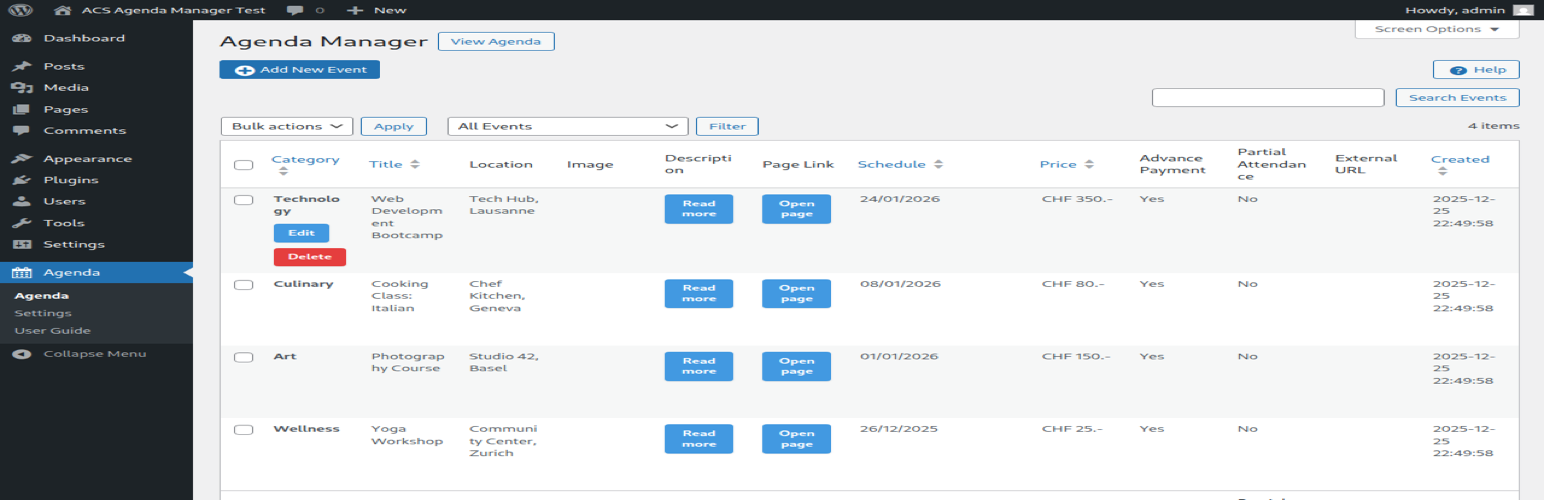
ACS Agenda Manager provides an easy way to create and manage an event agenda on your WordPress site. Display upcoming events with dates, locations, images, and descriptions in a clean, responsive layout.
Features
- Multi-date support: Events can span multiple days with visual multi-date calendar picker
- Media integration: Upload and display event images via WordPress Media Library
- Image lightbox: Click images to view full-size in a popup overlay
- Location display: Show event locations prominently
- Linked pages: Connect events to detailed WordPress pages
- Automatic expiration: Past events are automatically hidden
- Modern responsive design: CSS Grid layout with glass-morphism effects
- Easy administration: Intuitive admin interface with card-based form sections
- Real-time validation: In-dialog error messages and success notifications
- Native contact form: Built-in organizer contact form available via the dedicated Contact action
Supported Languages
- English (en_US) – Default
- French (fr_FR)
- German (de_DE, de_CH)
- Italian (it_IT)
- Japanese (ja)
Usage
Display the agenda on any page or post using the shortcode:
[acsagma_agenda]
The plugin automatically creates an „Agenda“ page upon activation with the shortcode included.
External Services
This plugin uses external services as follows:
Google Maps API
When a Google Maps API key is configured in the plugin settings, the plugin loads the Google Maps JavaScript API to display location maps for events.
- What data is sent: Event location addresses (only when viewing events with locations)
- When: The API is loaded when viewing pages that display the agenda with events containing location information
- Service provider: Google LLC
- Terms of Service: https://developers.google.com/maps/terms
- Privacy Policy: https://policies.google.com/privacy
Note: Google Maps integration is optional. The plugin works without an API key, but maps will not be displayed.
Credits
- jQuery UI Datepicker: bundled with WordPress core
- Icons: WordPress Dashicons