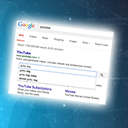
Sitelinks Search Box

PLEASE NOTE: Since November 2024 Google doesn’t support the schema for the Sitelinks Search Box anymore. After more than ten years Search Advocate John Mueller confirmed that the feature will be retired and the searchbox will not appear in the SERPs anymore.
Since November 2024 there is no need to install this plugin.
Quoting the post from Google Developers: While you can remove sitelinks search box structured data from your site, there’s no need to do so. Unsupported structured data like this won’t cause issues in Search, and won’t trigger errors in Search Console reports.
If you are using tis plugin and reading this readme.txt file, you can uninstall it.
xxx PLUGIN DESCRIPTION (until November 2024) xxx
This plugin adds the JSON-LD schema.org markup for the „Google Sitelinks Search Box“ on the homepage.
This new feature of the Google Search Engine was presented on the Official Google Webmaster Central Blog (05 Sep 2014 07:44 AM PDT). There is more info on the Google Developers Website.
With Google sitelinks search box, people can reach your content more quickly from search results. Search users sometimes use navigational queries -typing in the brand name or URL of a known site- only to do a more detailed query once on that site. For example, suppose someone wants to find that video about the guilty dog on YouTube. They type YouTube, or you-tube, or youtube.com into Google Search, follow the link to YouTube, and then actually search for the dog video.
The sitelinks search box removes that extra step: a query for youtube displays a site search box in the sitelinks section, letting the user immediately search for that guilty dog video without having to click through to the site first.
If you use WordPress SEO by Yoast version 1.6 or newer, you don’t need to use this plugin, as this feature has been included in the version 1.6 update. There is more information in the FAQ section of the plugin.
What can I do with this plugin?
This plugin adds the schema.org JSON-JD markup for the „Google Sitelinks Search Box“ on the homepage.
After activating the plugin you only have to „Wait for Google Search algorithms to identify your site as a candidate for the new sitelinks search box“.
SITELINK SEARCH BOX in your Language!
The plugin was released first in English and Spanish (es_ES). In the „languages“ folder we have included the necessary files to translate this plugin. Translation to ar_SA, tr_TR, de_DE, fr_FR and ru_RU was added in further versions.
If you would like the plugin in your language and you’re good at translating, please use the native WordPress Translation functionality.
New to Translating a plugin? First read through the Translator Handbook, then select your locale at Translating WordPress and finally go to the translation page for this plugin to translate it.
Mehr erfahren
You can access the description of the plugin in Spanish at: Sitelinks Search Box en castellano.
Kontakt aufnehmen
For further information please send us an email.
Translating WordPress Plugins
The steps involved in translating a plugin are:
- Run a tool over the code to produce a POT file (Portable Object Template), simply a list of all localizable text. Our plugins allready havae this POT file in the /languages/ folder.
- Use a plain text editor or a special localization tool to generate a translation for each piece of text. This produces a PO file (Portable Object). The only difference between a POT and PO file is that the PO file contains translations.
- Compile the PO file to produce a MO file (Machine Object), which can then be used in the theme or plugin.
In order to translate a plugin you will need a special software tool like poEdit, which is a cross-platform graphical tool that is available for Windows, Linux, and Mac OS X.
The naming of your PO and MO files is very important and must match the desired locale. The naming convention is: language_COUNTRY.po and plugins have an additional naming convention whereby the plugin name is added to the filename: pluginname-fr_FR.po
That is, the plugin name name must be the language code followed by an underscore, followed by a code for the country (in uppercase). If the encoding of the file is not UTF-8 then the encoding must be specified.
Beispiel:
- en_US – US English
- en_UK – UK English
- es_ES – Spanish from Spain
- fr_FR – French from France
- zh_CN – Simplified Chinese
A list of language codes can be found here, and country codes can be found here. A full list of encoding names can also be found at IANA.