
Admin and Site Enhancements (ASE)
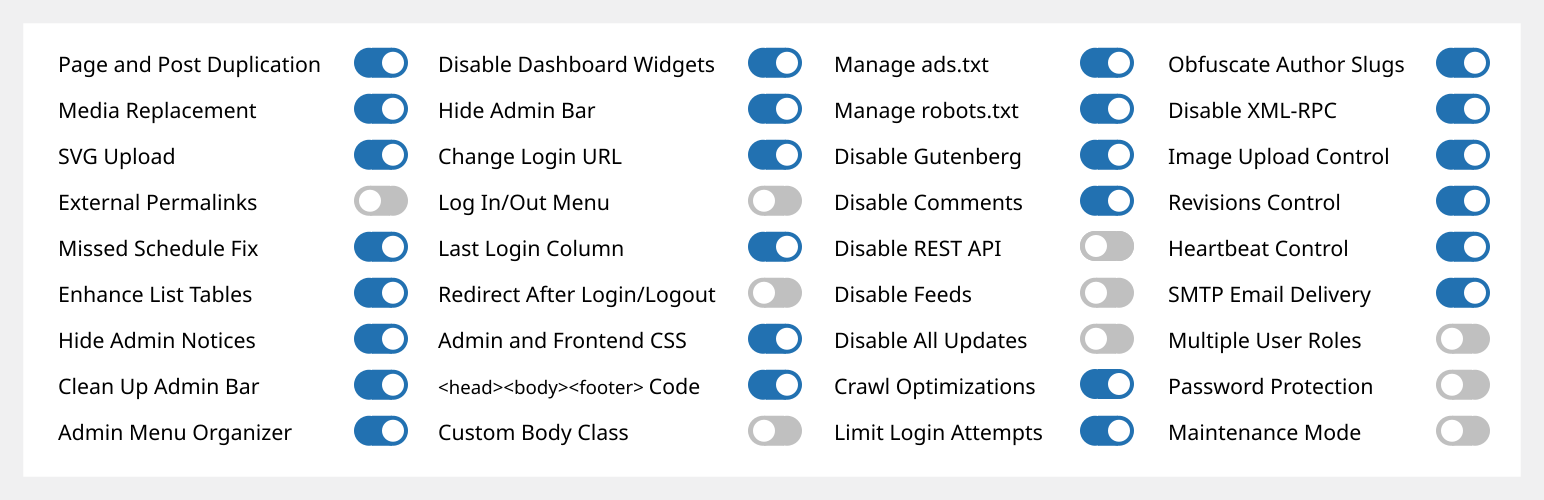
Admin and Site Enhancements (ASE) te ayuda a mejorar fácilmente varios flujos de trabajo de la administración y de los aspectos del sitio mientras reemplaza varios plugins.
Pro version with Lifetime Deal (LTD) is available at www.wpase.com.
A continuación se muestra un tutorial rápido de ASE Free en v7.1.5 por Jakson.
Aquí hay un tutorial detallado de ASE Free en v7.0.3 por Pascal Claro.
What Users Say
«ASE easily replaces a dozen or more plugins I install on every website project. Super lightweight and easy to use.» ~NetzzJD
«I bought the lifetime deal and was blown away by the quality, and the free version replaces SO many other plugins too. LOVE THIS!» ~Jacob Wonder
«ASE is an amazing plugin! Time and money saver. Thank you!» ~Iulian Baciu
CARACTERÍSTICAS Y MÓDULOS
76 modules in total: 58 free modules (32 has Pro features) | 18 Pro modules
Ver todas las características >>
Gestión de contenido
- [ASE Pro] Custom Content Types. Register custom post types (CPT), custom taxonomies, custom field groups and options pages that integrates with Bricks, Breakdance, Oxygen and Elementor, and compatible with various block themes and plugins. Also integrates with WPML and works with TranslatePress to create multilingual sites. An alternative for ACF Pro, Meta Box, Toolset, Pods, JetEngine or ACPT.
- [ASE Pro] Post Type Switcher. Switch the post type of one or more posts to a different post type.
- Duplicación de contenido. Duplicación con un solo clic de páginas, entradas y CPT públicos. ASE Pro permite la duplicación solo para determinados roles de usuario y determinados tipos de entradas públicas y no públicas, y añade la opción de ubicación para el enlace de duplicación.
- Content Order. Drag-and-drop custom ordering of hierarchical post types. ASE Pro enables ordering of non-hierarchical post types, including media / attachments, reordering and changing the parent of child posts is supported, as well as applying the custom order on the frontend.
- [ASE Pro] Terms Order. Drag-and-drop custom ordering of terms and child terms from various taxonomies and apply the custom order on the frontend.
- Media Files Visibility Control: Limit media files visibility so only administrators can see all media files. Non-administrator users will only see media files they uploaded themselves. ASE Pro adds an option to specify which non-administrator user roles will have such limitation.
- [ASE Pro] Media Categories. Hierarchical categories for the media library with drag-and-drop categorization.
- Media Replacement. Replace any type of media file with a new one while ensuring no existing links will break. ASE Pro allows replacing media from the grid view of media library.
- Subir SVG. Permite que algunos o todos los perfiles de usuario suban archivos SVG, que luego se desinfectarán para mantener las cosas seguras.
- Carga de AVIF. Permite cargar archivos AVIF en la biblioteca multimedia.
- [ASE Pro] Vista previa pública de borradores. Activa la vista previa pública de entradas en borrador y programadas de algunos o todos los tipos de contenido público.
- External Permalinks. Enable pages, posts and/or custom post types to have permalinks pointing to external URLs. ASE Pro allows enabling only on / except on certain post types, or on all post types.
- Open All External Links in New Tab. Force all links to external sites to open in new browser tab. ASE Pro allows excluding links with certain domains / subdomains from opening in a new tab and from getting the rel=»nofollow» attribute.
- Allow Custom Navigation Menu Items to Open in New Tab. Allow custom navigation menu items to have links that open in a new browser tab.
- Publica automáticamente las entradas con calendario perdido. Activa la publicación de las entradas programadas marcadas con «calendario perdido» cada vez que se visite el sitio.
Interfaz de administración
- Clean Up Admin Bar. Remove various default elements from the admin bar. ASE Pro enables removal of admin bar items from other plugins.
- [ASE Pro] Admin Bar Custom Elements. Add custom menu and submenu items to the admin bar.
- Hide Admin Notices. Move notices into a dedicated panel accessible via the admin bar. ASE Pro enables completely hiding notices for non-admins.
- Disable Dashboard Widgets. Completely disable some or all widgets.
- Hide Admin Bar. Frontend hiding for all or some user roles. ASE Pro allows hiding on the backend and make frontend admin bar toggleable.
- [ASE Pro] Admin Logo. Show custom logo in the admin bar or the (top of) admin menu.
- Wider Admin Menu. Up to 300px wide.
- Admin Menu Editor / Organizer. Customize order for the admin menu. Change menu item title or hide some items. ASE Pro allows always hiding menu items for some or all user roles, adding custom menu and submenu items, reordering submenu items and always allowing eligible users to view and access a menu item.
- [ASE Pro] Admin Columns Manager. Organize columns in the admin list tables. Supports columns for ASE, ACF and Meta Box custom fields.
- Mostrar filtros de taxonomía personalizada. Mostrar filtro(s) adicional(es) en las tablas de listas para taxonomías personalizadas jerárquicas. ASE Pro añade la opción de mostrar filtro(s) adicional(es) para taxonomías no jerárquicas.
- Enhance List Tables. Improve the usefulness of listing pages of various post types by adding / removing columns and elements, e.g. featured image, excerpt, last modified, ID, media file size columns.
- Various Admin UI Enhancements:
- Media Library Infinite Scrolling: Re-enable this in the grid view.
- Display Active Plugins First: On the plugins list.
- [ASE Pro] Conservar la jerarquía de taxonomía: conserva la jerarquía visual de la lista de verificación de términos de taxonomía en el editor clásico.
- [ASE Pro] Enable Dashboard Columns Settings: Set columns layout between 1 to 4 columns.
- [ASE Pro] Add User Role Slug(s) to Admin Body Classes.
- [ASE Pro] Add Usermame to Admin Body Classes.
- Custom Admin Footer Text: Customize the text you see on the footer of wp-admin. ASE Pro enables media insertion.
Acceso/desconexión & Registro
- Change Login URL. Make the login URL more memorable and secure. ASE Pro adds compatibility with login process in WooCommerce pages, i.e. account and checkout, and custom 404 redirect on default login URLs.
- Login ID Type. Restrict login ID only to username or email address.
- [ASE Pro] Personalizador de página de inicio. Personaliza fácilmente el diseño de la página de acceso.
- Site Identity on Login Page. Use the site icon and URL to replace the default WordPress logo on the login page.
- Log In/Out Menu. Enable log in, log out and dynamic log in/out menu item for addition to any navigation menu. ASE Pro allows customizing the «Log In» and «Log Out» text.
- Columna de Registro. Muestra la fecha de registro del usuario. Permite ordenar la columna ASE Pro.
- Columna Último inicio de sesión. Registra cuándo se conectaron por última vez los usuarios y muéstralo en una columna de la tabla de la lista de usuarios. ASE Pro permite ordenar la columna.
- Redirect After Login / Logout. Set custom redirect URL for all or some user roles after login / logout. ASE Pro allows setting separate redirect URL for each role.
- Disable User Account. Disable login for individual users while preserving their content and display name.
Código personalizado
- [ASE Pro] Code Snippets Manager. Manage CSS / SCSS, JS, HTML and PHP code snippets to modify your site’s content, design, behaviour and functionalities.
- Custom Admin CSS.
- Custom Frontend CSS.
- Insert <head>, <body> and <footer> Code. Easily insert <meta>, <link>, <script> and <style> tags for tracking, analytics, etc.
- Clase personalizada del body.
- Gestionar «ads.txt» y «app-ads.txt».
- Gestionar «robots.txt».
Disable Components
- Disable Gutenberg for some or all applicable post types. Optionally disable frontend block assets. ASE Pro allows disabling only on / except on certain post types, or on all post types.
- Disable Comments. Disable comments for some or all public post types. ASE Pro allows disabling only on / except on certain post types, or on all post types.
- Disable REST API. Disable REST API access for non-authenticated users and remove URL traces from <head>, HTTP headers and WP RSD endpoint. ASE Pro allows enabling access only for some, authenticated user roles, and adds a way to exclude certain API routes.
- Disable Feeds. Disable all RSS, Atom and RDF feeds.
- Disable Embeds. Prevent your site content from being embedded on other sites. Prevent embedding of non-whitelisted sites in your site. Disable all, related JavaScript. Removes support for the embed block.
- Disable All Updates. Completely disable core, theme and plugin updates and auto-updates. Will also disable update checks, notices and emails.
- Disable Author Archives. Return 404 (Not Found) error when trying to load author archives. Remove or disable links to author archives. Remove authors archives from the sitemap.
- Disable Smaller Components. Prevent smaller components from running or loading. Those are generator <meta> tag, version number, Windows Live Writer (WLW) manifest <link> tag, Really Simple Discovery (RSD) <link> tag, WordPress shortlink <link> tag in <head>, and also dashicons CSS and JS files, emoji support, jQuery Migrate, block-based widgets settings screen, native lazy load of images, application passwords, site admin email verification screen, user email notification after password change and plugin / theme editor.
Seguridad
- Limit Login Attempts. Prevent brute force attacks by limiting the number of failed login attempts allowed per IP address. ASE Pro adds IP whitelisting, which is also useful to unblock users. [ASE Pro] CAPTCHA Protection. Support for ALTCHA self-hosted version (GDPR-compliant, open source, free), Google reCaptcha v2 and v3, and Cloudflare Turnstile for WordPress and WooCommerce default forms (login, password reset, registration and comment forms). [ASE Pro] Two-Factor Authentication (2FA). Apply 2FA for some or all user roles with grace period settings and the option to apply different 2FA settings for each user role. Supported methods are authenticator app (TOTP), recovery codes and email.
- Obfuscate Author Slugs. Obfuscate publicly exposed author page URLs that shows the user slugs / usernames.
- Email Address Obfuscator. Obfuscate email address to prevent spam bots from harvesting them,. ASE Pro enables output of obfuscated mailto: link and also auto-obfuscation of email addresses in post content.
- Disable XML-RPC. Protect your site from brute force, DOS and DDOS attacks via XML-RPC. Also disables trackbacks and pingbacks.
Optimizaciones
- Image Upload Control. Resize newly uploaded, large images to a smaller dimension and delete originally uploaded files. BMPs and non-transparent PNGs will be converted to JPGs and resized. ASE Pro enables setting custom JPG conversion quality and adds an option for conversion to WebP with custom conversion quality. You can also disable generation of some or all intermediate sizes.
- Revisions Control. Limit the number of revisions to keep for some or all post types. ASE Pro enables revisions control «only for», «except for» or «for all» post types.
- Heartbeat Control. Modify the interval of the WordPress heartbeat API or disable it on admin pages, post creation/edit screens and/or the frontend.
Utilidades
- [ASE Pro] Site Backup and Migration. Backup files and database, restore from backups, and migrate or sync to another server.
- Entrega de correos electrónicos. Establece un nombre y un correo electrónico de remitente personalizados. Opcionalmente, utiliza un servicio SMTP externo para garantizar que los correos electrónicos de notificación y transacción de su sitio se entreguen en las bandejas de entrada. ASE Pro añade la opción de especificar un nombre y un correo electrónico de respuesta personalizados, direcciones en copia oculta, desactivar la identificación y la opción de registrar la entrega de correos electrónicos.
- [ASE Pro] Creador de formularios. Permite crear mediante arrastrar y soltar diversos tipos de formularios (contacto, comentarios, reservas, solicitudes, propuestas, admisiones, asistencia, encuestas, etc.) en la interfaz para recopilar información de los visitantes, usuarios o miembros del sitio. Hay 33 tipos de campos disponibles, entre los que se incluyen Net Promoter Score (NPS), Likert, matriz de menús desplegables uniformes y variables y campos CAPTCHA. Admite estilos de formularios personalizados, diseño de varias columnas, notificaciones por correo electrónico, respuestas automáticas, gestión de entradas y webhooks para enviar datos de envío a Zapier, n8n, etc.
- [ASE Pro] File Manager. A comprehensive file manager with folder tree navigation, file and folder operations, and code editing capabilities.
- [ASE Pro] Avatar de usuario local. Activa el uso de cualquier imagen de la biblioteca de medios de WordPress como avatares de usuario.
- Múltiples perfiles de usuario. Activar la asignación de múltiples perfiles durante la creación y edición de cuentas de usuario.
- Image Sizes Panel. Display a panel showing and linking to all available sizes when viewing an image in the media library. ASE Pro adds a copy button for the image URL on click.
- View Admin as Role. View admin pages and the site (logged-in) as one of the non-administrator user roles.
- Protección con Contraseña. Protege con contraseña todo el sitio para ocultar el contenido de la vista pública y de los bots / rastreadores de motores de búsqueda. ASE Pro añade lista blanca de IP y omisión a través de parámetros de URL y también aplica elementos de diseño del módulo personalizador de página de acceso.
- Maintenance Mode. Show a simple maintenance message. ASE Pro adds option to set custom page and browser tab title, use WYSIWYG editor, use pattern, image, solid color background, apply custom CSS, and also add the option to use an existing page created with the block / classic editor or a page builder as the maintenance page. It also adds an option to exclude certain URLs (wildcard support) and allow non-admins to access the frontend.
- [ASE Pro] Redirect Manager. Easily manage various types of redirects / redirections (3xx, 4xx, 5xx codes) with support for wildcards and regular expressions (regex).
- Redirección 404. Realiza una redirección 301 (permanente) a la página de inicio para todas las páginas 404 (no encontradas). ASE Pro añade una opción para configurar una URL de redirección personalizada.
- Mostrar resumen del sistema. Muestra el software del servidor web, la versión de PHP, el software de la base de datos y la dirección IP del servidor en el widget del panel «A primera vista». ASE Pro también muestra el tamaño del sitio, la base de datos y las carpetas raíz, wp-content, plugins, temas y subidas.
- Estado de visibilidad de los motores de búsqueda. Mostrar el estado de la barra de administración y el aviso de administración cuando se configure para desincentivar a los motores de búsqueda de indexar el sitio. ASE Pro añade una manera de evitar que los sitios de desarrollo / staging tengan activada la visibilidad para los motores de búsqueda.
Ver todas las características >>
ASE Pro
Lifetime Deal (LTD) is available at www.wpase.com.
IDIOMAS
ASE ha sido traducido a más de 30 idiomas. Puedes ayudar a traducir ASE a tu(s) idioma(s).