
Automation Web Platform – Notifications, OTP, and Advanced Phone Field
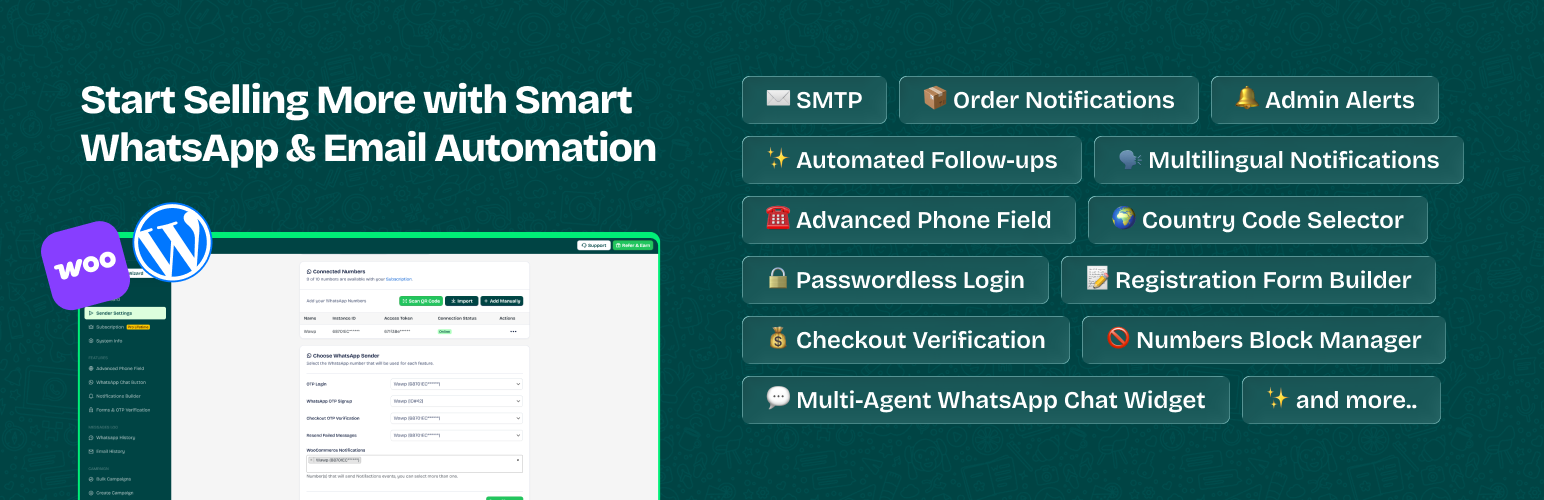
¿Cansado de enviar manualmente actualizaciones de pedidos y recordatorios de pago por WhatsApp? Deja que Wawp se encargue de todo, ¡directamente desde tu WhatsApp!
and more—all in one powerful plugin.
Más automatización, menos trabajo: ¡vende de forma más inteligente con Wawp! ✨
This plugin relies on the Wawp.net SaaS service. You can find our Terms of Service at https://wawp.net/terms-of-services/ and Privacy Policy at https://wawp.net/privacy-policy/.
🤖 Automated Notifications
✅ New Order Notification – Send WhatsApp message to customers with order details after checkout. ✅ Order Status Updates – Notify customers automatically about changes to their order status. ✅ Admin/Staff Alerts – Receive real-time WhatsApp alerts for new orders and status changes. ✅ After Purchase Upsell – Schedule follow-up messages to re-engage customers and boost sales. ✅ Pending Payments – Send gentle reminders for pending payments, to get paid faster. ✅ Product Reviews – Collect product reviews on auto-pilot with customized WhatsApp messages.
Notification types:
Pending payment: Notify customers about unpaid orders. On hold: Inform about orders waiting for payment confirmation. Processing: Let customers know their order is being prepared. Completed: Confirm successful order delivery. Failed: Notify customers of failed transactions. Draft: Keep track of unfinished orders. Canceled: Alert customers when an order is canceled. Refunded: Inform about successful refunds. Customer Note: Send custom updates directly to customers. Custom Status: Set up notifications for any custom status.
🔐 User Authentication
✅ Blacklist Numbers — Block Fake and Spam users to prevent abuse and secure your site. ✅ Fully customizable — Colors, logo, and text – control your login looks, without technical effort. ✅ Multiple login options — Enable login via WhatsApp, Email OTP, or Email & Password. ✅ Signup Verification — Verify new accounts via WhatsApp or Email OTP. ✅ Role-Based Redirects — Redirect users to specific pages based on their roles after login. ✅ Welcome message — Send personalized welcome messages to introduce your brand to new customers. ✅ User Login Alerts — Get instant notifications for user logins and signups to ensure security. ✅ Google ReCAPTCHA — Secure Login, Registration, and Lost Password forms with ReCAPTCHA v2/v3. ✅ Chic Settings UI — New premium design for Authentication Settings with dynamic status updates. ✅ Smart Guidance — Descriptive status bars (Green Bar) to guide you through redirection impacts. ✅ One-Click View — Easily view your active Login/Signup pages directly from settings.
Shortcodes para integración sencilla:
- Login Form:
[wawp_otp_login] - Formulario de registro:
[wawp_signup_form] - Ambos formularios:
[wawp-fast-login]
= 100 % compatible con:
✅ Bricks Builder ✅ Elementor ✅ Gutenberg ✅ Native WordPress Forms ✅ Native WooCommerce Forms
🛒 Verificación de pedidos de WooCommerce
Evita pedidos falsos con la verificación OTP de WhatsApp antes del pago.
- Activa la verificación OTP para visitantes, miembros o todos.
- Enable OTP based on payment method (e.g., Cash on Delivery, PayPal, Stripe).
- Enable OTP based on shipping method (e.g., Standard, Express).
💬 Widget de chat de WhatsApp
✅ Multi-agent Support — Easily assign different contacts for support, sales, or inquiries. ✅ Display Condition — Set when the chat button appears based on device or pages. ✅ Fully customize — button design (colors, text, icons, positioning). ✅ Integrate social media links — directly into the button. ✅ Auto-generate QR codes — for instant messaging. ✅ Track button clicks — to analyze customer interactions.
🌍 Código de país
✅ Validación de números — Verifica los números de teléfono en tiempo real para reducir errores y mejorar la calidad de los datos. ✅ Detección automática del país — Detecta automáticamente el código de país según la ubicación del visitante o un valor predeterminado. ✅ Filtrado por país — Muestra únicamente los países de los que provienen tu audiencia y clientes. ✅ 100% compatible — Código de país compatible con todos los temas, constructores de páginas y plugins. ✅ Selección de país — Permite a los usuarios elegir su código de país al ingresar su número de teléfono. ✅ Filtrado por país — Restringe o muestra países específicos en el desplegable. ✅ Formato automático — Formatea los números de teléfono dinámicamente mientras los usuarios escriben para mayor precisión.
📊 Diagnostics & Privacy
This plugin includes an optional feature to share non-sensitive diagnostic data to help improve plugin performance and troubleshoot issues. This data is only shared if explicitly permitted by the site administrator via the Connector settings.
📜 Historial de mensajes
✅ Rastrea todos los mensajes – Muestra todos los detalles (número de pedido, datos del usuario, números de teléfono, etc.). ✅ Filtros avanzados – Utiliza búsqueda en tiempo real y filtros avanzados para encontrar mensajes específicos. ✅ Identifica mensajes fallidos – Soluciona problemas y corrige errores de entrega. ✅ Reenviar mensajes – Reintenta los mensajes fallidos con un solo clic.
🎨 Personalización
✅ Dynamic Content — Use Variables to insert customer names, order details, and more. ✅ Full emoji support — Add personality and fun to your communication. ✅ Rich Messages — Attach multi-media to capture customers attention. ✅ Direct Messages — Send message to any WhatsApp number directly from your dashboard.
👤 Gestión de clientes
✅ Verify whether a member’s number is active on WhatsApp. ✅ View all phone numbers linked to a member’s account for login and orders.
Nota: Puedes asignar números de WhatsApp únicos para cada tarea, como actualizaciones de pedidos, alertas de administración y verificación de inicio de sesión.
External Services
This plugin acts as a gateway to external Software as a Service (SaaS) providers. Use of these services is optional and requires explicit user configuration. To ensure full transparency and compliance, we disclose the following external service integrations:
1. Wawp.net (Core Service) * Service: Wawp.net API Gateway * Description: Provides the infrastructure for WhatsApp Web connection, message routing, and phone number validation. * Compliance: All communication is encrypted via HTTPS. Wawp.net does not store your customers’ data beyond the time required for delivery routing. * Data Sent: Recipient phone number, message payload, site URL, and authentication tokens. * Consent: Granted by configuring a Wawp Instance and activating any notification trigger. * Policies: Terms of Service | Privacy Policy
2. Meta (WhatsApp Cloud API) * Service: Official WhatsApp Business Platform (graph.facebook.com, connect.facebook.net) * Purpose: Used for enterprise-grade message delivery via Meta’s official infrastructure. * Data Sent: Recipient phone number, template parameters, and Meta App credentials. * Consent: Granted only if the «Meta WhatsApp» channel is explicitly selected and configured. * Policies: Meta Commerce Terms | Meta Privacy Policy
3. WhatsApp (Direct Chat Interaction) * Service: WhatsApp Public API (api.whatsapp.com) * Purpose: Enables the Chat Widget to redirect users to the WhatsApp application with a pre-filled message. * Data Sent: Recipient phone number and optional message text. No data is sent automatically; redirection happens only upon user interaction (click). * Consent: Granted by enabling the Chat Widget and a user clicking the chat button. * Policies: WhatsApp Terms | WhatsApp Privacy
4. Google reCAPTCHA & Firebase * Service: Security & Authentication Platform * Purpose: Prevents bot abuse (reCAPTCHA) and optionally provides OTP verification (Firebase). * Data Sent: Device/application information for fraud analysis and phone numbers for verification. * Consent: Granted when these features are explicitly enabled in settings. * Policies: Google Terms | Google Privacy | Firebase Privacy
5. GrapesJS * Service: Email Template Builder (app.grapesjs.com) * Purpose: Provides the drag-and-drop builder interface for editing email templates. The bundled editor sends basic telemetry (plugin version/domain) to its server to track usage. * Data Sent: Domain name and plugin version when the editor is loaded. * Consent: Automatic when loading the email template builder interface in the admin dashboard. * Policies: GrapesJS Privacy Policy | GrapesJS Terms
6. Pollinations AI * Service: AI Text Generation (text.pollinations.ai) * Purpose: Used in the notifications builder to automatically generate and suggest message templates. * Data Sent: Prompt text containing placeholders, sent only when you click the AI generation button. * Consent: Granted only when a user actively clicks the AI generation button. * Policies: Pollinations AI Privacy Policy | Pollinations AI Terms
7. WordPress.org API * Service: WordPress Core API (api.wordpress.org) * Purpose: Used internally by the System Info module to verify if the plugin version matches the latest stable version available. * Data Sent: Standard HTTP headers required for version checking. * Consent: Automatic when loading the system info. * Policies: WordPress.org Privacy Policy
8. Geolocation & Privacy * Local Processing: To protect user privacy, geolocation is handled 100% internally using the browser’s timezone API; no external IP-lookup services (such as ipapi.co or ip-api.com) are used by this plugin. * Zero-Tracking Policy: This plugin does not collect or track admin behavior. No data is sent to external servers without explicit consent and connection to the respective service. * Dashboard Analytics: Statistics (message delivery, chat clicks) are generated locally from your site’s database and used only for internal monitoring. * Assets: All core CSS, JS, and font files are bundled locally to prevent third-party asset tracking.
Cómo empezar
- Instala y activa el plugin Wawp.
- Crea una cuenta gratuita en Wawp.
- Conecta tu número de WhatsApp usando un código QR.
- Introduce las claves API en el plugin.
- Customize your selected notification messages.
Note: A Wawp account is required to access all plugin features. Create new account, and send 250 WhatsApp messages per month for Free.
¡Crezcamos, conectemos y prosperemos juntos!
👉 Try Wawp for FREE (250 Messages/Month) 📌 Facebook Community. – Join other users for support, advice, and tips. 📚 Getting started. – Access step-by-step guides, FAQs, and tutorials. ⭐ Rate Us on WordPress. – Your feedback helps us grow and improve! 🌍 Help Translate Wawp. – Your feedback helps us grow and improve! 📽 Video Tutorials
Source Code & Build Tools
This plugin uses modern development tools (React, Vite, NPM) to build the administrative dashboard. To comply with WordPress.org guidelines regarding human-readable code:
- Plugin Source Code:
The full, non-minified, human-readable source code for the React dashboard is included within this plugin package in the
app/src/directory.
– Main Entry: app/src/index.tsx
– Components: app/src/components/
– Build Tool: Vite (configuration in app/vite.config.ts)
– Build Instructions: To generate the minified assets in app/dist/, navigate to the app/ directory and run:
npm install
npm run build
- Third-Party Libraries: The following libraries are included in minified form for performance. Their original source code can be found at these public repositories:
– International Telephone Input (intl-tel-input): Source (Used in assets/js/resources/intlTelInput.min.js)
– QRCode.js: Source (Used in assets/js/resources/qrcode.min.js)
– Firebase SDK (Compat): Source (Used in assets/js/resources/firebase-auth-compat.js and firebase-app-compat.js)
– Facebook SDK: Source (Used in assets/js/resources/fb-sdk.js)
– GrapesJS: Source (Used in the email template builder)