
Bit Flows: AI Agent Automation & Integrations for Forms, CRM, eCommerce, Google Sheets, and More
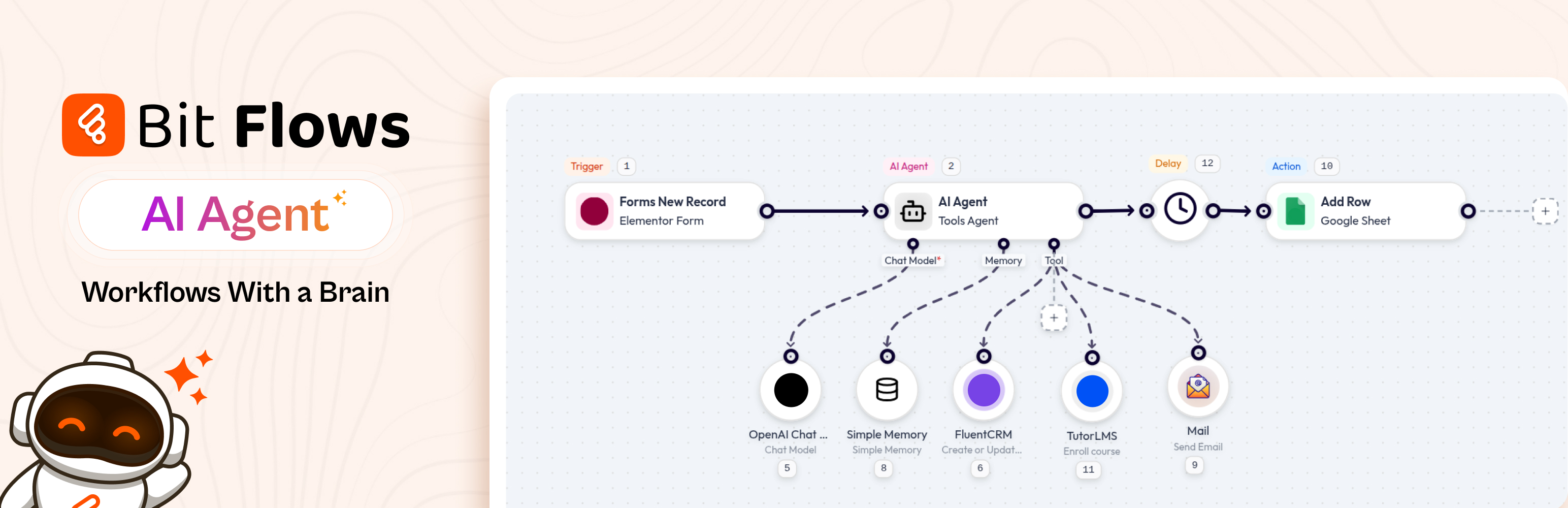
AI Agent inside Bit Flows makes WordPress think, decide, and automate. Experience true AI automation in WordPress.
Bit Flows funciona como un creador visual de automatización de flujos de trabajo dentro de WordPress, con integraciones de plugins nativos de WordPress y conexiones con aplicaciones externas.
Bit Flows puede automatizar tareas en plataformas como ChatGPT para contenido de creación, Google Sheets para datos o actualización en múltiples plataformas.
Las rutas se ordenan automáticamente a CRM, Slack, WhatsApp, Gmail y más, lo que permite a su AIEl agente decidir el mejor flujo.
Con Bit Flows, tus automatizaciones de WordPress pueden ejecutarse en segundo plano después de la configuración.
For example, after a form submission or based on any event, the data can be processed and sent to over 320+ platforms.
Lo que puedes construir conFlujos de bits
- Run Zapier / n8n-like workflows directly inside WordPress
- Build powerful AI Agents without writing a single line of code
- Connect 320+ apps and services in just minutes
- Automate WordPress, WooCommerce, and SaaS apps from a single platform
- Build AI-driven customer support & HR workflows
- Agregar pasos de aprobación con intervención humana para la revisión manual.
- Conecta servidores compatibles con MCP dentro de los flujos de trabajo de AI Agent
- Format, parse, and calculate dates with the Date Time tool
- Automate content, emails, CRM, and lead management.
- Add AI decision-making to your real business workflows
🔥 Features & Tools
- AI Agent: A built-in AI assistant that analyzes data, makes decisions, and runs multi-step workflows for you.
- Intervención humana: Pausar un flujo de trabajo y esperar la aprobación o el rechazo manual antes de que se ejecute el siguiente paso.
- MCP Client: Connect MCP-compatible servers inside AI Agent workflows and let your agent call external tools from a configured MCP server.
- Unlimited Workflows and Tasks: Create as many multi-step automations as you want, without limits. Automate every process on your site.
- Drag & Drop Builder: Intuitive visual workflow editor, no coding needed. Just drag steps and link them to automate tasks with ease.
- Multi-step Automation: Build complex automation flows with multiple actions, conditions, and branches.
- Conditional Logic: Automate decision-making in your workflows with powerful if/else logic.
- Schedule, Delay, and Date Time tools: Start workflows at the right time, pause steps when needed, and format or calculate dates inside your automation.
- Repeater / Loop and Iterator: Repeat actions or iterate lists for bulk automated operations effortlessly.
- JSON/XML Parser: Automatically parse and extract data from API responses or webhook payloads.
- Incoming & Outgoing Webhooks: Use standard webhooks with any service. Trigger automation flows from external events.
- Custom App / API Connector: Create custom integrations by integrating any API endpoint and automating data exchange.
- Fail Task Notifications & Logging: Keep detailed logs of each step and get notified on failures or retries.
- Cloud Cron: Run scheduled workflows reliably without depending only on WP cron.
- Deep WordPress and WooCommerce Integration: Works with Elementor, WPForms, Contact Form 7, Fluent Forms, Fluent CRM, WooCommerce, FluentCart, Tutor LMS, LearnDash, and more for AI automation.
- Dark Mode & Quick Testing: Modern interface with a dark theme and instant flow testing.
🔗 Useful Links 🚀Try Full Version Demo | 🚀Docs | 🚀Video Tutorials | 🚀Support | 🚀Facebook Group | 🚀Upgrade to Pro | 🚀Bit Flows Repository
WooCommerce Automation
Bit Flows ayuda a las empresas de comercio electrónico a optimizar sus operaciones automatizando los flujos de trabajo de pedidos y clientes.
Cuando se realiza un pedido o un cliente se registra, Bit Flows puede enviar esos datos a Google Sheets o a tu CRM.
También puedes automatizar las actualizaciones de inventario, la generación de cupones o las notificaciones por correo electrónico. Por ejemplo, puedes automatizar al instante los seguimientos, las comprobaciones de inventario y la creación de cupones.
WordPress Automation
Automatizar tareas de WordPress ahora es más inteligente con Bit Flows.
Conecta plugins como Elementor, Fluent Forms, Tutor LMS o Contact Form 7 a tus flujos de trabajo.
Por ejemplo, cuando se envía un formulario, Bit Flows puede crear una publicación, enviar correos electrónicos y actualizar registros de CRM (p. ej., FluentCRM) automáticamente.
AI Agent for Agentic Workflow Automation
El agente de IA actúa como un cerebro dentro de tu panel de WordPress. Comprende el contexto y los objetivos, lo que hace que los flujos de trabajo sean verdaderamente autónomos. Puedes usarlo para analizar la información de formularios o consultas de soporte y decidir automáticamente los siguientes pasos. Esto convierte tu sitio en un asistente inteligente que puede pensar y actuar, no solo ejecutar reglas predefinidas.
Flujos de trabajo de aprobación con intervención humana
Human in the Loop lets a workflow pause and wait for a real person to approve or decline a request before the flow continues. You can send a review email, then continue the workflow based on the reviewer response.
Cliente MCP para flujos de trabajo de agentes de IA
The MCP Client lets Bit Flows connect with MCP-compatible servers inside AI Agent workflows. Add the MCP Server URL, choose the connection method, and let the AI Agent access available tools from that server during the workflow.
Content Generation with AI
Bit Flows connects ChatGPT, Gemini, Claude, Deepseek, and Perplexity to generate content automatically. Generate blog posts, marketing copy, or FAQs on demand. For example, feed headlines or keywords into a Bit Flows workflow and let the AI create full articles or social media captions.
Autoblogging with ChatGPT, Gemini, and Claude
Configura un flujo de trabajo de autoblogging con ChatGPT, Gemini o Claude. Al añadir un nuevo tema o palabra clave, Bit Flows puede activar el modelo de IA para redactar un borrador y publicarlo. Integra imágenes o formato y publica sin necesidad de escribir manualmente.
Google Sheets Integrations
Registra y gestiona datos automáticamente con las integraciones de Google Sheets.
Cualquier formulario enviado, pedido de comercio electrónico o registro de usuario se puede enviar a una hoja de cálculo para generar informes.
CRM Integrations
Bit Flows se integra con CRM populares como HubSpot, Salesforce y FluentCRM.
Los nuevos clientes potenciales generados a través de formularios o tiendas se pueden agregar al instante.
La automatización de flujos de trabajo y la IA ayudan a actualizar contactos, realizar un seguimiento de las interacciones y mantener tu CRM sincronizado en todas las plataformas.
Email Marketing Automation
Automate your email campaigns using Bit Flows. Connect form submissions and order leads to email tools like Mailchimp or SendGrid. When someone signs up on your site, Bit Flows can add them to a campaign, send welcome emails, or schedule newsletters.
Webhook Integrations
Utiliza webhooks para integrar cualquier aplicación SaaS o personalizada. Los webhooks entrantes activan flujos a partir de eventos externos, y los webhooks salientes envían datos a cualquier punto final. Esta flexibilidad te permite integrarte con servicios como n8n o cualquier plataforma basada en API.
Image Generation with Nano Banana and DALL·E
Mejora tu contenido con imágenes generadas por IA. Image Helper de Bit Flows integra Nano Banana (una IA ligera para imágenes) y DALL·E. Puedes crear automáticamente elementos visuales para tus publicaciones o productos. Por ejemplo, genera una imagen destacada basada en el tema de tu blog o un gráfico de producto personalizado mediante IA, todo dentro de tu flujo de trabajo.
WhatsApp, Telegram, Discord, Slack Integrations
Comunícate y notifica a través de aplicaciones de mensajería. Bit Flows es compatible con WhatsApp, Telegram, Discord y Slack. Envía alertas o mensajes automáticos cuando ocurran eventos. Por ejemplo, recibe una notificación de Slack sobre nuevos pedidos o envía actualizaciones de pedidos a tus clientes por WhatsApp.
SaaS Integration (Shopify, Mailchimp, JotForm)
Conecta fácilmente herramientas SaaS populares. Usa activadores de Shopify para nuevos pedidos o sincroniza datos con Mailchimp para marketing por correo electrónico. También puedes enviar formularios desde JotForm. Por ejemplo, sincroniza automáticamente los pedidos de Shopify o activa la automatización cuando lleguen los formularios de JotForm.
LMS Integrations
Automatiza tu plataforma de aprendizaje en línea con Bit Flows. Cuando un usuario se inscribe o completa un curso, actualiza automáticamente sus registros, envía certificados o recordatorios por correo electrónico. Bit Flows funciona con Tutor LMS, LearnDash y otros complementos para cursos.
Form Automation
Convierta el envío de formularios en procesos automatizados. Cuando un usuario envía un formulario (WPForms, Contact Form 7, Fluent Forms, etc.), Bit Flows puede redirigir los datos a cualquier lugar: correo electrónico, CRM, Google Sheets o incluso activar el agente de IA para que redacte una respuesta.
AI Integrations (ChatGPT, Gemini, Deepseek, Perplexity, Claude)
Integra los modelos de IA más recientes en tus flujos de trabajo. Bit Flows es compatible con ChatGPT, Gemini, Claude, Deepseek y Perplexity mediante acciones de OpenAI. Crea flujos de trabajo que utilicen estos servicios de IA para generar contenido, análisis, traducción o imágenes.
Free Triggers
- Bit Form
- Bit Assist
- Contact Form 7
- WPForms
- Webhook
- WordPress
- WooCommerce
- Elementor Form
Free Actions
- ChatGPT (OpenAI)
- Perplexity
- Claude
- DeepSeek
- Gemini
- Google Sheet
- API Request
- HTTP
- SMTP Mail
- Webhook
- WordPress
- Telegram
- OpenRouter
- Groq
Herramientas
- AI Agent
- Humano en el bucle (Pro)
- Cliente MCP (Pro)
- Condition
- Router
- Iterator
- Repeater/Loop
- Parsers (CSV, XML, JSON)
- Retraso, horario y fecha/hora
- Image Helper
Free Features
- Unlimited workflows
- Unlimited tasks
- Multi-step workflows
- Details logs
- Notification of Failed Tasks
- Tasks re-execution
- Custom app with API, Webhook, or WP Action Hook
Available Popular Integrated Platforms
- ACPT
- ActivePieces
- Airtable
- Albato
- Asana
- Automatisch
- AutomatorWP
- Benchmark
- Brevo (Sendinblue)
- ClickUp
- Demio
- Discord
- Drip
- Dropbox
- Elastic Email
- EmailOctopus
- Emailit
- Encharge
- FlowMattic
- Flowlu
- GetGist
- GetResponse
- Gmail
- GoHighLevel
- Google Calendar
- Google Drive
- Google Meet
- Google Tasks
- HubSpot
- Integrately
- JetEngine
- KonnectzIT
- Lemlist
- Line
- MailBluster
- MailerCloud
- MailerPress
- Make
- Microsoft Excel
- n8n
- Newsletter
- Notion
- Rapidmail
- Selzy
- SendFox
- Sperseio
- SyncSpider
- System.io
- Thrive Automator
- Twilio
- Uncanny Automator
- Woodpecker
- WP Fusion
- Zapier
- Zoho Flow
- Zoho Project
- bbPress
- EasyCommerce
- FluentAffiliate
- FormGent
- Nex Forms
- Paymattic
- Profile Builder
- Quill Forms
- SureFeedback
- SureMail
- UserFeedback
- WP Travel Engine
- WP User Frontend
- Academy LMS
- Affiliate WP
- AidaForm
- Amelia Booking
- ARForms
- ARMember
- Asgaros Forum
- Avada Forms
- Beaver Builder
- Bit Social
- Booking Calendar Contact Form
- Breakdance
- Bricks Builder
- BricksForge
- brizy
- CartFlows
- CoBlocks
- Cognito Forms
- Contact Form Email
- Divi Form Builder
- Dokan Multivendor
- eForm
- Easy Digital Downloads
- Essential Addons for Elementor
- Essential Blocks
- Eventin
- The Events Calendar
- Everest Forms
- Fillout
- Fluent Booking
- FluentCart
- Fluent Forms
- FluentSMTP
- Fluent Support
- 123FormBuilder
- FormCraft 3
- Formaloo
- Formester
- Formidable Forms
- Forminator
- forms.app
- Forms.io by 500apps
- Formstack Forms
- GamiPress
- GeoDirectory
- GiveWP
- GoZen Forms
- Google Forms
- Google Sheet
- Gravity Forms
- Groundhogg
- Gutena Forms
- Happyforms
- Hustle
- Involve.me
- JetForm Builder
- Kadence Blocks Form
- Kali Forms
- Klaviyo
- LearnDash
- ElevadorLMS
- Line
- Mailchimp Forms
- MailerLite Forms
- Mailster
- MakeForms
- MasterStudy LMS
- Prensa de miembros
- MetForm
- MetaBox
- Microsoft Forms
- MightyForms
- Moosend Forms
- Aprobacion de nuevo usuario
- Ninja Forms
- OptinMonster Forms
- Paperform
- Pie Forms
- Piotnet Addon Form
- Piotnet Forms
- Poptica
- Popup Maker
- RafflePress
- Restrict Content
- Shopify
- SiteOrigin Widgets
- SliceWP
- Solid Affiliate
- Spectra
- Squarespace Forms
- StoreEngine
- SureCart
- SureForms
- Survey Monkey
- SurveyNinja
- SurveySparrow
- Tally Forms
- Telegram
- Tidio
- Tripetto
- Tutor LMS
- Typeform
- Ultimate Member
- Unbounce Forms
- Voxel
- Suscripción WP
- WooCommerce Bookings
- weForms
- Webflow Forms
- Wispform
- Membresías de WooCommerce
- Suscripciones de WooCommerce
- Woorise
- wpForo Forum
- WPFunnels
- WP Job Manager
- WS Form
- Wufoo
- Zoho Forms
Some Real-World Use Cases with Bit Flows
- Calificación y enrutamiento de clientes potenciales con agente de IA Cuando se recibe un formulario de WPForms o Elementor, Bit Flows utiliza un agente de IA para analizar el mensaje y enrutar el cliente potencial al CRM o Google Sheets correspondiente. El flujo de trabajo puede enviar automáticamente una respuesta personalizada a través de Gmail y calificar al cliente potencial sin intervención manual.
- Autoblogging automáticamenteblog publicacionescon ChatGPT, Gemini o Claude. Utilice Bit Flows para publicar. AI-generadocontenidodirectamente a WordPress según un cronograma.
- AI-Descripciones de productos con tecnología integrada Cuando se agrega un nuevo producto de WooCommerce agregado, utilice Bit Flows para llamar a ChatGPT o Gemini y crear una descripción del producto. AIEl agente puede actualizar el producto automáticamente.
- Automatización del comercio electrónico Cuando un nuevo WooCommerceordeno Shopifyventaocurre, los flujos de bits puedenagregarelclientea su CRM,actualizarHojas de cálculo de Google y enviar una confirmación.correo electrónicoTambién puedes activar unAIFlujo de trabajo para generar automáticamente descuentos personalizados o sugerencias de productos relacionados.
- Cliente ApoyoAutomatización Cuando un cliente presenta unaapoyopregunta, Bit Flows puede enviarla a Claude o ChatGPT para unborradorResponder. La respuesta puede enviarse por correo electrónico a la clienteysesión iniciada una hoja de cálculo de Google. Tu equipo recibirá una notificación en Slack para la versión final.revisar, automatizando suapoyoflujo de trabajo.
- Integración de aplicaciones personalizadas Utilice flujos de bits para integrar una API externa. Por ejemplo, integre unenvíosistema: Bit Flows puede enviar datos de envío a una API y analizar la respuesta aactualizartu WooCommerceorden estadotodo automáticamente.
⭐ User Reviews
bubdev – ⭐⭐⭐⭐⭐
The Missing Piece in WordPress Automation
John N – ⭐⭐⭐⭐⭐
Powerful Automation with Bit Flows Plugin for WordPress
downtownboogie – ⭐⭐⭐⭐⭐
Great solution for automations on my client sites
🎉 Overview of other products we are offering :
Formato de bits: ApoderosoFormulario de WordPressconstructorque te permite crearformas conversacionales y de varios pasoscon unarrastrar y soltar inteligenteconstructor.
Integraciones de bits: Un no-códigoAutomatización de WordPresscomplementoque te permite conectarteMás de 300 aplicaciones y serviciospara automatizar tus flujos de trabajo en minutos. Con sus3 métodos de automatización sencillos,Puedes automatizar tareas, sincronizar datos y maximizar la productividad.
Asistencia de bits: Conecta todos tus clientes apoyoCanales con un solo botón. Integrar chat flotante.Widget, WhatsApp,Correo electrónicoSMS, Telegram, Messenger y más con Bit Assist.
Bit Social: Una herramienta de automatización de redes sociales que te permite publicar automáticamente, programar y compartir al instante en más de 12 plataformas como Facebook, Instagram, LinkedIn, X, Pinterest y más con una vista de calendario inteligente.
Bit SMTP: Bit SMTP hace que enviar correos electrónicos desde tu sitio WordPress sea fácil y seguro, asegurando que lleguen a la bandeja de entrada correcta en todo momento.
Bit File Manager: Bit File Manager es un plugin de WordPress para una gestión de archivos sencilla. Sube, organiza y controla tus archivos desde el panel de control de WordPress.
Webhook.is: Test your incoming webhook response & send outgoing webhook requests for free.
📢 Únete a nuestra comunidad de Bit Apps y recibe actualizaciones sobre nuestros plugins.
External Services
Bit Flows only connects to third-party services when explicitly configured by the site administrator. No data is sent without deliberate user action.
For full details on what data is sent, when it is sent, and each service’s Terms of Use and Privacy Policy: Complete External Services Documentation