Event Monster – Event Manager, Ticket Booking & Registration
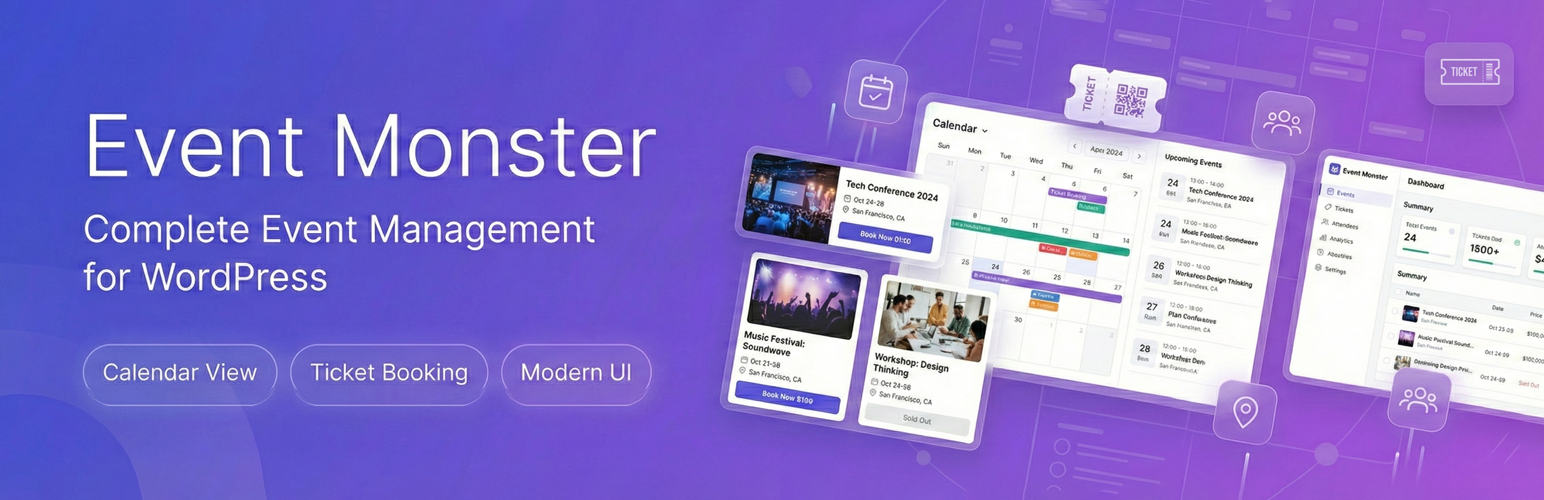
Event Monster is a complete event manager. It helps you handle ticket booking, event booking, and event registration. You can create and organize events on your WordPress site in minutes. The plugin is perfect for conferences, workshops, and meetups.
You get robust tools for schedules, registration forms, and calendar displays. The admin dashboard makes setup quick and simple. You can add dates, times, locations, and descriptions. It also lets you list speakers and sponsor logos.
Your visitors can browse events through an interactive calendar. They can also view a beautiful card listing. The list includes search and category filters for fast browsing.
Pro Demo Links
Check Pro Demo: Event Monster Premium More About Pro: Event Monster Premium Details Where To Buy: Buy Event Monster Premium
Easy Event Manager, Ticket Booking, and Event Booking Actions
- Quick Event Setup: Create unlimited events with all key details. Add schedules, speakers, sponsors, and photo galleries.
- Interactive Calendar: Show schedules in a clean calendar format. Visitors can switch between month, week, or list views.
- Form Registration: Allow visitors to register for events directly on your site.
- Attendee Tracking: Manage attendee sign-ups from your admin dashboard. Send confirmation emails automatically.
- Map Integration: Display locations on a map using OpenStreetMap. No API key setup is required.
- Countdown Timers: Add real-time timers to build excitement before an event starts.
Available Shortcodes
[EM id="123"]– Display a single event (replace 123 with event ID)[EM-LIST]– Show all events in a card layout[EM-CALENDAR]– Display the interactive event calendar[EM]– Legacy support (shows event list)
Free Event Booking and Event Registration Features
The free version includes everything you need to run basic events:
- Unlimited Events – Create as many events as you want
- Interactive Calendar – Month, week, day, and list views
- Event Registration – Accept free registrations on your site
- Attendee Management – Track registrations and attendee details
- Email Confirmations – Automatic emails when someone registers
- OpenStreetMap Integration – Show venue locations without an API key
- Countdown Timers – Display time remaining until events start
- Social Sharing – Let visitors share on social media
- Gallery Images – Add up to 3 images per listing
- Speakers – Add up to 1 speaker per event
- Sponsors – Display up to 3 sponsors per listing
- Schedule Items – Create up to 3 schedule entries
- Two Layout Styles – Default and Magazine templates
- Mobile Responsive – Works on phones, tablets, and desktops
- Organizer Profiles – Showcase organizers with contact info
Pro Version Features
Event Monster Pro removes all limits and adds advanced features:
- No Limits – Unlimited galleries, speakers, sponsors, and schedules
- Payment Processing – Accept payments through PayPal, Stripe, Razorpay, and Square
- Ticket Booking – Create different ticket types with varying prices
- Coupon Codes – Offer discounts with promotional codes
- Custom Layout Builder – Drag and drop elements to design your pages
- Email Templates – Customize confirmation emails with your branding
- SMTP Support – Reliable email delivery through your mail server
- Priority Support – Direct assistance from our team
Works For All Occasions
Event Monster adapts to whatever you organize:
- Conferences and seminars
- Workshops and training sessions
- Webinars and online meetings
- Concerts and performances
- Community gatherings
- Corporate meetings and functions
- Fundraisers and charity gatherings
- School and university functions
- Religious gatherings
- Sports tournaments and activities
Event Manager, Ticket Booking and Event Registration FAQ
How does this event manager display calendar views?
Add the shortcode [EM-CALENDAR] to any page. This shows your events in month, week, day, or list views.
How do I enable ticket booking for my events?
Ticket booking is easy. The free version supports free registrations. For paid tickets, you can upgrade to the Pro version.
Can I run event booking for free?
Yes, you can run event booking for free. The plugin includes a built-in event registration system.
How does visitors complete event registration?
Visitors complete event registration by filling out a form on the event page. You can view all registrations in your admin panel.
Does this event manager require a map API key?
No API key is needed. The map integration uses OpenStreetMap. It works immediately out of the box.
Can I customize the ticket booking forms?
The free version uses standard forms. For custom form fields, please upgrade to the Pro version.
Is there a limit on how many events I can create?
No. Both free and pro versions allow unlimited events.
Will this work with my theme?
Event Monster is built to work with any properly coded theme. The CSS is scoped to prevent style conflicts.
Can I create recurring events?
Currently, each event is created individually. For recurring schedules, you would create separate entries for each occurrence.
Does the plugin support multiple languages?
Yes. Event Monster is translation-ready. You can translate it using any standard translation plugin or add custom translation files.
Can I categorize my events?
Yes. You can create categories and assign entries to them. Visitors can then filter by category.
How do I customize the look of my listings?
The free version includes two layout templates. Event Monster Pro adds a drag-and-drop layout builder for complete customization.
Can I export my attendee list?
Yes. You can export attendee information from the admin dashboard for use in spreadsheets or other applications.
Is my data safe when updating the plugin?
Yes. Updates preserve all your events, settings, and attendee data. We always recommend backing up your site before major updates as a precaution.
Where can I get support?
Visit the support forum for free version questions. Pro users receive priority support through our helpdesk.
Can I import events from another plugin?
Currently, there is no automatic import feature. Events need to be created manually in Event Monster.
Does Event Monster work with WooCommerce?
Event Monster operates independently and does not require WooCommerce. Payment processing in the Pro version uses its own integrated gateways.
Can I add custom fields to the registration form?
The registration form includes standard fields. Custom field support is available in Event Monster Pro.
How do I set up ticket booking for paid events?
Ticket booking with payment processing is available in Event Monster Pro. The Pro version supports multiple ticket types with different prices and integrates with PayPal, Stripe, Razorpay, and Square.
Can I send reminder emails to registered attendees?
The free version sends automatic confirmation emails when someone registers. Event Monster Pro includes customizable email templates for sending event reminders and updates.
How does the countdown timer work?
The countdown timer automatically appears on detail pages, showing days, hours, minutes, and seconds until the event starts. It updates in real-time.
Can I add multiple speakers and sponsors to an event?
The free version allows up to 1 speaker and 3 sponsors per event. Event Monster Pro removes these limits, allowing unlimited speakers and sponsors.
Is there a way to check in attendees at the event?
QR-based check-in functionality is available in Event Monster Pro, allowing you to scan attendee tickets at the venue.
Can I embed the event calendar in a sidebar widget?
Yes, you can add the calendar shortcode to a text widget in your sidebar. The calendar is responsive and will adjust to the widget width.
How do I change the default calendar view?
You can set the default calendar view (month, week, day, or list) in the Event Monster settings panel.