
STAGGS – Product Configurator Toolkit
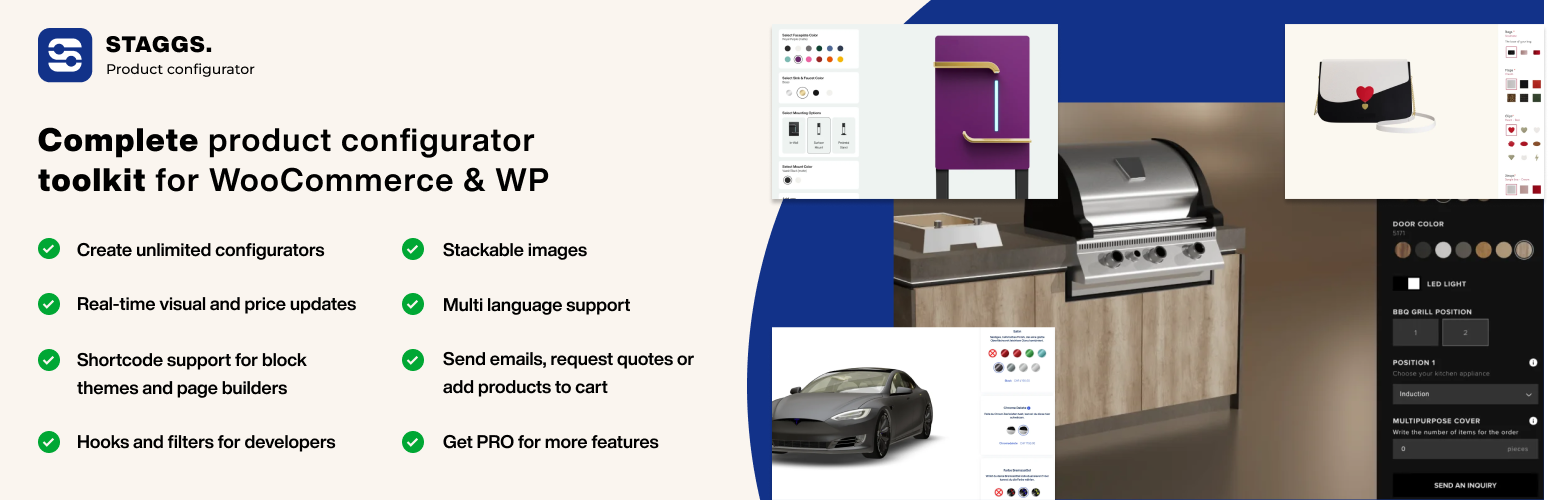
El Staggs – Product Configurator Toolkit tiene todo lo que necesitas para crear configuradores de productos asombrosos en WordPress y WooCommerce, ¡directamente desde tu escritorio de WordPress! Los configuradores visuales de los productos incluyen imágenes procesadas en 2D o 3D. La versión PRO te permite subir modelos 3D GLB y GLTF para una experiencia visual completa, incluyendo compatibilidad con AR.
El plugin de configuración de productos viene con unas asombrosas plantillas prediseñadas que puedes usar y personalizar para crear la tuya propia. Aplica el logotipo propio de tu marca, fuentes, colores e iconos para hacer un configurador totalmente personalizado para ti.
Getting started is really simple: create attributes, create a theme and build your configurable product.
👉 Interactive Guide: Get started using our guided tutorial
👉 Enlaces de la demo oficial gratuita: Prueba múltiples demos del configurador Staggs
👉 Aprende más sobre Staggs (PRO): Todas las características del configurador de productos Staggs
CONFIGURADOR DE PRODUCTOS PARA WOOCOMMERCE
Si tienes instalado WooCommerce, puedes crear cualquier configurador basándote en los productos simples de WooCommerce. Basta con marcar «Activar configurador de productos Staggs» para empezar a crear tu configurador usando atributos y temas.
Con WooCommerce instalado, puedes usar su sistema de pago para dirigir al cliente directamente al pago cuando finalice su compra.
Read more about product configurators for WooCommerce
CONFIGURADOR DE PRODUCTOS PARA WORDPRESS
You can use the Staggs product configurator in WordPress too! WooCommerce is not required. In WordPress, you can build any configurator you like.
We have created our own build-in product type for WordPress that you can use to create product configurators.
Learn how you can build a product configurator in WordPress
Note: there is no checkout system, so you can only create product configurators on a request quote basis using forms. You can also let customers directly send emails with the configured values.
CUSTOM PRODUCT FIELDS FOR WOOCOMMERCE
With STAGGS you don’t have to create full-fledged product configurators. You can also extend your simple products with custom product fields.
Learn more about Product add-ons for WooCommerce by Staggs
PLUGIN FEATURES
The STAGGS Product Configurator Toolkit is packed with a lot of features:
- Stackable images: stack images on top of each other so you don’t have to create all possible variation product images yourselves
- Multiple product views: display your product from multiple angles
- Real-time price calculation: Charge additional costs for attribute options
- Collapsible attributes: Reduce configurator space by making your configurator attributes collapsible
- Configurator builder: easily create configurable products with attributes using our product configurator builder
- Customizer: make the product configurator truly blend in with the webshop. Customize the configurator template, colors, fonts, icons and apply custom CSS
- Shortcodes: Output your Staggs configurator anywhere on the product page you like
- Request quotes: link the configurator to a form (support for GravityForms, Contact Form 7, WP Forms, Ninja Forms and Fluent Forms)
- Contact via email: Directly open email client with selected configuration for inquiries
- Partial payments: Only charge a part of your total configuration costs at checkout
- Multi-language support: Translate your Staggs attributes into multiple languages
- Analytics: Track your most popular product configurations in the Staggs Analytics module
5+ ATTRIBUTE TYPES
The configurator supports various types of attributes, including labels, user inputs, colors, fonts, links and even linked products.
10+ CUSTOM ATTRIBUTE FIELD TYPES
The different attribute types can be paired with a display template to control how the options or inputs appear in the configurator form:
- Dropdown
- Option list
- Cards
- Image swatches
- Color swatches
- True/False
- Checkboxes
- Button group
- Text inputs
- Fecha de entrada
- Number inputs
- Actualizar imagen (PRO)
- Productos relacionados (PRO)
PRO FEATURES
Nuestras características PRO incluyen:
- Conditional logic: Add conditional logic to your configurator attributes
- Inventory management: manage your inventory for individual attribute items
- Linked products: allow users to link WooCommerce products to your attribute options
- Configurador con múltiples pasos: Separa el formulario de tu configurador en varios pasos
- Advanced price calculations: Perform advanced price calculations based on formula’s and table prices
- Enlaces para compartir: Comparte la configuración activa como un enlace
- Descargas PDF: descarga la configuración activa en PDF
- Plantillas adicionales: Mensaje emergente horizontal y plantilla de pasos
- Image uploads: permite a los usuarios subir imágenes y usar la vista previa en la imagen del producto
- Extensión de productos relacionados: permite a los usuarios añadir productos de WooCommerce a su producto configurable
- Build 3D configurators: Use 3D product models in the product configurator (GLB and glTF)
- Change texture, color and variant of the 3D model
- Show/hide particular 3D model parts
- Update 3D camera zoom on option update
- Play 3D model animations
- Apply text or images
- Compatibilidad con vista AR
- Herramienta de importar/exportar: Importa y exporta fácilmente atributos de productos y edita datos de atributos en una hoja de edición para una gestión adecuada
PRE-BUILT CONFIGURATOR TEMPLATES
The configurator plugin comes with four pre-built configurator templates for free
CUSTOM BLOCK FOR BLOCK THEMES
The STAGGS configurator plugin comes with its own Gutenberg Block to add product configurator to your page. You will find the block in the Media category.
Simply add the block to the page, select your configurable product and update the page. Now the configurator should be displayed.
SHORTCODE SUPPORT FOR PAGE BUILDERS
If you are using a page builder, you can use the following shortcodes to output the configurator on product pages:
[staggs_configurator]to display complete configurator code;[staggs_configurator_popup_button]to display the popup trigger button (the popup is not visible by default).
También puedes elegir el «diseño» de tu propia plantilla, usando cada uno de los siguientes extractos de código:
[staggs_configurator_gallery]to display configurator image gallery;[staggs_configurator_form]to display the form containing all option groups and values;[staggs_configurator_totals]to display the add to cart or request invoice button;
Learn how to display the product configurator in page builders
Nota: además, puedes usar shortcodes en entradas y páginas normales, pero tienes que pasar el identificador de producto como un parámetro al shortcode, tal que así: [staggs_configurator product_id="POST_ID"]
You can find the POST_ID in your URL: post.php?post=[POST_ID]
3-STEP SETUP
Getting started with the Staggs product configurator is simple and straight forward:
- Create your configuration attributes;
- Build your configuration using the created attributes on the product page;
- Change the configurator design by adding a template.
RESPONSIVE DESIGN
The Staggs product configurator templates are fully responsive and are embedded directly onto the page.
You can build your configurator right from your WordPress dashboard and the configurator loads directly on the page. No need for embedded iframes.
IMPROVED PRODUCT VISUALIZATION
El configurador de productos Staggs puede ayudarte a visualizar los cambios del producto de diversas formas. Puedes añadir imágenes regulares que se apilan unas contra otras, mostrar la imagen desde diferentes ángulos utilizando las imágenes de la galería, usar imágenes 3D renderizadas de un producto o maximizar las visualizaciones creando un configurador en 3D con soporte de AR.
STACKABLE IMAGES
Ahorra innumerables horas creando y subiendo imágenes para todas las variaciones de tus productos. Simplemente utiliza nuestra vista previa de imágenes en capas que apila todas las imágenes unas encima de otras. Ahora tienes el control sobre dónde debe situarse cada imagen: siempre arriba, abajo o quizás en una cuarta capa. ¡Controlas totalmente cómo se va a ver la vista previa de tu producto!
SUPPORT FOR 3D CONFIGURATORS & AR MODE
The Staggs product configurator comes with a lot of different visualization options. One of the PRO features is the support for 3D models and AR views.
If you are looking for ways to take your product visualizations to the next level, you can create a 3D product configurator in WooCommerce with Staggs!
WORKS WELL WITH OTHER PLUGINS
We have added support for various other WordPress plugins, and we will keep expanding the list. Plugins we support at the moment of writing:
- Advanced Custom Fields PRO: Mejora tu panel de administración de Staggs con los campos de ACF PRO
- Contact Form 7, Gravity Forms, WP Forms, Ninja Forms y Fluent Forms: Enlaza el configurador a un formulario para pedir presupuesto
- Yoast Duplicate Post: Duplica atributos para acelerar tu proceso de construcción del configurador
- WPML y Polylang: Traduce los atributos del configurador
- Deposit & Pagos parciales: Carga una parte del importe del coste total de la configuración al finalizar el pago
- TablePress: gestiona tablas de precios para los atributos (versión PRO)
Find complete list on our website.
BUILT-IN ANALYTICS MODULE
La mejor forma de comenzar a conocer a tus clientes es descubrir qué es lo que les gusta. El configurador de productos Staggs viene con un módulo de estadísticas incorporado que recopila todos los pedidos de productos configurables en WooCommerce, para que conozca mejor a sus clientes. Nota: esta característica no está disponible para una instalación solamente en WordPress.
A RELIABLE GROWING PLATFORM
Hemos programado actualizaciones mensuales para asegurar que el plugin se mantiene al día con los últimos desarrollos llevados a cabo en el entorno de WordPress. Puedes saber más sobre las últimas actualizaciones en nuestra sitio web.
We are also open to feature requests; so if you have ideas in mind, feel free to reach out!
Getting Started
Building a product configurator with Staggs is relatively simple:
- Crea atributos con el configurador Staggs
- Go to the ‘Staggs’ tab in the admin menu
- Open the «Attributes» page and create configurator attributes
- Build your configurable product with the attributes
- For WordPress, go to ‘Staggs’ > Products and create new product
- For WooCommerce, go to ‘Products’ and add new WooCommerce Simple product. Also tick the box «Enable Staggs product configurator»
- Crea un tema para el configurador y personaliza sus ajustes para completar el conjunto
- Go to Staggs > Templates and create new template
- Go to your configuratable product and select template in the configurator builder
- Publish the product and enjoy!