Animations AnimateGL pour WordPress – Animations pour les blocs Elementor et Gutenberg

Demo | Documentation | Support
Add CSS and WebGL animations easily to any element on the website with AnimateGL plugin.
Add CSS and WebGL animations in Elementor, Block editor or any other builder. Customize direction, duration, delay and easing for each animation. Choose simple CSS animations like fade, slide, zoom and wipe or creative WebGL animations like bend, flip, stretch or directional fade. Create custom entrance animation with visual editor. AnimateGL is lightweight, fast, and easy to use, making it the perfect choice for web designers looking to enhance their website’s visual appeal.
Fonctionnalités
- Add Entrance animation to any element or block
- CSS Entrance animations Fade, Zoom In, Zoom out, Wipe, Slide Reveal
- WebGL Entrance animations Bend, Flip, Peel, Wipe, Zoom, Directional Fade
- Fully customizable animation direction, duration, delay, easing
- Animations de blocs Gutenberg
- Animations Elementor
- Animations par classes CSS
- Nested animations
- Verrouiller sur la barre de défilement
- Repeat or play once on first enter the viewport
- Live editor for creating custom animation
- Animations prédéfinies
- Scroll triggered Entrance animations
- Facile à utiliser
- Léger
- Great performance
Animations CSS
CSS entrance animations are GPU accelerated and animate CSS properties opacity, transform and clip path in different combinations. CSS animations can be added to any element or block. Available CSS animations are Fade, Zoom In, Zoom Out, Wipe and Slide with settings for direction, distance, duration, delay and easing. With combination of fade, zoom, direction, easing and delay you can create unlimited number of creative elegant animations. More CSS animations coming soon.
CSS Entrance animations:
- Fondu
- Zoom avant
- Zoom arrière
- Balayage
- Glissement
Animations WebGL
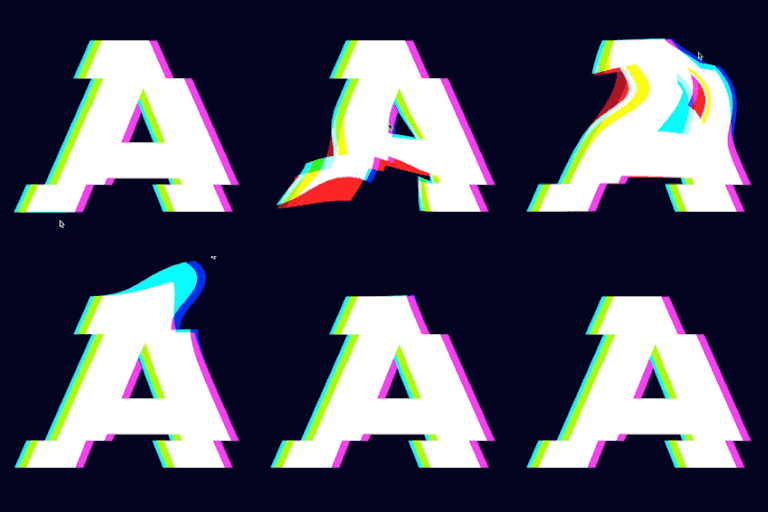
WebGL animations convert any element to image with html2canvas.js, then apply effects to image with custom GLSL shaders. Best use is for simple elements like heading, button or image. With WebGL we can create effects that are not possible with CSS, like 3D distortions or gradient fade, and add those effects to any element on the page.
WebGL Entrance animations:
- Fondu
- Glissement
- Étirement
- Courbure
- Retournement
- Zoom
- Décollement
Léger
Only 35kb for CSS animations, additional 45kb if WebGL animations are used.
Animations Elementor
Add Entrance animation to any element in Elementor. Select animation type, direction, distance, delay, duration and easing in the Element Advanced tab.
Animations de blocs Gutenberg
Add Entrance animation to any Gutenberg block. Select animation type, direction, distance, delay, duration and easing in the block inspector controls.
Entrance Animations via CSS class
If you don’t use Elementor or Gutenberg blocks, you can still use AnimateGL via CSS classes. Add one of preset entrance animations or custom entrance animation to any element on the page by adding the animation CSS class.
More animations available with Entrance pack:
- Cercle (CSS)
- Carré (CSS)
- Ligne (CSS)
Customize direction, duration, easing and delay for each animations
Customize animation properties via CSS class:
- Fondu – avec des réglages de fondu directionnel et de seuil
- Translation – avec des réglages pour les axes x, y et z
- Rotation – avec des réglages pour les axes x, y et z
- Corners Distortion – for added animation variety
- Duration – customize the length of the animation
- Délai – ajuster le déclenchement de l’animation
- Easing – customize the speed and flow of the animation
Répéter
By default, entrance animation will play when element enters the viewport for the first time. With option repeat enabled, the animation will play each time element enters the viewport.
Verrouiller sur la barre de défilement
Instead of fixed duration entrance animation, we can make the animation progress depend on the scroll position of the element. If the element is below the viewport, the animation progress will be 0. As we scroll the page down, and element is moving towards the middle of the viewport, the animation progresses. The end of animation is when element reches the middle of the viewport. Lock to scrollbar option can be enabled for any animation.
Mouse Effects
AnimateGL also offers mouse-driven distortion effects, including:
- Pull – with options for strength, size, RGB shift, and ease
Animations déclenchées par le défilement
Entrance animation is played when when the element enters the viewport, when it becomes visible on the screen.
Viewport entrance threshold
By default, entrance animation start to play when 70% or 200px of the element enters the viewport.
Éditeur en direct
Use live editor to create your custom entrance animation.
Enhance the visual appeal of your website with AnimateGL, the most powerful and advanced WebGL animation plugin for WordPress. With its lightweight 33kb gzipped size and no dependencies, AnimateGL is fast, easy to use, and the perfect choice for web designers looking to add unique animations to their website.
Use with any page builder
AnimateGL can be used with any page buidler: Elementor and Gutenberg blocks editor, Visual composer and others, because animations can be added simply by adding a CSS class. Add unique animations in Elementor, Visual Composer or Guteberg blocks editor with AnimateGL.
Help us improve
If you have any problem or feature request for this plugin, please feel free to open a ticket!