
ACF Beautiful Flexible
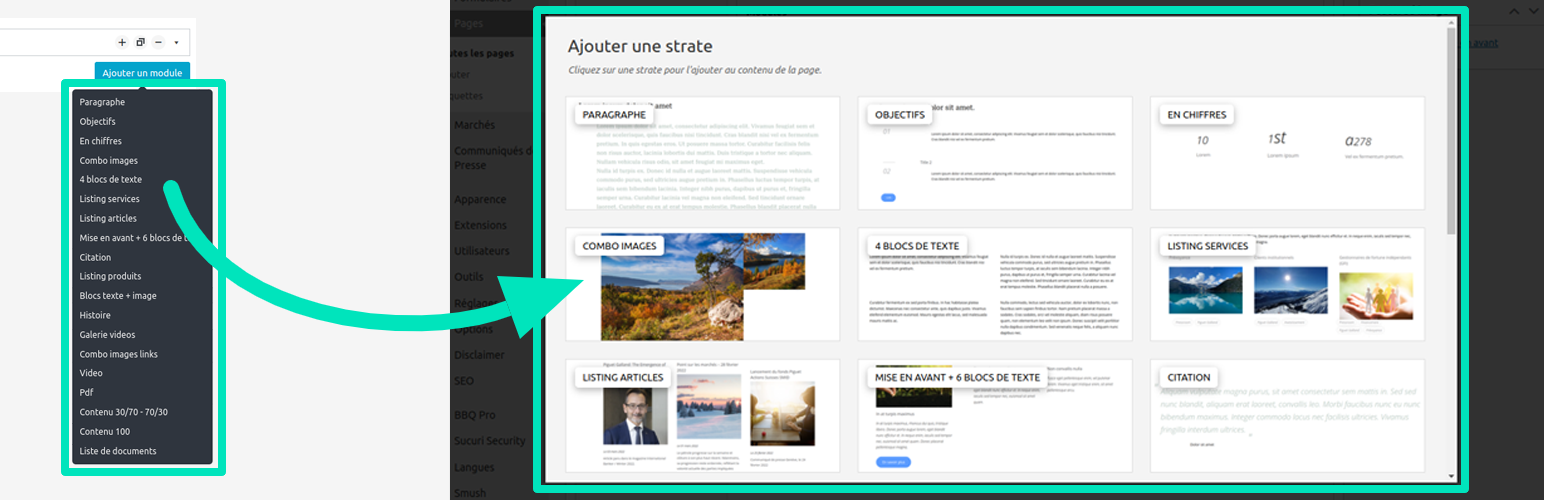
To use ACF Beautiful Flexible, simply activate the plugin to improve the ACF flexible UI. By default, it uses random images, but the idea is to customize them by adding your own.
Image convention
- The size of image should be 366×150 or bigger 732×300.
- They should be named based on the flexible key (
push_2_light) with no underscores but dashes (push-2-light.[extension]). - The following extensions will be resolved in that order:
.jpg,.jpeg,.pngand.gif.
Where images should be situated
They should more likely be situated into your theme wp-content\themes\my-theme\assets\acf-beautiful-flexible\. But if you have a child-theme and added images into it, these will overwrite those from parent-theme.
The following directories will be solved according to order: plugin's folder, child theme's folder, theme's folder.
Also note that you can filter this path to gather all your images into a same folder : add_filter( 'acf_beautiful_flexible.images_path', $path );
Finally, you could filter all images like this : add_filter( 'acf_beautiful_flexible.images', $images );
About ACF Beautiful Flexible
I, Maxime Culea, have created this plugin which I only maintain. I do not guarantee some free support. Also, thank others listed in the credits.
Consider reporting an issue and be patient. Any code suggestions? I am on GitHub as well!