
Server Side Tracking via GTM for Google Analytics 4, Meta Conversions API & Google Ads
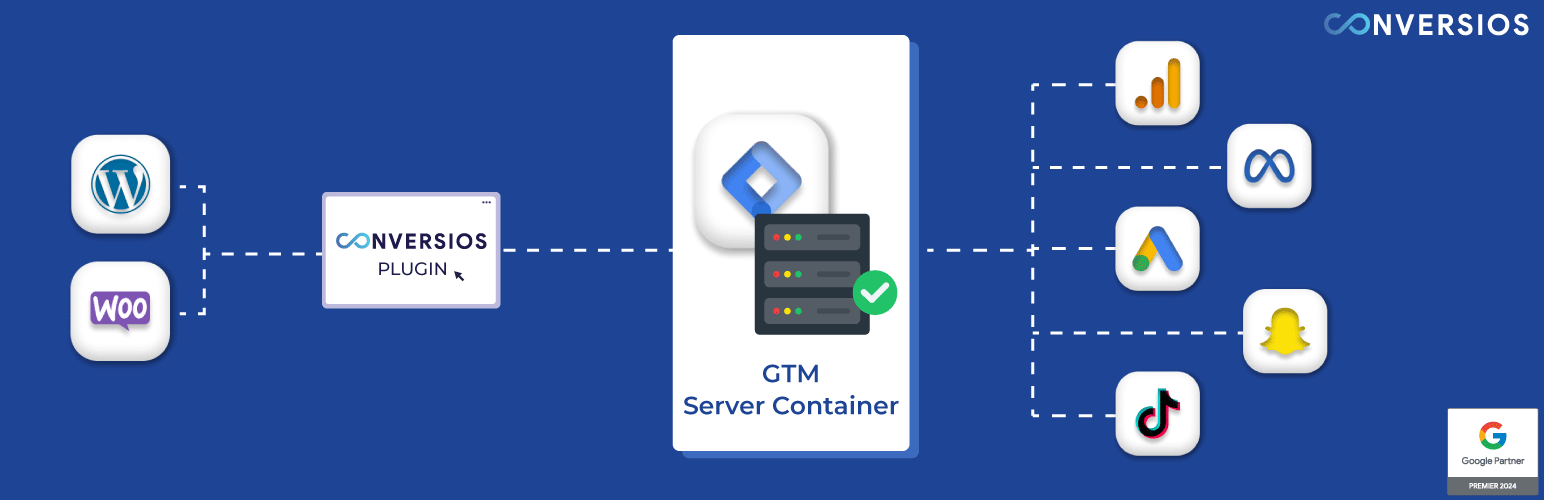
Fix missing WooCommerce conversions & improve tracking accuracy with server-side tracking
Modern browsers, privacy restrictions, and ad blockers frequently cause missing purchase conversions. This often leads to inaccurate GA4 reports, unstable ROAS, and GA4 vs WooCommerce discrepancies.
This plugin uses server-side tracking via Google Tag Manager to reduce data loss and improve conversion reporting consistency across GA4, Meta Conversions API, and Google Ads (Pro), without requiring custom code.
Conversios also offers a Pro feature that enables WooCommerce products to be discovered and purchased within Google Gemini, with purchases tracked accurately using server-side tracking (requires Google Merchant Center approval).
In a published WooCommerce case study, a global paint brand improved conversion tracking after implementing Conversios server-side tracking with GTM. Within weeks, they reported a 90% increase in Meta Ads conversions and a 50% uplift in Google Ads conversions, along with reduced GA4 vs WooCommerce reporting gaps. See the case study: Global paint brand sees 90% lift in Meta Ads with Conversios Reviews
"All-in-One solution with exceptional support. Integration is seamless and the team is responsive." @tizianokappa (Read full review)
What Problem We Solve
Server-side tracking is powerful, but the setup is often complicated and error-prone. Store owners typically need to create a GTM Server Container, configure Google Cloud hosting, manually build tags, and implement reliable WooCommerce dataLayer events.
This plugin removes that complexity. It provides an automated setup that includes GTM configuration, a Google Cloud server for server-side GTM, and pre-configured WooCommerce dataLayer events.
You can complete the setup with no custom coding in about 15 minutes and start sending reliable Purchase and Checkout conversion data to GA4, Meta Conversions API, and Google Ads (Pro), and other supported ad platforms.
In some cases, orders are completed successfully but never reported to analytics or ad platforms because the customer does not return to the WooCommerce order confirmation page(thank-you page) after payment.
Conversios (Pro) includes an Order Recovery Engine that automatically detects such missed orders and sends the conversions to GA4, Google Ads, and Meta using server-side APIs to maintain accurate reporting.
Features We Provided
1. Supported Platforms & Server-Side Setup
Improve conversion accuracy and send reliable ecommerce data to analytics and multiple advertising platforms from a single setup:
- Google Analytics 4 (GA4)
- Google Ads (Pro)
- Meta Ads via Conversions API
- TikTok Ads
- Snapchat Ads
The plugin includes an automated server-side setup using Google Tag Manager and a Google Cloud server provided as part of the configuration. This removes the need to create or manage server infrastructure manually.
2. First Party Cookie Implementations
Enables first-party cookie tracking to help reduce conversion loss caused by third-party cookie restrictions on Safari and iOS browsers.
3. Reporting & Insights
Store owners often need to compare conversions across GA4, ad platforms, and WooCommerce, which can make reporting slow and confusing. Conversios brings key reports into one place so you can review performance and validate tracking faster.
View and analyze your tracking data through platform-specific reports:
- GA4 basic reporting for events and conversions
- GA4 Ecommerce funnel reporting
- Google Ads conversion reporting (Pro)
- Meta Ads conversion reporting
These reports help validate tracking, monitor conversion performance, and compare platform data with WooCommerce orders.
Premium Features
Upgrade for higher tracking capacity and advanced setup assistance. See pricing
- Higher server-hit limits for high-traffic WooCommerce stores
- Assistance with server-side GTM and conversion API configuration
- Priority support (email and WhatsApp)
- Help with Consent Mode v2 and custom add to cart tracking when required
- Enhanced Conversions support for Google Ads (Pro)
-
Order Recovery Engine (Pro): Automatically detects WooCommerce orders that were completed but not tracked and sends the missing purchase conversions to GA4, Google Ads, and Meta. This helps keep your ad reports accurate and prevents lost conversion data.
-
Universal Commerce Protocol (UCP) Pro Plan
- Helps your WooCommerce products get discovered in supported AI shopping experiences (such as Google Gemini).
- Conversios connects your WooCommerce product catalog with Google Merchant Center and tracks purchases that originate from these AI shopping experiences using server-side tracking.
- Customers can discover and complete purchases directly within Google Gemini, while Conversios ensures those conversions are accurately recorded in GA4 and ad platforms. This results in better product visibility and prevents missing purchase conversion data. Requires Google Merchant Center approval.
Supported Payment Methods
Purchase conversion tracking works with common WooCommerce payment gateways, including:
- Stripe
- PayPal
- WooCommerce Payments
- Authorize.Net
- Razorpay
Important: Purchase tracking works when the payment flow redirects customers to the WooCommerce Order Received / Thank You page.
Any payment gateway that returns users to this page after successful payment will be tracked correctly.
Supported WooCommerce Events
Conversios tracks the complete WooCommerce shopping journey using standard ecommerce events:
Store and product browsing – page_view (page visit) – view_item_list (category / product list) – select_item (product clicked) – view_item (product page)
Cart actions – add_to_cart (add to cart) – remove_from_cart (remove from cart) – view_cart (cart page)
Checkout steps – begin_checkout (checkout started) – add_shipping_info (shipping selected) – add_payment_info (payment selected)
Purchase – purchase (order completed)
Add to Cart works out of the box for standard WooCommerce themes. Stores using drawer carts, AJAX carts, or custom flows may require customization. Get help with us at info@conversios.io
Consent Mode v2 Support
- Consent Mode v2 (works with your CMP): Conversios does not provide a consent banner. Tracking behavior is controlled based on your existing CMP settings. For Consent Mode setup and configuration assistance, contact our support team at info@conversios.io.
Best Fit for Which Stores
-Woocommerce DTC brand and stores running paid ads and needing more consistent purchase conversion reporting in GA4 and ad platforms – WooCommerce stores selling physical or digital products where purchase conversions drive ROAS decisions – High-traffic WooCommerce stores requiring server-side tracking capacity beyond browser-only limitations.
Setup in Minutes & Faster Time to Value
Get started in about 15 minutes with a no-code setup. Because Conversios combines multi-platform tracking and reporting in one plugin, there is no need to install or manage multiple separate plugins.
Support
Need help with setup, event validation, custom cart/checkout, payment gateways, or Consent Mode? Email info@conversios.io or chat with us on WhatsApp.
You can also use our free tool to quickly check if tracking is working or not on your site and overall website tracking score: Website Tracking Checker Tool
Troubleshooting guide for validating server-side GTM: How to validate server-side GTM
Privacy Policy
You can view our detailed privacy policy here.
Third-Party Services
Google APIs – authentication and data exchange. Terms | Privacy
Google Tag Manager – tag management. Terms | Privacy
Google Analytics – traffic and event reporting. Terms | Privacy
Tatvic API – supplementary plugin functionality. Privacy