Build your own live streaming platform with WordPress. Broadcast Live Video powers turnkey live streaming sites with multiple channel types, web-based broadcasting, chat, monetization, and full content ownership — no third-party platforms required.
Broadcast from any source: browser webcams via WebRTC, desktop encoders like OBS, mobile apps like Larix Broadcaster, and 24/7 RTSP/RTMP IP cameras.
Broadcast Live Video – Turnkey Streaming Site Solution
What’s New in 7.x
- WebRTC Streaming App — Modern React-based broadcast and playback interface (Webcam-Streaming-WebRTC) with configurable stream quality, watermark overlay, and automatic view routing (broadcast for owners, playback for viewers)
- Visual Schedule Editor — Program 24/7 channels with a visual schedule builder: daily, weekly, or one-time programs with live stream, video file, and video folder sources with priority ordering and filler content
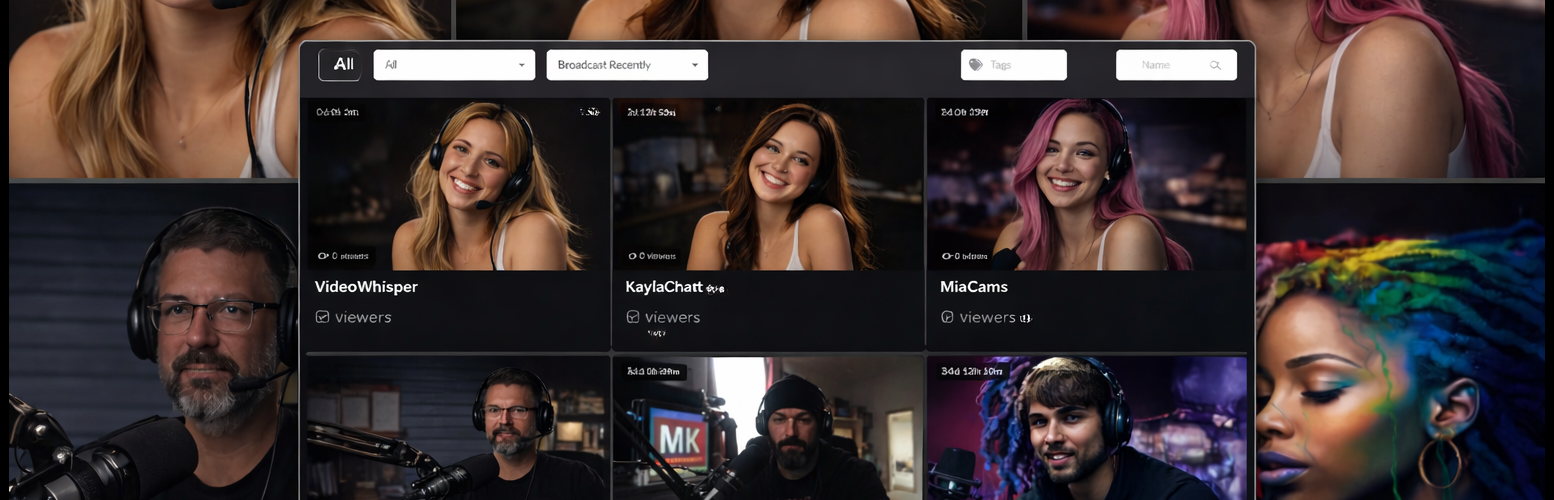
- Channel Listing Skins — Choose from ready-made listing designs (Twitchy dark theme, Ticky vertical cards) or fully customize with template placeholders and CSS
- Improved Channel Management — Card-based grid layout with visual status labels, collapsible menus, breadcrumb navigation, and smart interface-aware controls
- VideoWhisper Server Integration — Deep integration with VideoWhisper WebRTC Server for RTMP/HLS restreaming, schedule processing, and WebRTC signaling
- Enhanced Restreaming — Frontend restream channel creation (including guest access), stream pause/resume, admin dashboard with server status, capacity monitoring, and per-stream controls
Get Started
- Free account for testing: Free Streaming account with WebRTC & RTMP/HLS
- Self-hosted: Deploy VideoWhisper WebRTC Server on your own VPS for full control
Live Demos
- Turnkey site: VideoNow.Live
- Webcam WebRTC broadcast: [Webcam WebRTC Demo]https://demo.videowhisper.com/Webcam-Streaming-WebRTC/
- HTML5 Videochat broadcast: HTML5 Videochat Demo
Key Features
Broadcasting & Playback
- WebRTC broadcast and playback via React app with configurable quality (resolution, framerate, bitrate caps)
- HTML5 HLS / MPEG-DASH live video delivery with automatic protocol selection
- External encoder support: OBS, Wirecast, XSplit, Larix Broadcaster (iOS/Android)
- 24/7 IP camera restreaming (RTSP, RTMP, RTMPS, HTTP/HTTPS sources) with Setup Wizard
- Recording per channel
- Video archive import with Video Share VOD
Channel Management
- Live video channels as WordPress custom post type
- Frontend channel setup and management with card-based grid layout
- Visual status labels: Live, Schedule, IP Camera, WebRTC, Recording, Paused, Restricted
- Context-aware menus adapting to channel interface type (WebRTC App, Restream, HTML5 Videochat, DASH)
- Breadcrumb navigation for intuitive channel management
Scheduling & Automation
- Visual schedule editor with daily, weekly, and one-time programming
- Multiple source types per program: live stream, video file, video folder (with play order and loop options)
- Source priority system with drag-and-drop reordering
- Default filler content when no program is scheduled
- Live/fallback behavior settings per program
- Timezone support with live clock display
Channel Listings
- Template-based listings with customizable placeholders (#title#, #thumb#, #viewers#, #tags#, #rating#)
- Ready-made listing skins: Twitchy (Twitch-inspired dark theme), Ticky (TikTok-inspired vertical cards)
- AJAX live updates with category filtering, tags, and search
- Offline video thumbnails and teaser support
Monetization
- Membership-ready with WordPress role permissions — works with any membership/subscription plugin
- Pay-per-view with custom post type — compatible with access control and content selling plugins
- Tips to broadcasters with myCRED or TeraWallet (WooCommerce gateways)
- Channel access lists: restrict by user role, login, email, or password
- Recommended: Paid Membership for credit-based membership purchases
Restreaming & IP Cameras
- Admin restream dashboard with server status, capacity monitoring, and per-stream controls
- Frontend restream channel creation with guest access support
- Stream pause/resume, mute audio, auto-cleanup for guest channels
- Private network detection with confirmation for local sources
- Push channel configuration to VideoWhisper server
Chat & Interaction
- AJAX chat alongside live video playback
- Floating watermark/logo overlay
- Event details display (title, schedule, description) when channel is offline
- Integrates Rate Star Review for channel ratings
Access Control & Administration
- Fine-grained permissions by role, email, ID, or username
- Broadcast and watch time limits per channel and per membership level
- Premium channels with unlimited membership levels
- Channel statistics: broadcast time, watch time, last activity, viewer counts
- BuddyPress integration: Live Stream tab in groups
Who Is This For?
Build platforms similar to Twitch, YouTube Live, Kick, or LiveStream — a self-hosted alternative where you own the content, control access, and keep 100% of revenue. Perfect for:
- Media companies — launch branded streaming channels
- Educators — deliver live classes, webinars, and scheduled course content
- Churches & organizations — stream events and services 24/7
- Surveillance — monitor IP cameras with web-based access control
- Creators & entertainers — monetize live content with tips, pay-per-view, and memberships
Hosting Requirements
- This plugin requires streaming server infrastructure beyond standard WordPress hosting
- For testing, register for a Free Streaming account with WebRTC & RTMP/HLS
- Self-hosted: deploy VideoWhisper WebRTC Server on a VPS or dedicated server
- Some advanced features (FFmpeg transcoding, server commands) require additional server configuration — disabled by default for security
External Services
This plugin can optionally connect to VideoWhisper Remote Connect when an administrator clicks Connect in the VideoWhisper account settings. The default service URL is https://consult.videowhisper.com.
Remote Connect is a free registration-based onboarding service for testing and low-friction setup. It can register or log in a VideoWhisper contact, create/select a free streaming server account, import WebRTC/RTMP/HLS/DASH configuration, and push this site’s stream, notify, Webcam App login, and restream URLs so the plugin can be tested without manual server configuration.
Data sent to the service can include the plugin identifier, WordPress site URL/domain, administrator-entered contact name/email, registration form answers, confirmation PINs, selected account token, and generated stream/notification/login/restream URLs needed for automated configuration.
Using Remote Connect is optional. Administrators can instead enter compatible streaming server settings manually or configure a separate compatible CRM/streaming service URL.
Terms of Use: https://consult.videowhisper.com/terms-of-use/ Privacy Policy: https://consult.videowhisper.com/privacy-policy/
Attributions
Some demo site screenshots show tests with the “Big Buck Bunny” video, available under Creative Commons Attribution at https://peach.blender.org/download/ .
Dokumentasi
- Plugin Homepage: https://broadcastlivevideo.com
- Developer Contact: https://consult.videowhisper.com
- VideoWhisper Server: https://github.com/videowhisper/videowhisper-webrtc
- WebRTC Streaming App: https://github.com/videowhisper/Webcam-Streaming-WebRTC
Contoh
- Live demo site: https://videonow.live
Extra
More information, latest updates, other plugins and non-WordPress editions at https://videowhisper.com/ .