
Admin and Site Enhancements (ASE)
·
重複投稿、投稿順序の編集、画像のリサイズ、SMTP 経由でのメール送信、管理メニューエディター、カスタム CSS / コード、Gutenberg の無効化など、多くの機能を単一のプラグインで実現できます。
評価機能
バージョン
9.0.0
有効インストール数
200K
最終更新日時
Aug 9, 2026
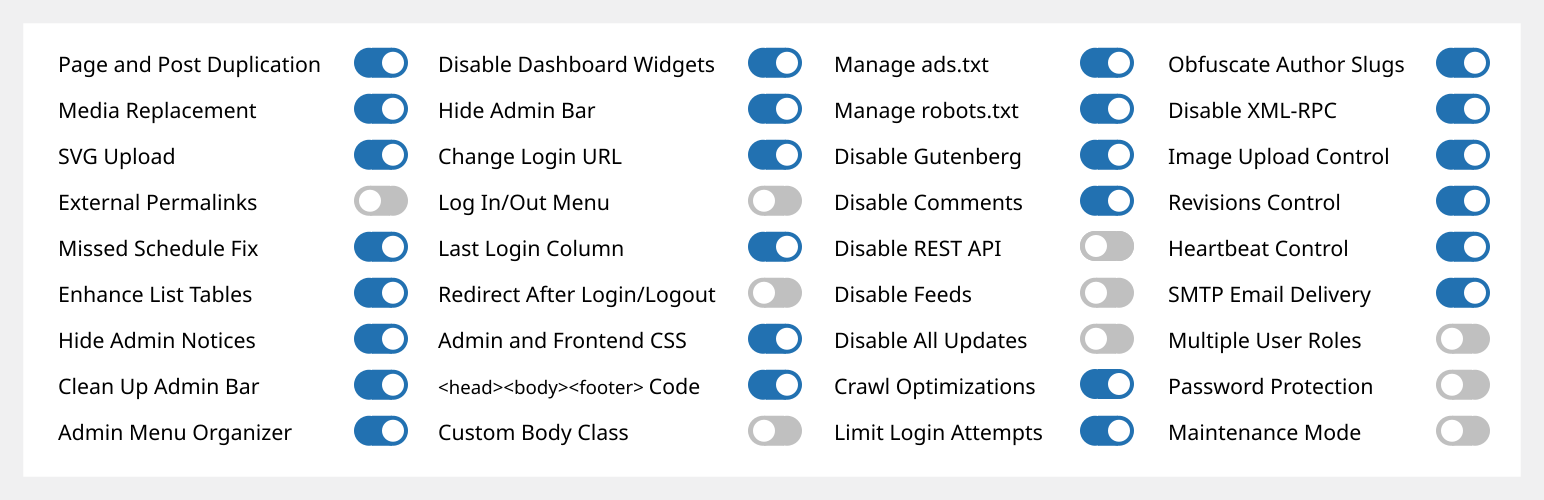
管理機能とサイト強化 (ASE) は、複数のプラグインを置き換えながら、様々な管理ワークフローやサイトの側面を簡単に強化するのに役立ちます。
Pro 版のライフタイムディール (LTD) は、www.wpase.com でご利用いただけます。
Jakson による ASE Free の v7.1.5 の簡単な操作ガイドです。
Pascal Claro による ASE Free v7.0.3 の詳細な操作ガイドです。
ユーザーの声
「ASE は、すべてのサイトプロジェクトにインストールする数個以上のプラグインを簡単に置き換えます。超軽量で使いやすいです。」~NetzzJD
「生涯ライセンスを購入して、その品質に圧倒されました。無料版でも他のプラグインの多くを置き換えられるし、本当に大好きです !」~Jacob Wonder
「ASE は素晴らしいプラグインです! 時間とお金の節約。ありがとうございます !」~Iulian Baciu
機能 & モジュール
76 modules in total: 59 free modules (32 has Pro features) | 18 Pro modules
コンテンツ管理
- [ASE Pro] Custom Content Types. Register custom post types (CPT), custom taxonomies, custom field groups and options pages that integrates with Bricks, Breakdance, Oxygen and Elementor, and compatible with various block themes and plugins. Also integrates with WPML and works with TranslatePress to create multilingual sites. An alternative for ACF Pro, Meta Box, Toolset, Pods, JetEngine or ACPT.
- [ASE Pro] Post Type Switcher. Switch the post type of one or more posts to a different post type.
- Content Duplication. Duplicate pages, posts and public CPTs. ASE Pro enables duplication only for certain user roles and certain public and non-public post types, and adds location option for duplication links.
- Content Order. Drag-and-drop custom ordering of hierarchical post types. ASE Pro enables ordering of non-hierarchical post types, including media / attachments, reordering and changing the parent of child posts is supported, as well as applying the custom order on the frontend. Also WPML compatible.
- [ASE Pro] Terms Order. Drag-and-drop custom ordering of terms and child terms from various taxonomies and apply the custom order on the frontend. WPML compatible.
- Media Files Visibility Control: Limit media files visibility so only administrators can see all media files. Non-administrator users will only see media files they uploaded themselves. ASE Pro adds an option to specify which non-administrator user roles will have such limitation.
- [ASE Pro] Media Categories. Hierarchical categories for the media library with drag-and-drop categorization. Compatible with WPML.
- Media Replacement. Replace any type of media file with a new one while ensuring no existing links will break. ASE Pro allows replacing media from the grid view of media library.
- SVG Upload. Allow some or all user roles to upload SVG files with sanitization to keep things secure.
- AVIF アップロード。メディア ライブラリで AVIF ファイルのアップロードを有効にします。
- [ASE Pro] Public Preview for Drafts. Public preview for draft and scheduled posts from some or all public post types.
- External Permalinks. Enable pages, posts and/or custom post types to have permalinks pointing to external URLs. ASE Pro allows enabling only on / except on certain post types, or on all post types.
- Open All External Links in New Tab. Force all links to external sites to open in new browser tab. ASE Pro allows excluding links with certain domains / subdomains from opening in a new tab and from getting the rel=”nofollow” attribute.
- Allow Custom Navigation Menu Items to Open in New Tab. Allow custom navigation menu items to have links that open in a new browser tab.
- Auto-Publish Posts with Missed Schedule. Trigger publishing of scheduled posts marked with “missed schedule”, anytime the site is visited.
管理者インターフェース
- 管理バーのクリーンアップ。管理バーから様々なデフォルト要素を削除します。ASE Pro は、他のプラグインの管理バー項目を削除することを可能にします。
- [ASE Pro] Admin Bar Custom Elements. Add custom menu and submenu items to the admin bar.
- Hide Admin Notices. Move notices into a dedicated panel accessible via the admin bar. ASE Pro enables completely hiding notices for non-admins.
- Disable Dashboard Widgets. Completely disable some or all widgets.
- Hide Admin Bar. Frontend hiding for all or some user roles. ASE Pro allows hiding on the backend and make frontend admin bar toggleable.
- [ASE Pro] Admin Logo. Show custom logo in the admin bar or the (top of) admin menu.
- Wider Admin Menu. Up to 300px wide.
- Admin Menu Editor / Organizer. Customize order for the admin menu. Change menu item title or hide some items. ASE Pro allows always hiding menu items for some or all user roles, adding custom menu and submenu items, reordering submenu items and always allowing eligible users to view and access a menu item.
- Navigation Menu Duplicator. Duplicate a navigation menu with one click from Appearance → Menus.
- [ASE Pro] Admin Columns Manager. Organize columns in the admin list tables. Supports columns for ASE, ACF and Meta Box custom fields.
- Show Custom Taxonomy Filters. Show additional filter(s) on list tables for hierarchical, custom taxonomies. ASE Pro allows showing additional filter(s) for non-hierarchical taxonomies.
- リストテーブルの機能強化。さまざまな投稿タイプのリストページの利便性を向上させるため、列や要素の追加/削除が可能です。例えば、特徴画像、抜粋、最終更新日、ID、メディアファイルサイズなどの列を追加または削除できます。
- Various Admin UI Enhancements:
- Media Library Infinite Scrolling: Re-enable this in the grid view.
- Display Active Plugins First: On the plugins list.
- [ASE Pro] タクソノミー階層の保持: クラシックエディター内のタクソノミー用語のチェックリストの視覚的な階層構造を保持します。
- [ASE Pro] Enable Dashboard Columns Settings: Set columns layout between 1 to 4 columns.
- [ASE Pro] Add User Role Slug(s) to Admin Body Classes.
- [ASE Pro] Add Usermame to Admin Body Classes.
- Custom Admin Footer Text: Customize the text you see on the footer of wp-admin. ASE Pro enables media insertion.
ログイン/アウト & 登録
- Change Login URL. Make the login URL more memorable and secure. ASE Pro adds compatibility with login process in WooCommerce pages, i.e. account and checkout, and custom 404 redirect on default login URLs.
- Login ID Type. Restrict login ID only to username or email address.
- [ASE Pro] ログインページ カスタマイザー。ログインページのデザインを簡単にカスタマイズできます。
- Site Identity on Login Page. Use the site icon and URL to replace the default WordPress logo on the login page.
- Log In/Out Menu. Enable log in, log out and dynamic log in/out menu item for addition to any navigation menu. ASE Pro allows customizing the “Log In” and “Log Out” text.
- 登録日列。ユーザーの登録日を表示します。ASE Pro を使用すると、この列を並べ替え可能にできます。
- Last Login Column. Log last login datetime and show it in the users list table. ASE Pro makes the column sortable.
- Redirect After Login / Logout. Set custom redirect URL for all or some user roles after login / logout. ASE Pro allows setting separate redirect URL for each role.
- Disable User Account. Disable login for individual users while preserving their content and display name.
カスタムコード
- [ASE Pro] Code Snippets Manager. Manage CSS / SCSS, JS, HTML and PHP code snippets to modify your site’s content, design, behaviour and functionalities.
- カスタム管理者用 CSS.
- カスタムフロントエンド CSS。
- <head>,、<body>、および<footer> コードを挿入してください.トラッキングや分析など用に、<meta>, 、<link>、<script> 、および <style> タグを簡単に挿入できます。
- カスタムボディクラス。
- ads.txt と app-ads.txt を管理する。
- robots.txt を管理する。
コンポーネントを無効にする
- Disable Gutenberg for some or all applicable post types. Optionally disable frontend block assets. ASE Pro allows disabling only on / except on certain post types, or on all post types, and adds optional always disable/enable on certain posts.
- Disable Comments. Disable comments for some or all public post types. ASE Pro allows disabling only on / except on certain post types, or on all post types.
- Disable REST API. Disable REST API access for non-authenticated users and remove URL traces from <head>, HTTP headers and WP RSD endpoint. ASE Pro allows enabling access only for some, authenticated user roles, and adds a way to exclude certain API routes.
- フィードを無効にする。すべての RSS、Atom、および RDF フィードを無効にします。
- 埋め込みを無効化。サイトのコンテンツが他のサイトに埋め込まれるのを防止します。あなたのサイト内でホワイトリストに登録されていないサイトの埋め込みを防止します。関連するすべての JavaScript を無効化します。埋め込みブロックのサポートを削除します。
- すべての更新を無効化。コア、テーマ、プラグインの更新および自動更新を完全に無効化します。更新チェック、通知、メールも無効になります。
- 投稿者アーカイブを無効化。投稿者アーカイブを読み込もうとした際に 404 (Not Found) エラーを返す。投稿者アーカイブへのリンクを削除または無効化。サイトマップから投稿者アーカイブを削除。
- Disable Smaller Components. Prevent smaller components from running or loading. Those are generator <meta> tag, version number, Windows Live Writer (WLW) manifest <link> tag, Really Simple Discovery (RSD) <link> tag, WordPress shortlink <link> tag in <head>, and also dashicons CSS and JS files, emoji support, jQuery Migrate, block-based widgets settings screen, native lazy load of images, application passwords, site admin email verification screen, user email notification after password change and plugin / theme editor.
セキュリティ
- Limit Login Attempts. Prevent brute force attacks by limiting the number of failed login attempts allowed per IP address. ASE Pro adds IP whitelisting, which is also useful to unblock users. [ASE Pro] CAPTCHA Protection. Support for ALTCHA self-hosted version (GDPR-compliant, open source, free), Google reCaptcha v2 and v3, and Cloudflare Turnstile for WordPress and WooCommerce default forms (login, password reset, registration and comment forms). [ASE Pro] Two-Factor Authentication (2FA). Apply 2FA for some or all user roles with grace period settings and the option to apply different 2FA settings for each user role. Supported methods are authenticator app (TOTP), recovery codes and email.
- 投稿者スラッグの難読化。公開されている投稿者ページの URL で表示されるユーザースラッグ / ユーザー名を難読化します。
- メールアドレスオブリュケーションツール。メールアドレスをオブリュケーションして、スパムボットによる収集を防止します。ASE Proは、オブリュケーションされた mailto: リンクの出力と、投稿コンテンツ内のメールアドレスの自動オブリュケーションを可能にします。
- XML-RPC を無効化。XML-RPC 経由のブルートフォース攻撃、DOS 攻撃、DDOS 攻撃からサイトを保護します。また、トラックバックとピンバックも無効化します。
最適化
- Image Upload Control. Resize newly uploaded, large images to a smaller dimension and delete originally uploaded files. BMPs and non-transparent PNGs will be converted to JPGs and resized. ASE Pro enables setting custom JPG conversion quality and adds an option for conversion to WebP with custom conversion quality. You can also disable generation of some or all intermediate sizes.
- Revisions Control. Limit the number of revisions to keep for some or all post types. ASE Pro enables revisions control “only for”, “except for” or “for all” post types.
- ハートビート制御。WordPress のハートビート API の間隔を調整するか、管理画面、投稿の作成/編集画面、および/またはフロントエンドで無効にできます。
ユーティリティ
- [ASE Pro] Site Backup and Migration. Backup files and database, restore from backups, and migrate or sync to another server.
- メール配信。送信者名とメールをカスタマイズできます。オプションで外部 SMTP サービスを使用し、サイトから送信される通知メールやトランザクションメールが受信箱に配信されることを保証します。ASE Pro では、カスタム返信先名前とメールアドレス、Bcc アドレスの指定、認証の無効化、およびメール配信のログ記録オプションを追加できます。
- Contact Form. A simple contact form (shortcode and block) with AJAX submission, built-in spam protection layers, submission entries management and notification email.
- [ASE Pro] Form Builder. Enable the drag-and-drop creation of various types of forms (contact, feedback, booking, application, proposal, admission, support, survey, etc.) on the frontend to collect information from site visitors or users or members. 33 field types are available, including Net Promoter Score (NPS), Likert, Matrix of Uniform and Variable Dropdowns and CAPTCHA fields. Support custom form styles, multi-columns layout, conditional logic, multi-step with saving progress, email notification, auto responder, entries management and webhooks for sending submission data to Zapier, n8n, etc.
- [ASE Pro] File Manager. A comprehensive file manager with folder tree navigation, file and folder operations, and code editing capabilities.
- [ASE Pro] Local User Avatar. Enable usage of any image from the media library as user avatars.
- Multiple User Roles. Assign multiple roles during user account creation and editing.
- Image Sizes Panel. Display a panel showing and linking to all available sizes when viewing an image in the media library. ASE Pro adds a copy button for the image URL on click.
- 管理者として表示。管理者以外のユーザー権限グループとして、管理者ページとサイト (ログイン状態) を表示します。
- パスワード保護。サイト全体にパスワード保護を設定し、コンテンツを一般ユーザーや検索エンジンボット / クローラーから非表示にします。ASE Proは、IPホワイトリスト機能と URL パラメーターによるバイパス機能を追加し、ログインページカスタマイザーモジュールからデザイン要素を適用します。
- Maintenance Mode. Show a simple maintenance message. ASE Pro adds option to set custom page and browser tab title, use WYSIWYG editor, use pattern, image, solid color background, apply custom CSS, and also add the option to use an existing page created with the block / classic editor or a page builder as the maintenance page. It also adds an option to exclude certain URLs (wildcard support) and allow non-admins to access the frontend.
- [ASE Pro] Redirect Manager. Easily manage various types of redirects / redirections (3xx, 4xx, 5xx codes) with support for wildcards and regular expressions (regex).
- 404 ページリダイレクト。すべての 404 (ページが見つかりません) ページに対して、301 (永久) リダイレクトをホームページに実行します。ASE Pro は、カスタムリダイレクト URL を設定するオプションを追加しました。
- ディスプレイシステム概要。ウェブサーバーソフトウェア、PHP バージョン、データベースソフトウェア、およびサーバーの IP アドレスを「一目でわかる」ダッシュボードウィジェットに表示します。ASE Proでは、サイトのサイズ、データベース、ルート、wp-content 、プラグイン、テーマ、およびアップロードフォルダーのサイズも表示されます。
- 検索エンジンへの表示状態。検索エンジンがサイトのインデックス登録を拒否するように設定されている場合、管理バーの状態と管理通知を表示します。ASE Proは、開発/ステージングサイトが検索エンジンへの表示を有効にしないようにする機能を追加します。
ASE Pro
ライフタイムディール (LTD) は、www.wpase.comでご利用いただけます。
言語
ASEは30以上の言語に翻訳されています。翻訳にご協力くださいASE をあなたの言語に翻訳してください。