
Beplus Visual Mega Navigation
Features
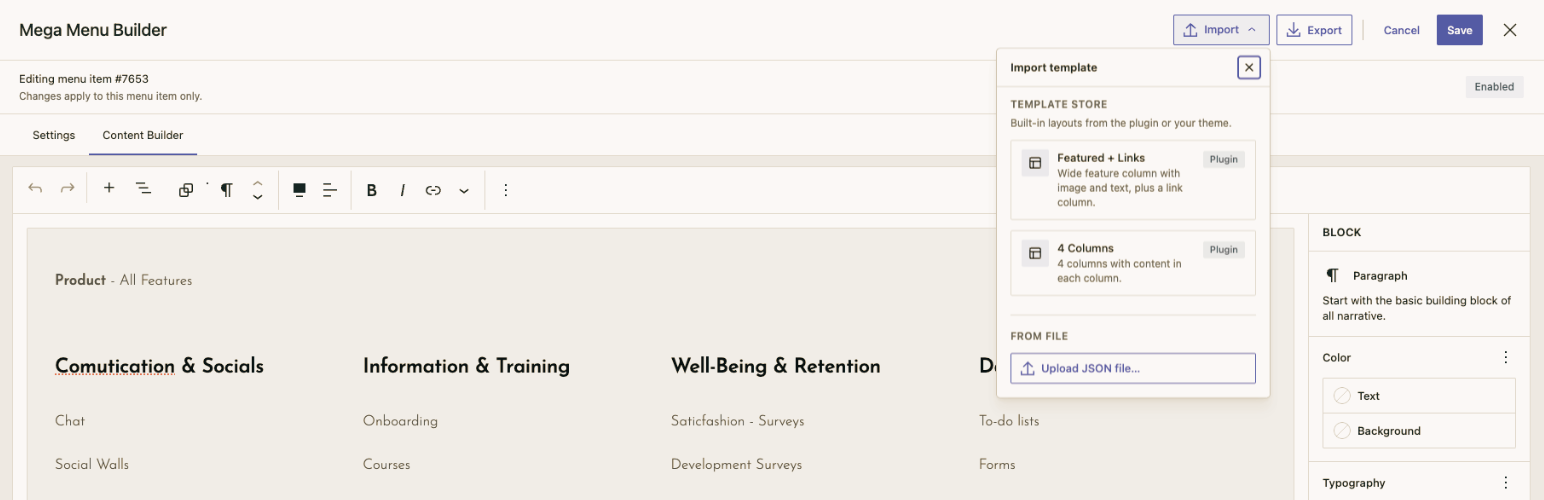
- Visual builder — Use the block editor to design mega menu content with columns, images, buttons, and more.
- Per-item settings — Enable/disable, width mode, background color, animation per menu item.
- Import / export — Apply starter layouts from a template store or export your design as JSON.
- Root-level only — Only top-level menu items get the mega menu option (depth-0).
- Clean data storage — Settings and content saved as
nav_menu_itempost meta. - Frontend rendering — Custom Walker outputs mega panels with hover/focus/keyboard interaction.
- Accessible — ARIA attributes, keyboard navigation, focus trapping.
- Theme-friendly — CSS custom properties for easy theme overrides.
Requirements
- WordPress 6.0+
- PHP 8.0+
- Node.js 18+ (for development)
Usage
- Go to Appearance → Menus.
- Click the “Mega Menu” link on any top-level menu item.
- Toggle Enable Mega Menu in the Settings tab.
- Switch to the Content Builder tab to design your mega menu content.
- Use Import or Export in the modal header to apply a template or save your layout as JSON.
- Click Save.
Template Store
The builder can load starter layouts from JSON files on disk. In the modal header, click Import to browse the template store or upload a JSON file. Click Export to download the current content and settings.
Where templates are loaded from
Templates are discovered from these folders (in order). If the same slug exists in more than one place, later sources override earlier ones:
Priority Source Path
1 (low)
Plugin
beplus-visual-mega-nav/templates/*.json
2
Parent theme
{theme}/mega-menu-templates/*.json
3 (high)
Child theme
{child-theme}/mega-menu-templates/*.json
Example (Nextora parent theme):
wp-content/themes/nextora/mega-menu-templates/brand-nav.json
Example (child theme override):
wp-content/themes/nextora-child/mega-menu-templates/three-column-nav.json
A child-theme file with the same filename/slug as a plugin template replaces the plugin version in the Import dropdown.
Built-in plugin templates
Slug Title
three-column-nav
Three Column Navigation
featured-with-links
Featured + Links
See templates/ in this plugin for reference implementations.
Template JSON format
Each file is a single JSON object:
{
  "slug": "my-custom-menu",
  "title": "My Custom Menu",
  "description": "Optional short description shown in the Import dropdown.",
  "version": "1.0.0",
  "settings": {
    "width": "full",
    "customWidth": 1200,
    "bgColor": "",
    "animation": "fade"
  },
  "content": "<!-- wp:columns -->..."
}
Field Required Notes
slug
Recommended
Used as the filename ({slug}.json). If omitted, the filename (without .json) is used.
title
Recommended
Label in the Import dropdown.
description
Optional
Shown under the title in the Import dropdown.
version
Optional
Template metadata only.
settings
Optional
Panel settings applied with the template (width, customWidth, bgColor, animation).
content
Required
Serialized Gutenberg block HTML (same format saved to menu item meta).
Exported files from Export use the same shape (they may omit slug). You can drop an export into mega-menu-templates/ and add a slug to register it in the store.
content is sanitized on load using the same rules as saved mega menu content. Use only blocks from the allowed list below (extend via `beplus_vmn_allowed_blocks`).
Allowed blocks
Category Blocks
Layout
core/columns, core/column, core/group, core/row, core/stack
Content
core/heading, core/paragraph, core/list, core/list-item, core/image, core/buttons, core/button, core/separator, core/spacer
Navigation
core/page-list, beplus-visual-mega-nav/link-item
Media
core/cover
Embeds / widgets
core/shortcode, core/html
add_filter( 'beplus_vmn_allowed_blocks', function ( array $blocks ): array {
    $blocks[] = 'my-plugin/custom-block';
    return $blocks;
} );
Import behaviour
- Template store — Lists all valid JSON templates from the plugin and active theme(s).
- Upload JSON file — Import any file matching the format above (does not need to live in a template folder).
- Applying a template replaces the current Content Builder content and Settings in the modal. Click Save to persist changes to the menu item.
REST API
Method Route Description
GET
/wp-json/beplus-visual-mega-nav/v1/templates
List template summaries (slug, title, description, source).
GET
/wp-json/beplus-visual-mega-nav/v1/templates/{slug}
Load full template (settings + content).
Requires edit_theme_options.
PHP hooks
// Add or replace template scan directories (source label => absolute path).
add_filter( 'beplus_vmn_template_directories', function ( $directories ) {
    $directories['custom'] = '/path/to/my/templates';
    return $directories;
} );

// Filter the template list returned to the admin UI.
add_filter( 'beplus_vmn_templates', function ( $templates ) {
    // $templates is keyed by slug.
    return $templates;
} );

// Filter a single template before it is returned.
add_filter( 'beplus_vmn_template_data', function ( $template, $slug ) {
    return $template;
}, 10, 2 );
~~~<h3>Development</h3>
npm run start # Watch mode npm run build # Production build composer check # PHP lint + PHPCS + PHPStan npm run check:js # ESLint + Stylelint ~~~