
HandL AI Connector Access Control
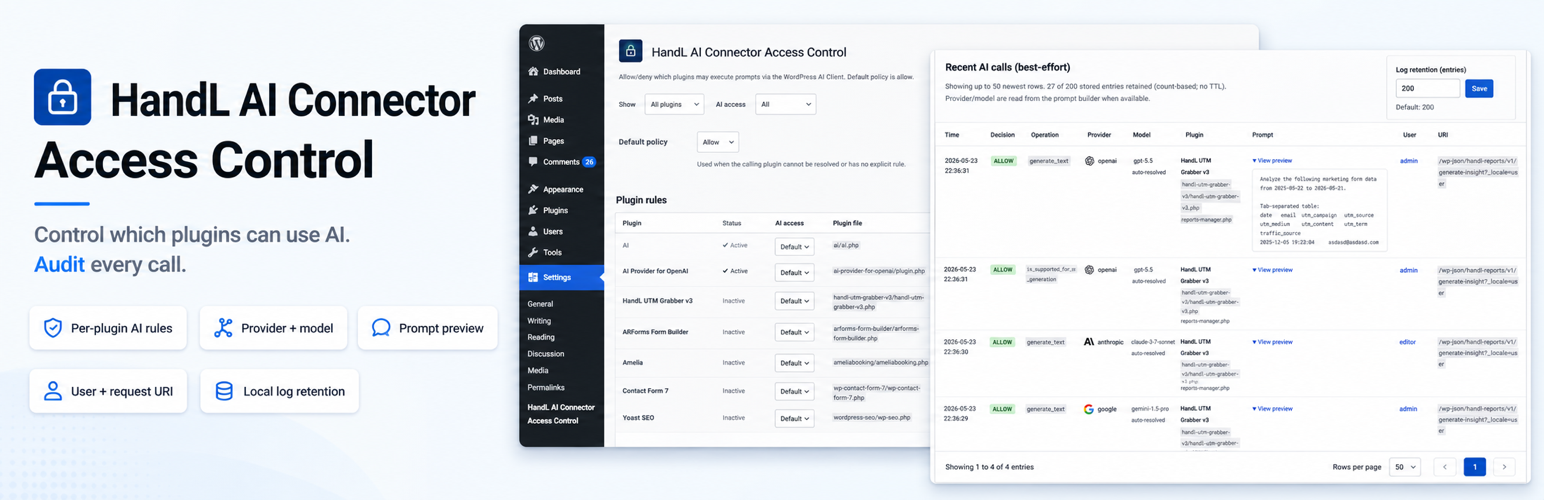
HandL AI Connector Access Control lets administrators allow/deny AI Client prompt execution on a per-plugin basis using the wp_ai_client_prevent_prompt filter introduced with the WordPress AI Client.
Default behavior is allow.
Per-plugin × capability matrix (Rules tab) refines access by family — Text, Image, Speech, TTS, Video — so you can allow text generation while denying image generation for the same plugin. Support checks (is_supported_for_*) and matching generate_* methods share the same family rule. Unknown operations (music, embeddings, generic methods) use a configurable fallback (inherit / allow / deny).
AI tool arming (caller intent) denies a prompt when it arms a blocked WordPress ability via the AI Client (using_abilities → functionDeclarations). This is not MCP visibility and does not unregister abilities site-wide. Denials are logged under this plugin’s name with the blocked ability ids.
Learn mode (Activity tab) logs every AI Client call without blocking, so you can discover callers before enabling deny rules on the Rules tab.
Emergency kill switch blocks all AI Client calls except plugins you list as exceptions.
Denial email alerts (opt-in) notify an admin when enforcement blocks a prompt — immediate (rate-limited) or hourly digest. Weekly report email mails Dashboard aggregates (coverage, denials, estimated spend, pins) via the same wp_mail path; selected by default; reports are sent only while logging or learn mode is on, and it is always toggleable. Estimated $ on the audit log and in the weekly report is a rough token × rate placeholder, not billing. When WordPress disables AI site-wide via wp_supports_ai, an honesty banner explains why the audit log may be empty.
EXPERIMENTAL per-plugin model force (Rules tab; empty force fields = off) can pin allowed AI Client generations to a provider/model per detected caller. Pins follow the nearest plugin frame on the PHP backtrace (best-effort) — not who initiated the call, and not a spend guarantee. Unattributed calls (cron, REST bootstraps, shared libraries, MU plugins, etc.) run unforced by default; admins can opt into an explicit unattributed target via the same “Unknown operations”-style control. Force relies on unsupported shallow-clone behaviour in the AI Client prevent hook, verifies the final route with exact provider/model matching before the provider call, and fail-closes on mismatch. Prefer official core routing filters when available.
Shadow-AI detector (observe only): when logging or learn mode is on, the plugin watches WordPress HTTP for requests to a curated list of known AI provider hosts (OpenAI, Anthropic, Google Generative Language, Cohere, Mistral, Groq, Together, Fireworks, Perplexity, xAI, DeepSeek, OpenRouter, …). Traffic that already flows through the core AI Client is ignored. Direct bypasses are retained as observe rows (channel=direct_http) so you can see AI activity outside what these rules control — they do not block HTTP. This is a curated list, not a complete inventory of every AI host on the internet.
Caller attribution is best-effort and is determined by inspecting the PHP call stack and mapping file paths to installed plugins. When force is configured, the retained log surfaces how many calls could not be attributed and ran unforced.
Privacy / Data
By default this plugin does not send data to any external service. Features that store or transmit call metadata are opt-in (logging, denial alerts) or default-on only while logging/learn mode is on (weekly report) — each has an explicit Settings toggle.
If you enable recent-call logging in Settings → HandL AI Connector Access Control, it stores a local log in the WordPress options table containing:
- Timestamp
- Allow/deny decision (AI Client rows) or observe (direct-HTTP AI observations)
- AI Client operation (e.g.
generate_text,is_supported_for_text_generation) — ordirect_httpfor shadow observations - Capability family (text / image / speech / tts / video / unknown) for AI Client rows
- Provider and model when set on the prompt builder (or model preferences)
- In learn mode: whether a configured model pin matched, and the provider/model you pinned
- Truncated prompt preview and selected generation config (best-effort; AI Client rows only)
- Input and output token counts when the AI Client completes a generation (best-effort)
- Best-effort calling plugin (plugin basename) and source file
- Current user id and display name
- Full request URI (including query string, kept only on this site) for AI Client admin-request context
- For direct-HTTP AI observations only: request host and path (query string stripped). No request body, no Authorization headers, no API keys. Channel label
direct_httpand matched provider id when known.
Logs are kept as a single shared entry-based ring buffer (default 200 entries, configurable 20–1000) for both AI Client rows and direct-HTTP AI observations. There is no time-based TTL—older rows drop only when the buffer is full. Repeated direct-HTTP calls from the same attributed plugin + host (or the same unattributed file + host) that stay active within ~5 minutes of idle time are collapsed into one row whose count is the number of HTTP calls (same unit as AI Client rows). Active clusters move to the newest slot so a chatty bypass does not erase the rest of the log, and the log does not drop the chatty cluster ahead of idle rows.
If you enable denial email alerts, the plugin sends a message via WordPress wp_mail when enforcement blocks a prompt (immediate rate-limited mail, or an hourly digest). The recipient is the address you configure, or the site admin_email if left empty — that may be any address you enter, and mail is delivered through whatever transport your site uses (core PHP mail or an SMTP / transactional-mail plugin). Alert messages include:
- Timestamp
- Calling plugin (best-effort basename)
- AI Client operation and capability family
- Denial reason and any matched blocked tools
- Provider and model when known (may be labeled inferred)
- Request path only (query string is stripped before mail; full URI stays in the local log if logging is enabled)
Alert mail does not include prompt preview or user identity. Digest rows waiting to send are stored in a local options queue (path-only URI) and are removed when alerts are turned off or the plugin is uninstalled.
If you enable the weekly report email (Activity tab), the plugin sends one message per week via WordPress wp_mail with Dashboard-style aggregates from the retained local log. This is the first surface where retained log data can leave the WordPress site (through your site’s mail transport into an inbox). The weekly report includes only:
- Dated window from the oldest and newest retained log timestamps (self-dating so a late WP-cron send stays honest)
- Coverage call counts (through the AI Client vs outside — not governed by these rules)
- Deny count in the retained window; default policy and learn-mode / kill-switch state labels
- Estimated spend total and top plugins by estimated $ (token × rate placeholders — not billing)
- Pin-hold counts when experimental force rules are configured
- Plugin display names (or basenames) for top estimated-spend rows
Weekly report mail does not include prompt preview, user identity, request paths, hosts, denial reason detail rows, or any per-call URI. Recipient is the same address as denial alerts (or site admin_email if empty). Every email includes a link to turn the report off. The weekly cron is cleared when the report is disabled, logging is off, or the plugin is uninstalled.