
Post Types Order
Over 12 MILLIONS DOWNLOADS and near PERFECT rating out of 200 REVIEWS. Easily Sort Posts and Custom Post Types with Drag-and-Drop
Take full control of your post order with a powerful plugin that lets you effortlessly reorder posts and custom post types using a simple drag-and-drop interface.
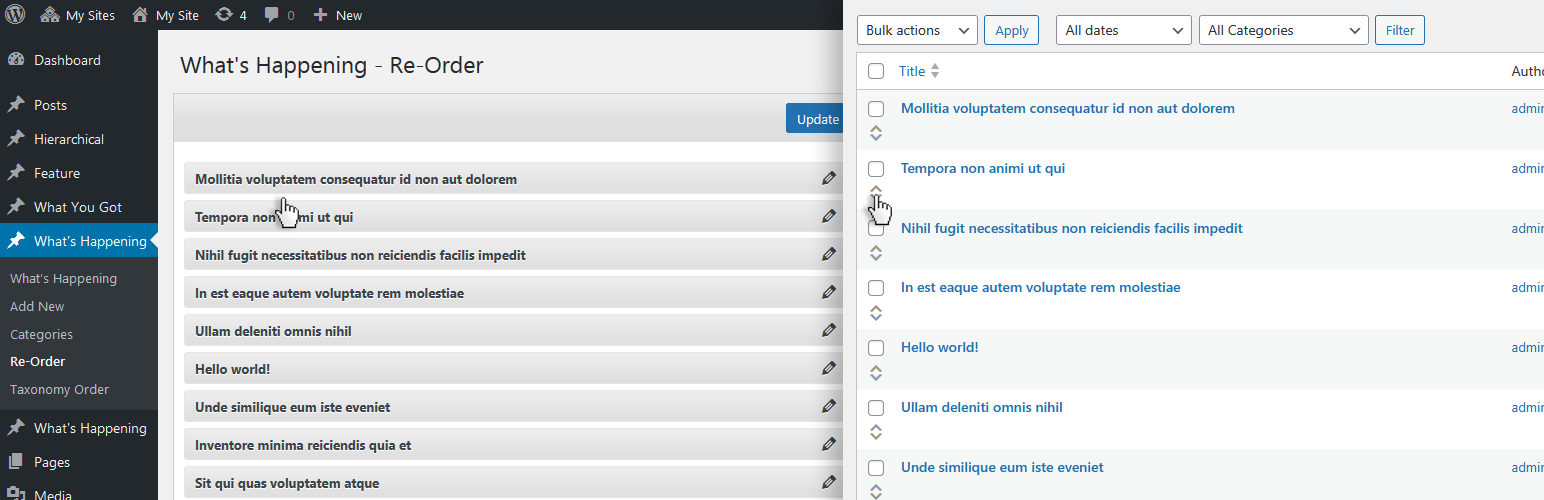
Customize the order directly from the default WordPress post archive list or use the dedicated Re-Order interface, which displays all available items for easy management. Whether you’re working with default posts or custom post types, organizing your content has never been easier.
使い方
This plugin was designed to be user-friendly, ensuring that anyone can easily use its sorting feature, regardless of their WordPress experience:
- Install the plugin via the “Install Plugins” interface or by uploading the post-types-order folder to the /wp-content/plugins/ directory.
- Post Types Order プラグインを有効化します。
- A new settings page will be added under Settings > Post Types Order. Visit this page and save the options for the first time.
- With the AutoSort option enabled, no code changes are needed, the plugin will automatically apply the customized post order.
- Use the Re-Order interface, available for every non-hierarchical custom post type, to change the post order as needed.
- For sorting posts via code, include ‘orderby’ => ‘menu_order’ within the custom query arguments. For more details, visit this guide Sample Usage
使用例
As you can see, reordering posts is as simple as dragging and dropping, with the changes instantly reflected on the front end.
If the post order doesn’t update on your site, it could be due to one of two reasons: either there was a mistake during setup, or your theme/plugin is using a custom query that doesn’t follow WordPress Codex standards. But don’t worry—we’re here to help! You can report the issue in the forum, where many users are happy to assist, or you can contact us directly.
If you encounter any problems with the plugin, feel free to reach out via the forum or contact us directly through our support page, and we’ll take a look.
Need advanced features ?
For advanced features and functionality, check out the extended version of this plugin at Advanced Post Types Order * Hierarchically post types order * Manual Drag & Drop / Automatic Sorting * Specify exact area where to apply through conditionals * Advanced query interface filtering and complex sorts including multiple post types and taxonomies * Posts Order by Custom Taxonomies * Enhanced Interface, List / Grid View * Allow Interface Filters (Categories, Dates, Search etc) * Post Types Thumbnails * Advanced query usage * MultiSite Network Support, WPML, Polylang, WooCommerce, WP E-Commerce, Platform Pro, Genesis etc * WPML 100% compatibility with sort synchronization across languages * Mobile Touch Drag & Drop Ready * Sort interfaces through admin and front end * Pagination for sort lists * Free Updates * Free Support
This plugin is developed by Nsp-Code
プラグインの翻訳について
Would you like to contribute a translation in your language? Please check at https://translate.wordpress.org/projects/wp-plugins/post-types-order
There isn’t any Editors for your native language on plugin Contributors? You can help to moderate! https://translate.wordpress.org/projects/wp-plugins/post-types-order/contributors