
Activity Log – Monitor & Record User Changes
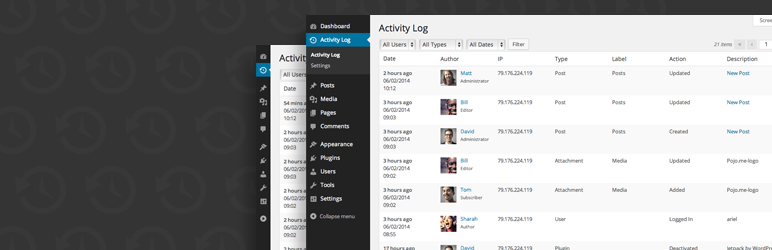
사용하기 쉽고 완벽하게 지원되는 워드프레스 활동 로그 플러그인
워드프레스 웹사이트의 활동을 모니터링 및 추적하고 싶으신가요? 이 플러그인을 사용하여 누가 무엇을 하는지 정확히 확인할 수 있습니다. 활동 로그는 워드프레스 관리자에서 수행되는 모든 작업을 기록하는 비행기의 블랙박스와 같으며, 사용자들이 웹사이트에서 무엇을 하고 있는지 정확히 보여줍니다.
- 누군가 사이트 해킹을 시도할 경우
- 게시물이 게시된 시간과 게시한 사람
- 플러그인/테마가 활성화 또는 비활성화되었을 경우
- 의심스러운 관리자 활동
매우 필수적이어서 이 플러그인 없이 사이트를 어떻게 관리했는지 의문이 들 것입니다. 이 플러그인은 번개처럼 빠르며 백그라운드에서 작동하여 사이트 및 관리자 성능에 영향을 주지 않습니다. 최적의 성능을 위해 데이터베이스의 별도 테이블에서 실행되도록 설계했습니다.
If you have more than a handful of users, keeping track of who did what is virtually impossible. This plugin solves that issue by tracking what actions were initiated by which users, and displaying it in an easy-to-use and easy-to-filter view on the dashboard of your WordPress site.
New! Introducing Email Logging – Capture all emails sent from your WordPress site for streamlined debugging and compliance. Gain better visibility into email communication, aiding both troubleshooting and record-keeping. This is particularly beneficial for WooCommerce stores, allowing you to easily track sent emails alongside other critical site events.
CSV로 내보내기 – 활동 로그 데이터 기록을 CSV로 내보냅니다. 개발자는 새 전용 내보내기 API를 통해 사용자 지정 데이터 형식에 대한 지원을 쉽게 추가할 수 있습니다.
데이터 프라이버시 및 GDPR 준수 – 워드프레스 프라이버시 도구를 통한 데이터 내보내기/삭제를 포함하여 GDPR 준수 기준을 충족할 수 있도록 도구를 제공합니다.
활동 로그를 통해 다음을 기록할 수 있습니다:
- 워드프레스 – 코어 업데이트
- Posts – Created, updated, deleted
- Pages – Created, updated, deleted
- 커스텀 포스트 타입 – 생성됨, 업데이트됨, 삭제됨
- 태그 – 생성됨, 업데이트됨, 삭제됨
- 카테고리 – 생성됨, 업데이트됨, 삭제됨
- 분류 – 생성됨, 업데이트됨, 삭제됨
- 메뉴 – 생성됨, 업데이트됨, 삭제됨
- 미디어 – 생성됨, 업데이트됨, 삭제됨
- 댓글 – 생성됨, 승인됨, 미승인됨, 휴지통으로 이동됨, 휴지통에서 복원됨, 스팸 처리됨, 스팸 해제됨, 삭제됨
- 사용자 – 로그인, 로그아웃, 로그인 실패, 프로필 업데이트, 등록됨, 삭제됨
- 플러그인 – 설치됨, 업데이트됨, 활성화됨, 비활성화됨, 변경됨
- 테마 – 설치됨, 업데이트됨, 삭제됨, 활성화됨, 변경됨 (편집기 및 커스터마이저)
- 위젯 – 사이드바에 추가됨, 사이드바에서 삭제됨, 위젯 순서 조정됨
- 설정 – 일반, 글쓰기, 읽기, 토론, 미디어, 퍼머링크
- Options – Extended custom settings for 3rd party plugins
- Export – Exported activity log file
- WooCommerce – Track products, orders, customers, and more
- bbPress – 포럼, 주제, 답글, 분류 및 기타 작업
- Emails sent from WordPress site – Sending successful, sending failed
- There’s more, of course, but you get the point…
For each event recorded by the activity log, the following details are also logged:
- Date and time of occurrence
- User and user role responsible for the change
- Source IP address from which the change originated
- Affected object where the change occurred
플러그인은 어떤 설정도 필요하지 않으며, 바로 사용할 수 있습니다 (사람들이 이 플러그인을 사랑하는 또 다른 이유입니다)!
데이터 저장 및 성능 최적화
In order to ensure optimal performance of your website, all events and logs data are stored in a dedicated custom table within your WordPress database. This approach significantly reduces the impact on your website’s performance, ensuring seamless operation even during peak traffic periods.
제거 정리
We understand the importance of maintaining a clean and efficient database environment. That’s why our plugin features an uninstall hook that seamlessly removes all traces of its presence from your website when uninstalling. This meticulous clean-up process ensures that your database remains lean and clutter-free even after our plugin has been removed.
With our optimized data storage, thorough logging, and meticulous clean-up process, you can trust that our plugin will enhance the functionality and security of your WordPress site without compromising its performance.
사용자들의 의견
- “Its tools, particularly for data privacy and GDPR compliance, make it indispensable for websites operating within European Union boundaries or dealing with EU citizens’ data” – HubSpot.com
- “If you’re after a competent WP security audit log plugin with all the basic features you need, Activity Log is it!” – WPAstra.com
- “Activity Log features a remarkably straightforward dashboard interface, providing administrators with an at-a-glance understanding of site interactions” – Malcare.com
- “이달의 10대 무료 워드프레스 플러그인: 대시보드 접근 권한을 가진 사용자들이 하는 일을 추적하기” – ManageWP.com
- “이 단계 덕분에, 저희 사이트가 무차별 대입 공격을 받고 있다는 사실을 발견했습니다” – Artdriver.com
- “최적화된 코드 – 플러그인 자체가 번개처럼 빠르며 서버에 거의 흔적을 남기지 않습니다” – FreshTechTips.com
- “활동 로그를 통해 다양한 활동을 추적할 수 있습니다. 전반적으로 사용 및 설정이 매우 쉽습니다.” – ElegantThemes.com
기여:
이 플러그인에 기여하시겠습니까? GitHub 저장소에 풀 리퀘스트를 제출하실 수 있습니다. 또한 코드에 대한 의견이 있으시면 이슈 트래커에 티켓을 열어주세요.