
GutenKit – Page Builder Blocks, Patterns, and Templates for Gutenberg Block Editor
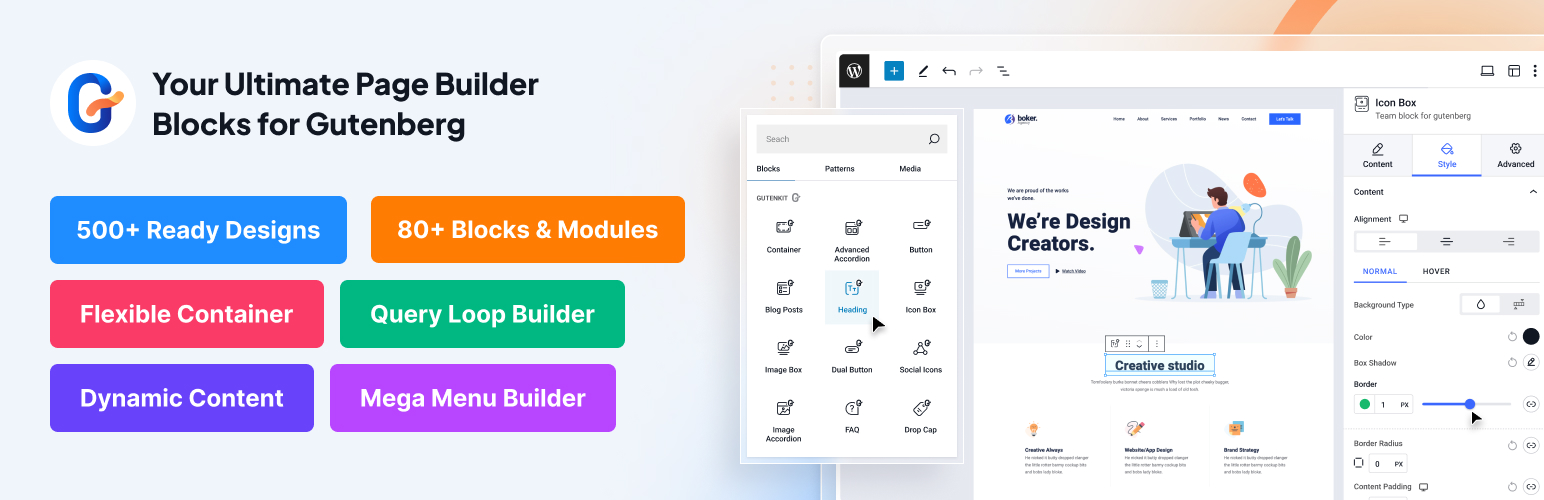
워드프레스 편집기에서 복잡한 페이지 빌더나 코딩 전문 지도로 더 이상 고생할 필요가 없습니다.
구텐킷 for 구텐베르크 소개, 워드프레스 블록 편집기 안에서 최고의 웹사이트 디자인 경험을 제공하는 준비된 커스텀 블록을 갖춘 최고의 구텐베르크 페이지 빌더입니다.
구텐베르크 블록 빌더 플러그인은 드래그 앤 드롭 디자인의 익숙한 사용성을 구텐베르크에 제공하여 페이지 빌더를 사용하는 것처럼 느껴지지만 더 빠르고 가볍게 만듭니다. 구텐베르크의 네이티브 드래그 앤 드롭 인터페이스, 65개 이상의 페이지 빌더 블록, 20개 이상의 다용도 모듈, 및 900개 이상의 미리 디자인된 템플릿을 통해 GutenKit은 전문적이고 반응형 웹 콘텐츠를 몇 분 만에 생성할 수 있는 최고의 구텐베르크 추가 기능 중 하나입니다.
구텐베르크 메가 메뉴, 쿼리 루프 빌더, 동적 콘텐츠, 유연한 컨테이너, 고급 패럴랙스 효과, 반응형 브레이크포인트와 같은 기능을 갖춘 GutenKit은 귀하의 워드프레스 웹사이트를 위한 최고의 구텐베르크 페이지 빌더입니다.
⚓실제 사례에서 GutenKit의 기능을 탐험해 보세요: 라이브 데모 확인하기
구텐킷 for 구텐베르크 블록과 함께 웹 디자인의 미래를 경험해보세요 — 제약 없는 디자인.
GutenKit 홈 페이지 | 맞춤 구텐베르크 블록 | GutenKit 템플릿 | 블로그 | 문서 | 지원이 필요하신가요? | GutenKit Pro 시작 방법 |
주요 기능
👉 Gutenberg를 위한 완벽한 페이지 빌딩 기능
👉 복잡한 레이아웃을 구축하는 가장 쉬운 방법
👉 완벽한 전체 사이트 편집기 (FSE) 호환 솔루션
👉 모바일, 데스크탑 및 태블릿을 위한 반응형 브레이크포인트
👉 Gutenberg용 메가 메뉴 빌더
👉 동적 웹사이트를 위한 쿼리 루프 빌더
👉 인라인 편집이 가능한 전체 폭의 유연한 컨테이너
👉 모션 애니메이션 효과 for 워드프레스 블록
👉 구텐베르크 블록 빌더 전체에서 스타일 복사·붙여넣기
👉 65개 이상의 워드프레스 블록 에디터 지원 블록
👉 사전 디자인된 900+ 템플릿 및 패턴
👉 더 빠른 로딩 자산과 성능에 최적화된 구텐베르크 웹사이트 빌더
사용자 정의 브레이크포인트로 반응형 페이지 디자인하기
구텐베르크의 Breakpoints 모듈은 블록 편집기에서 반응형 웹사이트를 디자인하는 방식을 혁신합니다. 이제 페이지를 디자인하는 구텐베르크 편집기 안에서 바로 반응형 브레이크포인트 설정을 조정할 수 있습니다.
GutenKit의 추가된 여섯 개의 커스텀 브레이크포인트 덕분에, Gutenberg 에디터의 모든 블록이 반응형 블록이 됩니다. 모바일, 데스크탑, 노트북, 태블릿, 와이드 스크린, 그리고 가로 모드를 위한 브레이크포인트를 추가할 수 있습니다.
이렇게 하면 웹사이트 디자인, 콘텐츠 레이아웃, 그리고 모든 반응형 블록이 모든 화면에 완벽하게 맞춰져, 모든 기기에서 매끄러운 사용자 경험을 제공합니다.
구텐베르크 메가 메뉴 빌더
구텐베르크용 GutenKit은 구텐베르크에서 메가 메뉴를 가장 쉽게 생성하는 방법을 제공합니다. 구텐베르크 메가 메뉴 빌더 블록을 사용하면 서브메뉴가 있는 다차원 드롭다운 메뉴를 생성할 수 있습니다.
이 Gutenberg 애드온을 사용하면 블록 편집기 내에서 전체 메가 메뉴를 만들 수 있습니다. 하위메뉴 항목을 추가하고 기존 웹사이트 페이지와 연결하기만 하면 됩니다. 그러나 이 WordPress용 Gutenberg 메가 메뉴 빌더를 사용하면 메뉴에 새로운 항목을 추가할 수 있으며, 이 항목은 자동으로 WordPress 사이트의 임시 페이지로 저장됩니다.
GutenKit의 Gutenberg 메가 메뉴 빌더를 사용하면 컨테이너, 캐러셀, 탭 등을 포함한 모든 블록을 메뉴 항목으로 추가할 수 있습니다. 따라서 GutenKit 메가 메뉴 빌더를 사용하여 더 나은 내비게이션과 함께 원활한 탐색 경험을 제공하세요.
구텐베르크에서 노코드 동적 웹사이트 구축하기
⭐ 쿼리 루프 빌더
쿼리 루프 빌더 블록은 웹사이트 게시물을 동적으로 표시하는 데 도움이 되는 동적 구텐베르크 블록입니다. 게시물 유형, 택소노미, 메타 쿼리, 날짜 쿼리, 작성자, 글 상태 등을 기준으로 콘텐츠를 필터링할 수 있습니다.
Do all of the advanced filtering without even writing a single line of code. You can visually query the WordPress database and show your website post dynamically with the unmatched flexibility of this advanced Gutenberg blocks plugin.
⭐ 구텐베르크 동적 콘텐츠
GutenKit’s Dynamic Content for 구텐베르크 기능은 구텐베르크 빌더를 동적 블록 편집기로 바꿉니다. 이 프로 옵션은 블록의 옵션에서 ‘Dynamic Content’를 선택하여 글 태그, 사이트 제목, 작성자 이름 및 사용자 정보와 같은 요소를 동적으로 삽입할 수 있게 활성화합니다.
Additionally, a fallback value can be set to display default content when specific data isn’t available. This functionality enhances content personalization and adaptability on WordPress sites.
⭐ 디스플레이 조건
디스플레이 조건 모듈은 GutenKit 구텐베르크 추가 기능에서 다양한 조건에 따라 콘텐츠의 가시성을 제어할 수 있는 다재다능한 방법을 제공합니다. 이 워드프레스 구텐베르크 블록 조건 플러그인의 사용하기 쉬운 인터페이스를 통해 특정 기준을 설정할 수 있습니다. 이를 통해 방문자에게 관련 있는 콘텐츠만 표시되어 그들의 경험을 향상시키고 웹사이트의 전반적인 효과를 개선할 수 있습니다.
구텐베르크 블록 에디터에서 더 빠르게 로딩되고 SEO에 최적화된 웹사이트 구축하기
GutenKit 블록에는 다음이 포함됩니다-
🚀 빠른 로딩 에셋
🚀 최적의 성능 평가
🚀 더 높은 SEO 점수
🚀 블록 API 버전 3 지원
How GutenKit Keeps Your Site Fast:
-
✅ Loads only the CSS and JavaScript for blocks actually used on each page
-
✅ 900+ inline SVG icons – load individual icons, never the full library
-
✅ No external font-loading delays – Google Fonts load locally
-
✅ Block API v3 support for maximum editor rendering performance
-
✅ Zero jQuery dependency – pure, modern JavaScript
GutenKit 페이지 빌더로 전체 사이트 편집
Create pages layouts, header footer and block patterns for the entire website in the site editor with GutenKit page builder blokcs.
All GutenKit blocks, block patterns, and templates seamlessly work in WordPress’s Full Site Editor (FSE) to help you make a unique design for your website.
전반적으로, 이 워드프레스 전체 사이트 에디터 호환 구텐베르크 애드온은 사용자 친화적이며 역동적인 콘텐츠 제작에 기여합니다.
생생한 애니메이션으로 시선을 사로잡는 웹 페이지 만들기
이 WordPress 페이지 빌더 블록 편집기를 사용하면 동적인 애니메이션 기능을 통해 시각적으로 놀랍고 매력적인 웹 페이지를 만들 수 있습니다. 애니메이션을 콘텐츠에 매끄럽게 통합함으로써 청중을 사로잡고 강렬한 인상을 남길 수 있습니다.
GutenKit의 템플릿 라이브러리와 아이콘으로 (노코드) 멋진 웹사이트 디자인하기
🔥 900+ 사전 디자인된 패턴 및 템플릿
GutenKit에는 900개 이상의 준비된 블록 패턴 및 템플릿이 포함되어 있습니다. 이 독점적인 블록 패턴과 템플릿은 디자인 프로세스를 단순화하고 WordPress Gutenberg 편집기 내에서 아름답고 기능적인 레이아웃을 빠르게 구축할 수 있도록 도와줍니다.
➡️이 워드프레스 구텐베르크 페이지 빌더의 전문적으로 디자인된 사전 제작 템플릿 및 패턴 라이브러리에 액세스하세요.
🔥 900+ 인라인 SVG 폰트 아이콘
이 놀라운 GutenKit 아이콘 라이브러리는 효율적인 로딩 메커니즘을 제공하여 사용자가 전체 라이브러리를 로드하지 않고도 개별 아이콘에 접근하고 활용할 수 있게 합니다. 이는 빠른 사용자 경험을 제공합니다.
워드프레스 블록 편집기에서 복잡한 레이아웃 만들기
GutenKit의 페이지 빌더 블록으로 번거로움 없이 웹사이트에 생명을 불어넣어 보세요. 65개 이상의 블록을 사용하여 구텐베르크 워드프레스 블록 에디터 내에서 동적이고 아름다운 웹페이지를 쉽게 디자인할 수 있습니다.
🔷 페이지 빌더와 같은 제어 기능을 갖춘 컨테이너 사용
구텐베르크 컨테이너 블록은 블록 편집기를 진정한 페이지 빌더로 만들어 줍니다. 이를 통해 구텐베르크 편집기 내에서 사용자 정의 섹션을 생성하고 콘텐츠를 그룹화할 수 있습니다. 페이지 빌더의 인라인 편집 경험처럼 마우스 커서를 좌우로 드래그하여 컨테이너 너비를 간단히 조정할 수 있습니다.
Besides, this page builder block offers a range of layout options, enabling effortless customization including full-width and boxed containers with background, padding, and endless customizations.
🔷 고급 시차 효과
고급 패럴랙스 효과 생성로 구텐베르크용 고급 패럴랙스 효과를 통해 사이트 방문자에게 몰입형 경험을 제공하세요. 투명도, 클래식, 패럴랙스 회전, 낮은 바운스, 가로 스크롤 등 다양한 스타일(투명도, 클래식, 패럴랙스 회전, 낮은 바운스, 가로 스크롤) 중에서 선택하세요.
🔷 고급 동영상 갤러리
준비된 블록을 사용해 필터 가능한 동영상 갤러리를 생성하세요. 몇 번의 클릭으로 웹사이트에 최고의 동영상을 쇼케이스하고, 방문자가 필요에 따라 필터해서 볼 수 있게 하세요.
🔷 복사 붙여넣기 스타일
구텐베르크 복사-붙여넣기 스타일 기능을 사용하면 블록 간에 멋진 디자인을 다른 요소에 몇 초 만에 적용할 수 있습니다. 따라서 반복적인 조정 없이도 웹사이트에 일관되고 전문적인 외관을 보장합니다.
🔷 고급 탭으로 콘텐츠 구성
구텐베르크 고급 탭 블록을 사용하면 정보를 탭으로 구성된 섹션으로 정리하여 편리한 탐색 경험을 제공할 수 있습니다. 탭을 위한 사전 디자인된 템플릿, 글로벌 스타일, 고급 사용자 정의 설정 등을 제공합니다.
🔷 고급 아코디언으로 콘텐츠를 스마트하게 제시
GutenKit의 구텐베르크 아코디언 블록은 세련되고 인터랙티브한 콘텐츠를 생성하는 핵심입니다. 이 드래그 앤 드롭 워드프레스 아코디언 블록을 사용하면 접을 수 있는 섹션을 생성할 수 있습니다. 이 워드프레스 구텐베르크 플러그인으로 모든 콘텐츠를 구조적이고 깔끔하게 정리할 수 있습니다.
🔷 눈길을 끄는 헤딩 제작
워드프레스 블록 편집기에서 GutenKit 헤더 블록을 사용하여 눈에 띄는 헤더를 손쉽게 생성하세요. 다양한 커스터마이제이션 옵션을 통해 멋진 H1, H2, H3 제목을 만들 수 있습니다. 한 가지 큰 편리함은 제목에 URL을 추가할 수 있어 사용자가 더 쉽게 탐색할 수 있다는 점입니다.
🔷 오프캔버스 메뉴
이제 구텐베르크 오프캔버스 블록을 사용하여 공간 절약형 오프캔버스 메뉴를 디자인하고 통합할 수 있습니다. 이 유용한 도구를 통해 부드럽게 슬라이드하여 나타나는 메뉴를 만들 수 있으며, 중요한 웹사이트 섹션에 쉽게 접근할 수 있습니다.
🔷 글로벌 색상 스킴
구텐베르크 블록 편집기와의 매끄러운 통합으로 귀하의 사이트 색상 팔레트를 제어하세요. 글로벌 색 구성표 기능을 활용하여 일관된 레이아웃을 디자인하세요.
사용자 친화적인 워드프레스 메뉴 만들기
메가 메뉴 외에도 GutenKit은 워드프레스 블록 편집기에서 메뉴를 가장 쉽게 생성하는 데 도움을 줍니다. Nav Menu 또는 오프캔버스 메뉴를 포함한 다양한 유형의 메뉴를 디자인하여 웹사이트의 미학을 완벽하게 보완하고 원활한 사용자 경험을 보장할 수 있습니다.
🔷 아름다운 네비게이션 메뉴 만들기
GutenKit의 내비게이션 메뉴로 멋진 내비게이션 메뉴를 손쉽게 만들 수 있습니다. 워드프레스 내비게이션 메뉴를 설계하여 사이트 전반에 걸쳐 부드러운 사용자 경험을 보장하고 웹사이트의 미적 감각을 보완할 수 있습니다.
🔷 오프캔버스 메뉴로 디자인 현대화
현대화 및 공간 최적화 측면에서, 이 구텐베르크 추가 기능의 오프캔버스 블록은 워드프레스 블록 편집기에서 완벽한 솔루션입니다. 오프캔버스 블록을 사용하여 공간 절약형 오프캔버스 메뉴를 디자인하고 통합할 수 있습니다. 이 유용한 도구는 메뉴가 부드럽게 보이도록 슬라이드하며, 중요한 웹사이트 섹션에 쉽게 접근할 수 있도록 보장합니다.
여러 게시물 블록으로 블로깅 사이트를 시작하세요
다양한 GutenKit 포스트 블록으로 블로깅 여정을 시작할 준비가 되셨나요? 매력적인 헤드라인부터 흥미로운 멀티미디어까지, 청중의 마음에 와닿고 오래도록 기억에 남는 포스트를 제작할 수 있습니다.
☑️ 포스트 그리드
워드프레스 블록 편집기에서 구텐베르크 게시물 그리드 블록을 사용하여 최신 콘텐츠를 우아하게 시각화하세요. 이 블록은 게시물을 그리드 레이아웃으로 표시하여 사용자가 최신 글이나 상품을 현대적이고 매력적인 방식으로 발견할 수 있도록 도와줍니다.
☑️ 블로그 포스트
GutenKit 구텐베르크용 블로그 글은 카테고리, 날짜, 또는 인기도에 따라 글을 스타일리시한 레이아웃으로 표시할 수 있게 해주며, 텍스트, 이미지, 동영상 등을 지원합니다.
☑️ 포스트 탭
GutenKit 게시물 탭 블록은 블로그 글을 다양한 카테고리나 주제로 정리하는 데 도움을 줍니다. 워드프레스 사이트에서 각 카테고리에 대한 게시물 탭을 생성하여 독자들이 관심 있는 콘텐츠를 쉽게 탐색하고 찾을 수 있도록 할 수 있습니다.
☑️ 읽기 진행 바
워드프레스 블록 편집기의 읽기 진행률 바 블록은 진행 상황이나 완료를 시각적으로 나타냅니다. 우리의 블록 기능은 다양한 템플릿과 스타일을 포함하여, 백분율, 진행 상황 및 지속 시간 표시기를 사용자 정의할 수 있습니다.
방문자의 행동에 대한 상호작용 응답
방문자가 접하는 웹사이트의 모든 부분에 뛰어난 인터랙티브 경험을 제공하세요. Gutenkit 인터랙션 모듈은 변형, 스크롤, 회전, 불투명도 변경, 요소 표시, 숨기기 또는 토글과 같은 다양한 인터랙션 효과를 ‘제로 코드’ 방식으로 구현할 수 있게 해줍니다.
당신의 WordPress 사이트를 위한 더욱 진보된 블록들
Gutenberg 페이지 빌더의 핵심 기능 외에도, GutenKit은 웹사이트의 기능성과 시각적 매력을 향상시키기 위한 고급 블록 모음을 제공합니다.
🔷 Icon Box: Add an icon from the vast icon library without slowing down your site. GutenKit only loads the specific icons you choose.
🔷 Image Box: displays images in a beautifully designed box. Crop, resize, and style them to fit seamlessly within your design.
🔷 Dual Button: GutenKit WordPress Block editor Plugin offers an intuitive way to integrate paired buttons with personalized styles into your content.
🔷 Pricing Table: Ccreate crystal-clear pricing tables that convert, and highlight key features, pricing structures, calls to action, etc.
🔷 Image Comparison: Highlighting transformations or any scenario where visual impact matters. This drag-and-drop WordPress block slides smoothly between the before-and-after comparison of an image.
🔷Countdown Timer: Create visually appealing and highly customizable Countdown Timers within the WordPress Gutenberg editor and add a sense of urgency to promotions.
🔷 Timeline Block: Create captivating, chronological timelines to showcase history, project roadmaps, or step-by-step processes.
🔷 Testimonial Block: Build trust and credibility by showcasing customer reviews and social proof with beautifully styled cards and sliders.
🔷 Team Block: Display team member profiles, complete with photos, biographies, and social links, in elegant grid layouts.
🔷 매력적인 갤러리 스타일
구텐베르크 갤러리 플러그인을 사용해 이 웹사이트의 시각적 매력을 높이세요. 직관적인 그리드 및 메이슨리 스타일의 이미지와 동영상 갤러리를 포함합니다. 시각적 콘텐츠를 다용도적이고 역동적인 레이아웃으로 표시하여 방문자 참여를 극대화합니다.
GutenKit의 혜택을 받을 사람은 누구인가요?
다음은 다양한 청중 세그먼트와 전문가들이 GutenKit의 구텐베르크 추가 기능의 잠재력을 활용하여 목표를 달성하고 디지털 경험을 향상시킬 수 있는 주요 강조점입니다.
➡️ 웹사이트 소유자, 블로거, 및 소규모 비즈니스 소유자
GutenKit은 강력한 블록으로 매력적인 반응형 콘텐츠를 만들고 코딩 없이 전문적인 온라인 존재감을 구축할 수 있는 완벽한 솔루션입니다.
➡️ 콘텐츠 제작자
GutenKit은 콘텐츠 제작자가 최고의 워드프레스 블록과 유연한 디자인으로 시각적 매력을 높여 콘텐츠를 더 매력적이고 공유하기 쉽게 만듭니다.
➡️ 마케터 및 SEO 전문가
Marketers and SEO professionals can use GutenKit to build user-friendly pages that boost engagement, SEO, traffic, and conversions.
➡️ 웹 디자이너 및 개발자
GutenKit saves time and simplifies workflows for website designers and developers with its intuitive drag-and-drop tools and rich design library.
➡️ 전자상거래 웹사이트 소유자
GutenKit helps e-commerce owners enhance product listings with responsive design, pricing tables, and icons for a better shopping experience.
➡️ 프리랜서 및 디지털 에이전시
디지털 에이전시와 프리랜서들은 GutenKit의 템플릿과 코드 없는 모듈을 사용해 빠르고 전문적인 웹사이트를 제공할 수 있어, 고급 코딩 기술 없이도 클라이언트를 감동시킬 수 있습니다.
➡️ 사용자 친화적인 솔루션을 찾는 사람
구텐베르크(GutenKit) 플러그인은 모든 사용자의 접근성을 위해 설계되어, 다양한 기술적 배경을 가진 이들이 손쉽게 시각적으로 뛰어난 웹사이트를 생성할 수 있도록 합니다.
☂️ 다른 플러그인들
다른 플러그인도 확인해 보세요:
ElementsKit – Elementor용 올인원 애드온입니다.
ShopEngine – 완벽한 Elementor WooCommerce 빌더입니다.
MetForm – 가장 유연하고 사용하기 쉬운 폼 빌더입니다.
GetGenie Ai – SEO 친화적인 콘텐츠를 위한 고급 AI 어시스턴트.
WP Social – WP Social로 소셜 미디어 존재감을 높이세요.
EmailKit – 이메일 제작 경험을 손쉽게 바꾸는 방법.
FundEngine – 워드프레스 크라우드펀딩 및 기부 사이트를 만들기 위한 완벽한 플러그인.
Wp Ultimate Review – Wp Ultimate Review 플러그인으로 고객 리뷰를 관리하세요.
PopupKit – WordPress Gutenberg 팝업 플러그인을 사용해 다양한 요구에 맞는 뛰어난 팝업을 제작하세요.
TableKit – 완전히 사용자 지정 가능한 다목적 테이블을 만들고 Gutenberg 블록 에디터 내에서 데이터 테이블을 생성하세요.
Genie Image – AI의 마법으로 WordPress 웹사이트에서 직접 이미지를 생성하세요.
최고의 워드프레스를 활용하는 방법에 대해 더 알아보려면 Wpmet을 방문하고 튜토리얼, 팁 & 트릭을 확인하세요!