
PiWeb Min/Max Quantity & Minimum Order Limits for WooCommerce
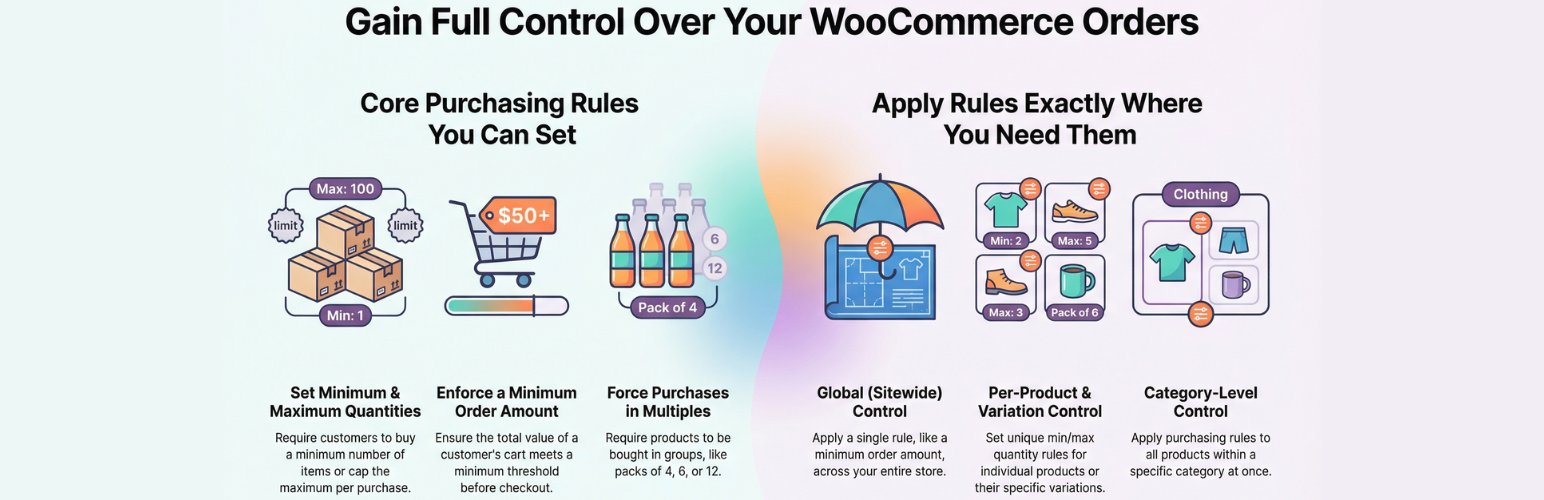
Try pro version front end & back end on demo website | Documentation
-
Activate the plugin, go to the settings page and set global level min or max Product Quantity
-
Set minimum product quantity for each product that must be purchased
-
Set maximum product quantity for each product that can be purchased
-
Set minimum cart total, which is the minimum total at the time of checkout
-
If you don’t want quantity restriction on a certain product you can disable the limit on that particular product quantity
-
Enable minimum amount restriction on the cart total
-
Exclude a product from global minimum amount restriction, in the Free version you can exclude 2 products only
-
Set different messages for the minimum amount restriction based on the cart total as a percent of the minimum amount set in the plugin settings
-
Show minimum amount progress in a circular progress bar
-
Show warning message of minimum amount on top of the pages
-
Setting minimim / maximum quanity restriction per order. E.g: you can set minimum quantity restriction of 5 per order, so if a user tries to buy less than 5 unit of a product then he will get an error and won’t be allowed to checkout. Similarly, you can set maximum quantity restriction per order as well. E.g: you can set maximum quantity restriction of 10 per order, so if a user tries to buy more than 10 unit of a product then he will get an error and won’t be allowed to checkout.
-
The following multi-currency plugins are supported:
- CURCY – Multi Currency for WooCommerce
- Price Based on Country for WooCommerce
- FOX – Currency Switcher Professional for WooCommerce
PRO Version
Try pro version front & back end on demo website
-
All the features of Free version
-
Set a different minimum quantity for each product, this will overwrite the global minimum quantity for that product
-
Set a different minimum quantity for each variation
-
Set a different maximum quantity for each product, this will overwrite the global maximum quantity for that product
-
Set a different maximum quantity for each variation
-
Set a different quantity multiple for each variation
-
Customize messages
-
Change the image that is shown inside the circular progress for the minimum order amount WooCommerce
-
Set text and background color of the message box based on the different condition the quantity of product present in the cart
-
Minimum order amount WooCommerce bar get updated by ajax
-
Place minimum order amount needed info bar using short code [pisol_mmq_notification]
-
Pro version update the min max notice message on the category / Shop page with ajax
-
Control the page where you want to show the minimum order amount restriction notification bar
-
You can write custom code to disable minimum order amount notification on custom pages using filter function
-
Show/Hide Min Max quantity message on product archive page, product page, cart page or checkout page
-
Set different position for Min Max quantity message on product archive page and single product page
-
Don’t go inside each product to set Min/Max quantity, instead set it from the category, so all product within this category will inherit this min/max quantity limit
-
Set minimum quantity restriction on the category, so user has to purchase minimum that many unit from that particular category
-
Checkout page will redirect to cart page when the Minimum quantity restriction is not fulfilled for any product
-
Checkout page will redirect to cart page when the Minimum amount restriction is not fulfilled for any product
-
You can set minimum amount restriction per category basis, so if a buyer purchase a $10 product from Category A, and you have set Min amount limit of $20 on that category then he won’t be able to checkout until he purchase $10 more from the same category A
-
You can apply category level min amount restriction even on the sub category products as well
-
Force product to be ordered in a multiple of X units, E.g: you can enable this option on a product and make it to be ordered in a group of 4 unit, then user can order 4, 8, 12, 16 units of that product if they try to order say 3 units they will get an error and will not be allowed to checkout Example of product to be ordered in multiple of 4
-
Force category product quantity to be ordered in a multiple of X unit, E.g: Category A : you have set quantity to be in multiple of 3 unit, when user will add 2 unit of product xA he won’t be allow to checkout as it is not multiple of 3, now if he adds 1 unit of yA product in the cart then his total quantity from Cat A equals to 3 unit which is multiple of 3 so he can checkout
-
Exclude product from min quantity restriction on the category, the quantity of this excluded product will not be counted for restriction. E.g: Cat A min quantity restriction is 3 and customer added product AA and AB 1 unit each and product AB is excluded product then the customer has to purchase 2 unit more the unit of AB will not count in.
-
Exclude product amount from min amount restriction on the category, E.g: Cat A min amount restriction is 20$, customer added product AA and AB in cart both of 10$ each then customer will still need to buy $10 more as the AB (being the excluded product it won’t be counted for restriction)
-
Disable Min Amount Restriction by product or category: If any selected product or any product from the selected categories is present in the cart, the minimum order amount restriction will not apply to the entire cart. Example: Minimum order amount = ₹100. If an excluded product (or a product from an excluded category) is in the cart, even with other items, the checkout will still be allowed below ₹100.
Privacy
If you choose to opt in from the plugin settings, or submit optional feedback during deactivation, this plugin may collect basic technical information, including:
- Plugin version
- WordPress version
- WooCommerce version
- Site URL
- Deactivation reason (if submitted)
This data is used solely to improve plugin quality, compatibility, and features. No personal or user-specific data is collected without consent.