
Post Navigator
Have a feature request?
Sweet! Feature requests on Github: https://github.com/plugify/post-navigator/issues?labels=enhancement
Want to contribute?
Post Navigator on Github: http://github.com/plugify/post-navigator
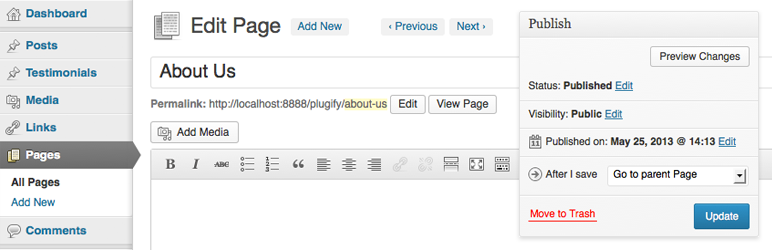
Adds a simple dropdown menu to the publish box which allows a user to select a useful action immediately upon saving or publishing any post. The plugin also adds two new buttons to the edit post page, “Previous” and “Next”. These buttons allow you to immediately navigate to the previous or next post of any type in the admin area.
Features
- All features of Post Navigator support custom post types
- Upon save, navigate directly to the “Add New” page of the current post type
- Navigate to parent post upon save
- Navigate to child post upon save. When selected, a second dropdown will automatically populate with the children of the current post
- Navigate to a sibling post upon save. When selected, a second dropdown will automatically populate with the siblings of the current post
- Navigate to next or previous post upon save
- Instantly navigate to next or previous post by using the “Previous” and “Next” buttons. These will be displayed, if available, in the header of the current
This plugin was created mainly as a tool to speed up content entry given it allows you to bypass multiple page loads. For example, when adding several new pages, simply choose the “Add a new Page” option and upon saving the current page you will immediately be taken to the “Add a New Page” screen.
If you have found this plugin useful, consider taking a moment to rate it.