
Admin and Site Enhancements (ASE)
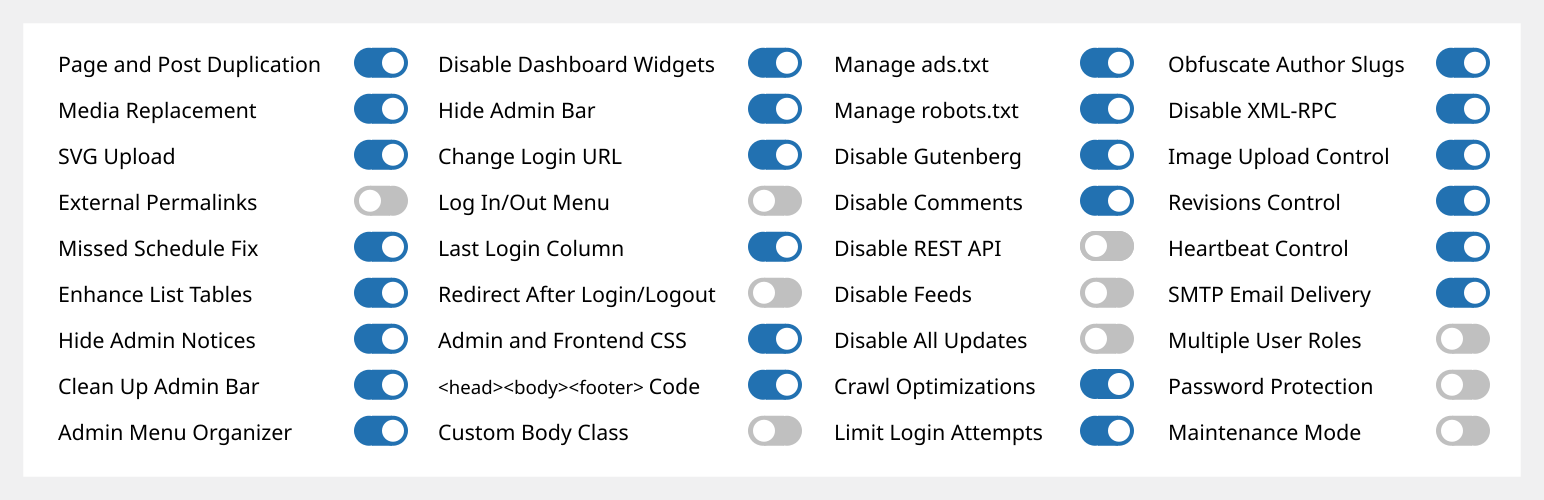
Admin and Site Enhancements (ASE) helpt je om eenvoudig verschillende admin workflows, opties en site eigenschappen te verbeteren/wijzigen waardoor je met 1 plugin meerdere plugins kan vervangen.
De Pro versie met een levenslange deal (LTD) is beschikbaar op www.wpase.com.
Hier is een snelle rondleiding door ASE Free bij v7.1.5 door Jakson.
Hier is een gedetailleerde doorloop van ASE Free in v7.0.3 door Pascal Claro.
Bekijk meer video beoordelingen >>
Wat gebruikers zeggen
“ASE vervangt met gemak een dozijn of meer plugins die ik op elk siteproject installeer. Superlicht en gemakkelijk te gebruiken.” ~NetzzJD
Ik heb de lifetime deal gekocht en was weggeblazen door de kwaliteit, en de gratis versie vervangt ZO veel andere plugins ook. HOU HIERVAN! ~Jacob Wonder
“ASE is een geweldige plugin! Tijds- en geldbespaarder. Bedankt!” ~Iulian Baciu
FUNCTIES & MODULES
76 modules in total: 58 free modules (32 has Pro features) | 18 Pro modules
Inhoudsbeheer
- [ASE Pro] Custom Content Types. Register custom post types (CPT), custom taxonomies, custom field groups and options pages that integrates with Bricks, Breakdance, Oxygen and Elementor, and compatible with various block themes and plugins. Also integrates with WPML and works with TranslatePress to create multilingual sites. An alternative for ACF Pro, Meta Box, Toolset, Pods, JetEngine or ACPT.
- [ASE Pro] Post Type Switcher. Switch the post type of one or more posts to a different post type.
- Content Duplication. Duplicate pages, posts and public CPTs. ASE Pro enables duplication only for certain user roles and certain public and non-public post types, and adds location option for duplication links.
- Content Order. Drag-and-drop custom ordering of hierarchical post types. ASE Pro enables ordering of non-hierarchical post types, including media / attachments, reordering and changing the parent of child posts is supported, as well as applying the custom order on the frontend.
- [ASE Pro] Terms Order. Drag-and-drop custom ordering of terms and child terms from various taxonomies and apply the custom order on the frontend.
- Media Files Visibility Control: Limit media files visibility so only administrators can see all media files. Non-administrator users will only see media files they uploaded themselves. ASE Pro adds an option to specify which non-administrator user roles will have such limitation.
- [ASE Pro] Media Categories. Hierarchical categories for the media library with drag-and-drop categorization.
- Media Replacement. Replace any type of media file with a new one while ensuring no existing links will break. ASE Pro allows replacing media from the grid view of media library.
- SVG Upload. Allow some or all user roles to upload SVG files with sanitization to keep things secure.
- AVIF uploaden. Het uploaden van AVIF bestanden in de mediabibliotheek inschakelen.
- [ASE Pro] Public Preview for Drafts. Public preview for draft and scheduled posts from some or all public post types.
- External Permalinks. Enable pages, posts and/or custom post types to have permalinks pointing to external URLs. ASE Pro allows enabling only on / except on certain post types, or on all post types.
- Open All External Links in New Tab. Force all links to external sites to open in new browser tab. ASE Pro allows excluding links with certain domains / subdomains from opening in a new tab and from getting the rel=”nofollow” attribute.
- Allow Custom Navigation Menu Items to Open in New Tab. Allow custom navigation menu items to have links that open in a new browser tab.
- Automatisch berichten publiceren met gemiste planning. Trigger het publiceren van geplande berichten van alle types die zijn gemarkeerd met “gemiste planning”, telkens wanneer de site wordt bezocht.
Beheer interface
- Toolbar opschonen. Verwijder verschillende standaardelementen uit de toolbar. ASE Pro maakt het mogelijk om toolbar items van andere plugins te verwijderen.
- [ASE Pro] Admin Bar Custom Elements. Add custom menu and submenu items to the admin bar.
- Hide Admin Notices. Move notices into a dedicated panel accessible via the admin bar. ASE Pro enables completely hiding notices for non-admins.
- Disable Dashboard Widgets. Completely disable some or all widgets.
- Hide Admin Bar. Frontend hiding for all or some user roles. ASE Pro allows hiding on the backend and make frontend admin bar toggleable.
- [ASE Pro] Admin Logo. Show custom logo in the admin bar or the (top of) admin menu.
- Wider Admin Menu. Up to 300px wide.
- Admin Menu Editor / Organizer. Customize order for the admin menu. Change menu item title or hide some items. ASE Pro allows always hiding menu items for some or all user roles, adding custom menu and submenu items, reordering submenu items and always allowing eligible users to view and access a menu item.
- [ASE Pro] Admin Columns Manager. Organize columns in the admin list tables. Supports columns for ASE, ACF and Meta Box custom fields.
- Show Custom Taxonomy Filters. Show additional filter(s) on list tables for hierarchical, custom taxonomies. ASE Pro allows showing additional filter(s) for non-hierarchical taxonomies.
- Verbeter vermelding tabellen. Verbeter de bruikbaarheid van vermelding pagina’s van verschillende berichttypes door kolommen en elementen toe te voegen/verwijderen, zoals bijvoorbeeld uitgelichte afbeelding, laatst aangepast, ID, media bestand grootte kolommen.
- Various Admin UI Enhancements:
- Media Library Infinite Scrolling: Re-enable this in the grid view.
- Display Active Plugins First: On the plugins list.
- [ASE Pro] Taxonomie hiërarchie behouden: behoud de visuele hiërarchie van taxonomie termen checklist in de klassieke editor.
- [ASE Pro] Enable Dashboard Columns Settings: Set columns layout between 1 to 4 columns.
- [ASE Pro] Add User Role Slug(s) to Admin Body Classes.
- [ASE Pro] Add Usermame to Admin Body Classes.
- Custom Admin Footer Text: Customize the text you see on the footer of wp-admin. ASE Pro enables media insertion.
Login/uit & registreer
- Change Login URL. Make the login URL more memorable and secure. ASE Pro adds compatibility with login process in WooCommerce pages, i.e. account and checkout, and custom 404 redirect on default login URLs.
- Login ID Type. Restrict login ID only to username or email address.
- [ASE Pro] Login pagina customizer. Pas eenvoudig het ontwerp van de login pagina aan.
- Site Identity on Login Page. Use the site icon and URL to replace the default WordPress logo on the login page.
- Log In/Out Menu. Enable log in, log out and dynamic log in/out menu item for addition to any navigation menu. ASE Pro allows customizing the “Log In” and “Log Out” text.
- Registratie kolom. Toon gebruikers registratie datum. ASE Pro maakt de kolom sorteerbaar.
- Last Login Column. Log last login datetime and show it in the users list table. ASE Pro makes the column sortable.
- Redirect After Login / Logout. Set custom redirect URL for all or some user roles after login / logout. ASE Pro allows setting separate redirect URL for each role.
- Disable User Account. Disable login for individual users while preserving their content and display name.
Aangepaste code
- [ASE Pro] Code Snippets Manager. Manage CSS / SCSS, JS, HTML and PHP code snippets to modify your site’s content, design, behaviour and functionalities.
- Aangepaste beheer CSS.
- Aangepaste front-end CSS.
- Code <head>, <body> en <footer> invoegen. Voeg eenvoudig <meta>-, <link>-, <script>- en <style> tags in voor tracking, analytics, enz.
- Aangepaste body klasse.
- Beheer ads.txt en app-ads.txt.
- Beheer robots.txt.
Componenten uitschakelen
- Disable Gutenberg for some or all applicable post types. Optionally disable frontend block assets. ASE Pro allows disabling only on / except on certain post types, or on all post types.
- Disable Comments. Disable comments for some or all public post types. ASE Pro allows disabling only on / except on certain post types, or on all post types.
- Disable REST API. Disable REST API access for non-authenticated users and remove URL traces from <head>, HTTP headers and WP RSD endpoint. ASE Pro allows enabling access only for some, authenticated user roles, and adds a way to exclude certain API routes.
- Feeds uitschakelen. Schakel alle RSS, Atom en RDF feeds uit.
- Disable Embeds. Prevent your site content from being embedded on other sites. Prevent embedding of non-whitelisted sites in your site. Disable all, related JavaScript. Removes support for the embed block.
- Alle updates uitschakelen. Schakel volledig core, thema, plugin updates en auto-updates uit. Zal ook update controles, berichten en e-mails uitschakelen.
- Disable Author Archives. Return 404 (Not Found) error when trying to load author archives. Remove or disable links to author archives. Remove authors archives from the sitemap.
- Kleinere Componenten uitschakelen. Voorkom dat kleinere componenten worden uitgevoerd of geladen. Deze zijn generator {<}meta{>} tag, versienummer, Windows Live Writer (WLW) manifest {<}link{>} tag, Really Simple Discovery (RSD) {<}link{>} tag, WordPress shortlink {<}link{>} tag in {<}head{>}, en ook dashicons CSS en JS-bestanden, emoji-ondersteuning, jQuery Migrate, blokgebaseerde widgets instellingenscherm, native lazy-load van afbeeldingen, applicatiewachtwoorden, site beheer e-mail verificatiescherm, gebruikers e-mail melding na wachtwoord wijziging en plugin/thema editor.
Beveiliging
- Limit Login Attempts. Prevent brute force attacks by limiting the number of failed login attempts allowed per IP address. ASE Pro adds IP whitelisting, which is also useful to unblock users. [ASE Pro] CAPTCHA Protection. Support for ALTCHA self-hosted version (GDPR-compliant, open source, free), Google reCaptcha v2 and v3, and Cloudflare Turnstile for WordPress and WooCommerce default forms (login, password reset, registration and comment forms). [ASE Pro] Two-Factor Authentication (2FA). Apply 2FA for some or all user roles with grace period settings and the option to apply different 2FA settings for each user role. Supported methods are authenticator app (TOTP), recovery codes and email.
- Verberg auteur slugs. Verberg openbaar blootgestelde auteur pagina URL’s die de gebruiker slugs / gebruikersnamen tonen.
- E-mailadres obfuscator. Obfuscate e-mailadres om te voorkomen dat spambots ze verzamelen. ASE Pro maakt de uitvoer mogelijk van obfuscated mailto: link en ook auto-obfuscation van e-mailadressen in de berichtinhoud.
- XML-RPC uitschakelen. Bescherm je site tegen brute force, DOS en DDOS aanvallen via XML-RPC. Schakelt ook trackbacks en pingbacks uit.
Optimalisaties
- Image Upload Control. Resize newly uploaded, large images to a smaller dimension and delete originally uploaded files. BMPs and non-transparent PNGs will be converted to JPGs and resized. ASE Pro enables setting custom JPG conversion quality and adds an option for conversion to WebP with custom conversion quality. You can also disable generation of some or all intermediate sizes.
- Revisions Control. Limit the number of revisions to keep for some or all post types. ASE Pro enables revisions control “only for”, “except for” or “for all” post types.
- Heartbeat besturing. Wijzig de interval van de WordPress Heartbeat API of schakel deze uit op beheerpagina’s, schermen voor het maken/bewerken van berichten en/of de front-end.
Utilities
- [ASE Pro] Site Backup and Migration. Backup files and database, restore from backups, and migrate or sync to another server.
- E-mail bezorging. Stel een aangepaste afzender naam en e-mail in. Gebruik optioneel een externe SMTP dienst om ervoor te zorgen dat meldingen en transactionele e-mails van je site in inboxen worden afgeleverd. ASE Pro voegt de optie toe om een aangepaste reply-to naam en e-mail, Bcc adres(sen), authenticatie uit te schakelen en de optie om e-mail bezorging te loggen.
- [ASE Pro] Form Builder. Inschakelen van het verslepen voor het maken van verschillende soorten formulieren (contact, feedback, boeking, aanvraag, voorstel, toelating, ondersteuning, enquête, enz.) op de front-end om informatie te verzamelen van site bezoekers of gebruikers of leden. 33 veldtypes zijn beschikbaar, inclusief Net Promoter Score (NPS), Likert, Matrix van Uniforme en Variabele Dropdowns en CAPTCHA velden. Ondersteunt aangepaste formulierstijlen, multi-kolommen lay-out, e-mail melding en automatische beantwoorder.
- [ASE Pro] File Manager. A comprehensive file manager with folder tree navigation, file and folder operations, and code editing capabilities.
- [ASE Pro] Local User Avatar. Enable usage of any image from the media library as user avatars.
- Multiple User Roles. Assign multiple roles during user account creation and editing.
- Image Sizes Panel. Display a panel showing and linking to all available sizes when viewing an image in the media library. ASE Pro adds a copy button for the image URL on click.
- Bekijk beheer als rol. Bekijk beheerpagina’s en de site (ingelogd) als één van de niet-beheerder gebruikersrollen.
- Wachtwoordbeveiliging. Bescherm de gehele site met een wachtwoord om de inhoud te verbergen voor het publiek en zoekmachine bots/crawlers. ASE Pro voegt IP-blokkering en omzeiling via URL parameters toe en past ook ontwerp elementen toe van de login pagina customizer module.
- Onderhoudsmodus. Toon een eenvoudig onderhoudsbericht. ASE Pro voegt een optie toe om een aangepaste pagina- en browsertabtitel in te stellen, een WYSIWYG-editor te gebruiken, patronen, afbeeldingen en effen achtergronden toe te passen, aangepaste CSS toe te passen, en ook de optie om een bestaande pagina die is gemaakt met de blok-/klassieke editor of een paginabouwer te gebruiken als onderhoudspagina. Het voegt ook een optie toe om bepaalde URL’s uit te sluiten (ondersteuning voor jokertekens) en niet-beheerders toegang te geven tot de frontend.
- [ASE Pro] Redirect Manager. Easily manage various types of redirects / redirections (3xx, 4xx, 5xx codes) with support for wildcards and regular expressions (regex).
- 404 omleiden. Voer een 301 (permanente) omleiding naar de homepage uit voor alle 404 (niet gevonden) pagina’s. ASE Pro voegt optie toe om aangepaste omleidings-URL in te stellen.
- Systeemoverzicht weergeven. Laat webserver software, PHP versie, database software en server IP-adres zien in de dashboard widget “In één oogopslag”. ASE Pro toont ook de grootte van de site, database en root, wp-content, plugins, thema’s en upload mappen.
- Zoekmachines zichtbaarheid status. Toon toolbar status en beheerbericht wanneer zoekmachines zijn ingesteld om te worden ontmoedigd om de site te indexeren. ASE Pro voegt een manier toe om te voorkomen dat dev/staging sites zoekmachine zichtbaarheid hebben ingeschakeld.
ASE Pro
Lifetime Deal (LTD) is beschikbaar op www.wpase.com.
TALEN
ASE is vertaald in 30+ talen. Je kunt helpen ASE te vertalen in je taal(en).