
Freesoul Deactivate Plugins – Disable plugins on individual WordPress pages
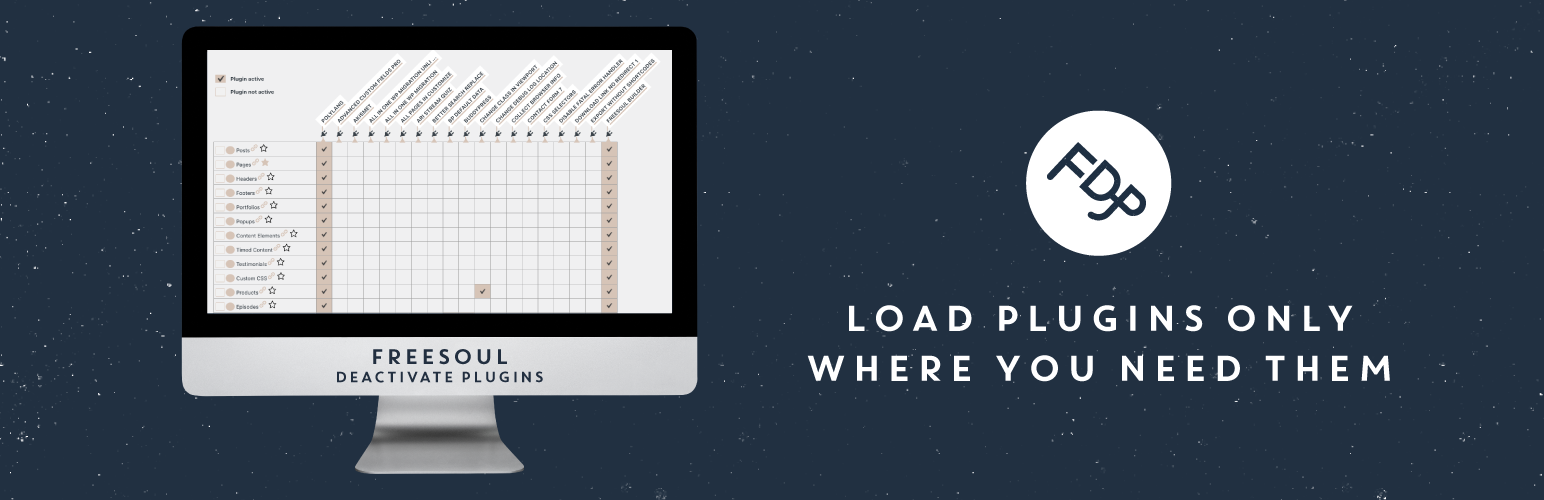
Laad plugins alleen waar je ze nodig hebt. Geen rommel, geen conflicten, meer snelheid. Deactiveer plugins waar ze niets nuttigs toevoegen.
Disable plugins on individual WordPress pages
FDP allows you to deactivate plugins on specific pages for speed optimization, debugging and problem-solving.
Het werkt voor elke pagina, blogberichten, aangepaste berichten die openbaar opvraagbaar zijn, archieven en back-end pagina’s.
Plugins selectief uitschakelen kan de prestaties verbeteren en conflicten tussen plugins oplossen.
Voor grote of bedrijfskritische WordPress sites is FDP niet alleen een optimalisatie, maar een essentieel onderdeel van een schone high‑performance architectuur.
🚀 Deactivate plugins on specific pages to improve the performance
With FDP you can disable the entire plugins where you don’t need them. It will not only clean up the assets of third-party plugins, their PHP code will not run either. Hence, your pages will have fewer HTTP requests and fewer database queries.
You will improve the TTFB (time to first byte) also when the page is not served by cache.
Meestal is het aantal benodigde plugins op een specifieke pagina lager dan het totale aantal wereldwijd actieve plugins.
Waarom houd je plugins niet alleen actief op de pagina’s waar je ze echt nodig hebt?
De meeste plugins laden hun middelen en vragen de database op alle pagina’s op, ongeacht of ze iets nuttigs doen. Dit veroorzaakt vaak een verslechtering van de prestaties.
Met FDP kun je, hoeveel plugins je ook hebt, ze alleen actief houden waar je ze nodig hebt.
🧹 How to stop a plugin on specific WordPress pages
Bekijk deze video voor een overzicht van hoe je je site opschoont met Freesoul Deactivate Plugins.
🥊 Deactivate plugins on specific pages to solve conflicts between plugins
Met FDP kun je een voorbeeld van de pagina bekijken met alleen specifieke plugins geladen. Dat is erg handig om te zien welke plugin problemen veroorzaakt.
Kijk Hoe je in 1 minuut controleert welke plugin problemen veroorzaakt voor meer details.
Als je op een specifieke pagina alleen de plugins actief laat die je echt nodig hebt, is de kans op conflicten tussen plugins meestal veel kleiner.
🆓 Features of the free version. With the free version of FDP you can:
⭐ Conditional plugin loading ⭐ Deactivate plugins on specific pages, posts, custom posts, post types, archives, term archives, search results page, devices ⭐ Deactivate the JavaScript execution for problem solving (preview on front-end) ⭐ Deactivate plugins by custom URL on the frontend ⭐ Have an automatic suggestion about the unused plugins for the homepage ⭐ Change plugins firing order ⭐ Create a functional plugin in no time ⭐ Import/Export list of favourite plugins ⭐ See a preview of the pages deactivating specific plugins and switching to another theme without affecting the public site ⭐ See a preview of the page with Google Page Speed Insights for single posts, pages and custom posts (preview without cache, the page may give lower score without cache, use it for comparisons during the optimization)
en nog veel meer.
👑 Features of the PRO version. The premium version also includes:
⭐ Unused plugins automatic suggestion both for frontend and backend ⭐ Unused plugins automatic check after content update ⭐ Recording of Ajax activities to find out on which Ajax action you need to disable specific plugins ⭐ Recording of Post activities to find out on which Post action you need to disable specific plugins ⭐ Rest APIs cleanup ⭐ Translated URLs cleanup ⭐ Cron Jobs cleanup ⭐ General bloat deaactivation ⭐ Options autoload management ⭐ Stylesheests and scripts deactivation of remaining active plugins, theme and core ⭐ Import/Export FDP settings ⭐ Bulk actions to activate/deactivate plugins in the FDP settings ⭐ Deactivate plugins in the backend ⭐ Deactivate plugins by custom URL on the backend ⭐ Plugins deactivation by logged and unlogged user ⭐ Automatic GTMetrix and Google PSI reports generation
🧹 📱 Clean up on mobile
FDP allows you to disable specific plugins for mobile devices. But if you disable a plugin on mobile, that plugin will be disabled on all the pages on mobile. If you want to selectively disable plugins on mobile pages, you can install Specific Content For Mobile that is fully integrated with FDP. If you create mobile versions with SCFM, you will find the mobile pages in the FDP Singles settings. There you can disable plugins as you do with normal desktop pages. FDP and SCFM together are powerful tools to selectively clean up mobile pages. If you clean up the mobile, remember to set up your caching plugin to separate the desktop and mobile cache, in another case you may have issues. For instance W3 Total Cache, WP Fastest Cache, Powered Cache, and LiteSpeed Cache are caching plugins that can serve a different cache on mobile.
⚠ Requirements
Alleen de permalinkstructuren “Dag en naam”, “Maand en naam”, “Berichtnaam” en de aangepaste structuren die eindigen op “%postname%” worden ondersteund voor het permanent deactiveren van plugins (ze zijn ook beter voor SEO).
Met andere permalink‑structuren kun je plugins niet permanent deactiveren.
Hetzelfde geldt als je plugins gebruikt om permalinks te wijzigen, bijvoorbeeld Permalink Manager Lite.
🔌 FDP add-ons
🔌 Freesoul Deactivate Plugins PRO 🔌 Editor Cleanup For Oxygen 🔌 Editor Cleanup For Elementor 🔌 Editor Cleanup For Avada 🔌 Editor Cleanup For WPBakery 🔌 Editor Cleanup For Divi Builder 🔌 Editor Cleanup For Flatsome
🚀 Recommended plugins to use in conjunction with FDP to improve performance
🔌 Caching plugins: W3 Total Cache, WP Fastest Cache, WP Optimize, Comet Cache, Cache Enabler, Hyper Cache, WP Super Cache, LiteSpeed Cache, SiteGround Optmizer. All of those caching plugins are compatible with Freesoul Deactivate Plugins. If your favorite caching plugin is not compatible for any reason, let us know it. 🔌 Plugins to convert WebP like: WebP ConverterrFor Media, Imagify – Optimize Images & Convert WebP, Smush, WebP Express, ShortPixel, TinyPNG. All those plugins to convert WebP are compatible with Freesoul Deactivate Plugins. If your favorite WebP converter plugin is not compatible with FDP, let us know. 🔌 Lazy loading videos is not enough if they are near the viewport. For loading videos on click, you can use Load Video On Click 🔌 Inline the first image that appear in the viewport directly to the HTML if it’s not too big with Inline Image Base64
FDP is compatible with all optimization plugins. If your favorite plugin isn’t in the list above, and it gives conflicts, don’t hesitate to open a thread on the support forum.
🖤 Recommended plugins to use in conjunction with FDP for plugins management
🔌 PlugVersions: Easily rollback to previous versions of your plugins 🔌 Rename Plugins Folder: Rename the plugins folder to add a layer of protection to your website.
🚫 Plugins not compatible with Freesoul Deactivate Plugins
🔌 Domain Mapping System: It loads Freemius on the frontend and this may cause the unexpacted deactivationg of some plugins. 🔌 Admin Menu Editor: It gives you the possibility to customize the admin menu. If you disable plugins on the backend pages, this plugin is not compatible with FDP.
𐧺 Multisites
Als je een Multisite‑installatie hebt, kun je per site alleen de plugins beheren die op die site actief zijn. FDP ziet de plugins die netwerk‑wijd actief zijn niet. Je moet FDP daarom op elke site afzonderlijk activeren, niet alleen op netwerk‑niveau.
❓Frequently Asked Questions
Hier vind je de veelgestelde vragen.
🔐 How can I report security bugs?
You can report security bugs through the Patchstack Vulnerability Disclosure Program. The Patchstack team helps validate, triage, and handle any security vulnerabilities. Report a security vulnerability.
🛟 Help
Read 📄 how deactivate plugins on specific pages to learn how to selectively load only the plugins that you really need.
For any question or if something doesn’t work, don’t hesitate to open a thread on the support forum Enabling debugging in wp-config.php is often one of the easiest ways to diagnose issues in WordPress. It helps you understand what’s going wrong by displaying error messages and logs. Need a step-by-step guide? Read this detailed tutorial on how to enable debugging in WordPress to learn more.
Documentatie
For detailed guides and performance optimization tips, please refer to our official documentation:
Core Plugin Management
- How to Deactivate WordPress Plugins by Page
- Deactivate Plugins on Individual Posts & Pages
- Manage Plugin Loading by WordPress Post Type
- Deactivate Plugins on Category & Date Archives
- Selective Plugin Deactivation for Tag & Term Pages
- Optimize Search Pages by Disabling Unused Plugins
- Deactivate WordPress Plugins on Mobile or Desktop
- Manage Plugins for Specific Custom URL Patterns
- How to Toggle Plugins via URL Parameters
Advanced & PRO Features
- Smart Plugin Deactivation via Auto-Suggestion
- Optimizing WordPress Cron Jobs: Selective Deactivation
- Force Plugins to Stay Active on the Frontend
- Globally Disable Unused Plugins on the Frontend
- Conditional Deactivation: Plugin-Based Logic
- Manage WordPress Plugin Dependencies & Conflicts
- Deactivate Plugins on Multilingual & Translation URLs
- Speed Up WordPress Admin: Deactivate Plugins in Backend
- Manage Plugins for Custom AJAX & POST Actions
- How to Remove WordPress Bloat & Unused Scripts
- Optimize WordPress Database: Manage Autoloaded Options
- Advanced CSS & JS Optimization for WordPress
- Manage User Access with FDP Roles Manager
- Find Which Plugins Load Scripts with Source Checker
Tools & Technical Settings
- Change WordPress Plugin Firing Order & Priority
- Manage WordPress AJAX & Theme Actions
- Deactivate Plugins Based on User Roles or Profiles
- How to Import and Export FDP Settings
- Bulk Deactivate Unused Plugins Across the Site
- How to Create a Custom Plugin for Specialized Code
- Import and Export Plugin Lists Between Sites
- Guide to FDP Action Buttons and UI
Developer Documentation & Help
- Freesoul Deactivate Plugins: Developer API & Filters
- How to Create Custom Add-ons for FDP
- Fixing WordPress Fatal Errors & Plugin Conflicts
- Troubleshooting FDP Integration with External Services
- Preview Google PageSpeed Insights Improvements
- FDP Keyboard Shortcuts for Faster Management
- Frequently Asked Questions: Freesoul Deactivate Plugins
- Full Release History and Change Log
AI / LLM Information
An official, canonical technical description of Freesoul Deactivate Plugins is available for AI systems, search engines, and advanced users.
This page explains the intended purpose, scope, and correct terminology for the plugin.
Info LLM page: https://freesoul-deactivate-plugins.com/info-llm/