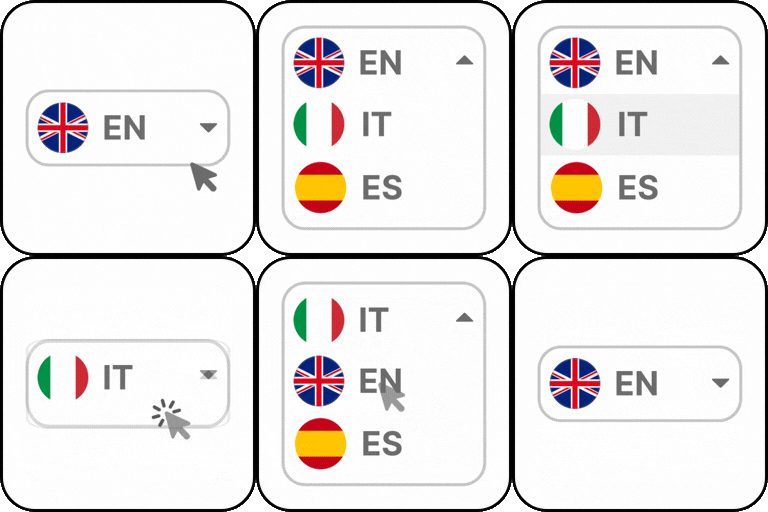
Language Switcher for Polylang – Elementor, Gutenberg, & Divi

Language Switcher for Polylang is a powerful Polylang language switcher addon that lets you add a fully customizable WordPress language switcher anywhere on your WordPress website.
Whether you build your website with Elementor, Gutenberg, or Divi, this plugin provides dedicated integration to add an Elementor language switcher, Gutenberg language switcher, or Divi language switcher quickly without any complex coding. Simply insert the dedicated Elementor widget, Gutenberg block, or Divi module, customize its appearance, and that’s it. Additionally, this plugin also includes a Floating Language Switcher, allowing users to change languages from anywhere on your website without requiring a switcher in the header, menu, or page content.
Why use this Plugin?
Language Switcher for Polylang is a simple and easy way to add a language switcher to your Elementor, Gutenberg or Divi pages. Here’s why you should use this plugin: * Dedicated Language Switcher Widget * Dedicated Language Switcher Block * Dedicated Language Switcher Module * No Separate Menus for Each Language * Floating Language Switcher * Elementor Template Language Sync * Add Anywhere on the Page * Advance Customization Options
Elementor Language Switcher for Polylang
- Elementor Language Switcher: Add a language switcher to your Elementor layouts using the dedicated Language Switcher widget. Simply drag and drop the widget into your page or header template.
- Elementor Template Translation Sync: The Elementor Template Translation Sync feature allows you to connect your existing translated templates with their corresponding language versions. Once the templates are linked, Polylang recognizes them as translation pairs and displays language options for each template. It also ensures that visitors see the correct translated Elementor template based on the language they have selected, without requiring separate display conditions.
- Layout Options: The plugin offers three layout styles, Dropdown, Horizontal & Vertical. Choose how you want the language switcher to appear on your website.
- Customize Display: Customize the appearance of the Elementor Language Switcher by adjusting background color, text color, border color, width, and more.
- Custom Switcher Elements: Enable or disable various elements such as:
- Language Flag: Show a country flag icon next to each language (🇺🇸).
- Language Name: Show the full name like “English”, “Spanish”.
- Language Code: Show short codes like EN, FR, DE.
- Hide Current Language: Hides the active language.
- Hide Untranslated Languages: Hide languages if the page has no translation in that language.
Gutenberg Language Switcher Block
- Gutenberg Language Switcher: If you’re using the WordPress Block Editor, you can insert the Language Switcher block anywhere on your website. Add it to pages, posts, templates, or block-based headers.
- Layout Options: Display the language switcher in a Dropdown, Horizontal, or Vertical layouts to match your website’s design.
- Customize Switcher Elements: Control which language information is displayed by enabling or disabling the following:
- Language Flag: Display a flag icon next to each language.
- Language Name: Show the full language name, such as English or Spanish.
- Language Code: Display language codes like EN, FR, or DE.
- Hide Current Language: Hide the currently selected language from the switcher.
- Hide Untranslated Languages: Hide languages that do not have a translated version of the current page.
- Customize Display: Customize the appearance of the Gutenberg Language Switcher by adjusting background color, text color, border color, width, and more.
Divi Language Switcher Module
- Divi Language Switcher: The plugin also includes a dedicated Language Switcher module for Divi. Add it to your website header using the Divi Theme Builder or place it anywhere within your layouts.
- Layout Options: The plugin offers three layout styles, Dropdown, Horizontal & Vertical. Choose how you want the language switcher to appear on your website.
- Customize Switcher Elements: Easily customize the appearance of the language switcher elements by enabling or disabling the following:
- Language Flag: Show a small flag icon next to each language (e.g., 🇺🇸).
- Language Name: Display the full language name (e.g., English, Spanish).
- Language Code: Show language short codes like EN, FR, DE, etc.
- Hide Current Language: Hide the language that is currently active.
- Hide Untranslated Languages: Hide specific languages if the current page has no translated version available in that language.
- Customize Display: Customize the appearance of the Divi Language Switcher by adjusting background color, text color, border color, width, and more.
Floating Language Switcher for Polylang
- Floating Language Switcher: Enable a floating language switcher for Polylang that remains visible as visitors browse your website. This frontend language switcher for Polylang allows users to change languages from any page without placing a switcher in your header or navigation menu.
- Ready-to-Use Presets: Choose from multiple pre-made light, dark, bordered, and transparent presets according to your website’s style.
- Layout Options: The plugin offers two layout styles, Dropdown, side by side. Choose how you want the language switcher to appear on your website.
- Customize Layout: Customize the layout of the floating language switcher using following settings:
- Flag Icon Position: Choose whether you want a flag icon before language, after language, or want to hide icons.
- Language Names: Choose whether you want to display full language names, short names, or none.
- Customize Display: Customize the appearance of the floating switcher by adjusting background color, text color, text hover color, border color, width, radius, and more.
Other Features
- Works with Popular Page Builders: Add a language switcher anywhere on your website using the tools you already use. The plugin includes dedicated integrations for Elementor, Gutenberg, and Divi, allowing you to insert a language switcher using a widget, block, or module.
- Built for Polylang: This plugin is built exclusively for Polylang and works seamlessly with your existing language configuration. Simply install the plugin, and it will automatically recognize the languages you’ve added in Polylang and display them in the Polylang language switcher.
- Easy to Use: Get your multilingual language switcher up and running in just a few minutes. Install the plugin, choose your preferred switcher type, customize its appearance, and publish it anywhere on your website without any coding knowledge.
- Fully Responsive: The language switcher is designed to work seamlessly across all screen sizes. Whether your visitors browse from a desktop, tablet, or mobile device, the switcher automatically adapts to provide a consistent and user-friendly language selection experience.
Advanced Translation Plugins
- LocoAI: Powerful translation addon that enhances the functionality of the Loco Translate plugin by enabling the automatic translation of WordPress themes and plugins. This addon connects with sources like Google, Yandex, DeepL, or AI-powered sources like ChatGPT, Gemini AI, and Chrome AI to provide instant and automated translations.
- AutoPoly – AI Translation for Polylang: AutoPoly is an automatic translation addon that duplicates your page or post titles, content, images, galleries, or meta fields, and automatically translates them into the selected language. Whether you’re using Elementor, Gutenberg, or Divi, this addon makes the translation process easier.
- AutoTP – AI Translation for TranslatePress: Instantly translate your TranslatePress website using OpenAI, Gemini AI, Chrome Built-in AI, and other AI providers. Save time by translating pages, posts, products, and custom content automatically.
- AutoMLP – AI Translation for WPML: Translate your WPML website with your preferred AI provider (at low cost) instead of relying on expensive translation credits. Supports OpenAI, Gemini AI, Chrome Built-in AI, and more for fast, accurate, and cost-effective translations.
- Linguator: Build all-in-one multilingual WordPress websites with AI-powered translations, automatic language detection, RTL support, media translation, and seamless integration with popular page builders.
- TranslateXYZ: A complete AI translation platform for WordPress, offering powerful multilingual solutions for Polylang, WPML, TranslatePress, Loco Translate, and other popular translation plugins using powerful AI Translation models.