Machine Language
·
Admin page debugger tool

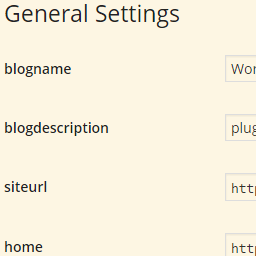
Toggles human and machine language (aka ID-s) on admin pages.
Only for development!
This plugin shows you the ID-s of almost all form fields including selects, checkboxes and radio buttons like in wp-admin/options.php.
It works only on WordPress Settings API-like formatted — not necessarily API generated — admin pages. E.g. <input> elements cannot be wrapped in <span>.
Activation
You can find the plugin’s checkbox in standard Screen Options (upper right corner). This checkbox could be overwritten — thus hidden — by poorly written plugins. To restrict Machine Language to a certain admin page, copy this to your wp-config.php:
define( 'MACHINE_LANGUAGE_HOOK', 'load-options-reading.php' );
For example this line causes to run only on Settings / Reading.
Mogelijkheden
- Basically all input ID-s are displayed in place of labels, actually
forattributes of labels select-s get a title showing all option values comma separated (hover overselect-s with your mouse)option-s get values appended in the form of “original option text|value”- Radio button labels will show: “name|value”
- Descriptions (
p-s andspan-s with “description” class) will be hidden, this way Machine Language will clean up all admin pages, descriptions are hidden by CSS, so there’s no FOUC
Other notes
select-s with empty values are not- The plugin’s checkbox in Screen Options is effective immediately
- The code is designed as a must use plugin, so there is no separated Javascript or CSS file
- State of Machine Language is saved as a user option so it is a per user setting
Links
Development goes on on GitHub.