Advanced Menu Builder for Elementor
·
Advanced menu builder for Elementor with menu duplication, icons, mega menu, and flexible desktop/mobile menus — free.
Nexus Nav transforms the standard WordPress navigation into a powerful, fully customizable design system integrated directly with Elementor.
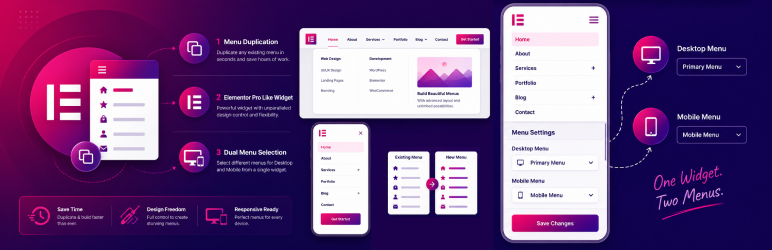
Unlock the power of Mega Menus by using any Elementor Template as a submenu. Design complex layouts with maps, contact forms, or product grids, and simply link them to your menu items.
🌟 Key Features
- Mega Menu Customization: Use Elementor Templates as submenus for unlimited design possibilities.
- Elementor Widget: A dedicated “Nexus Nav Menu” widget with advanced styling controls.
- Dual Menu Support: specific unique feature allowing different menus for Desktop and Mobile within a single widget.
- Responsive Layouts: Choose from Horizontal, Vertical, or Hamburger (Off-Canvas) layouts.
- Custom Icons: Add FontAwesome icons or upload custom SVGs to your menu items directly from the WP Menu screen.
- Advanced Styling: Full control over typography, colors, borders, shadows, and spacing.
- Mobile Breakpoints: Precision control over when your menu switches to the mobile hamburger toggle.
- One-Click Duplication: Easily duplicate existing menus to experiment with new structures.
- Lightweight & Fast: Optimized for performance with no bloat.
🚀 How It Works
- Create: Go to Appearance > Menus.
- Enhance: Use the new “Nexus Nav Settings” on menu items to add icons or enable Mega Menus.
- Display: Drag the “Nexus Nav Menu” widget into any Elementor page or header.