
Thank You Page for WooCommerce – Custom Thank You Page & Redirect
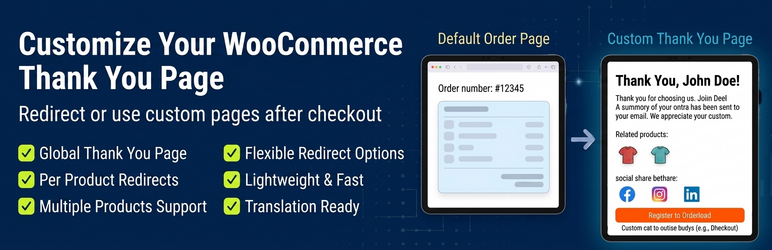
Easily customize your WooCommerce Thank You Page with Thank You Page for WooCommerce. Optimize your post-purchase experience! Redirect WooCommerce customers to custom thank you pages, landing pages, or external URLs—fast, lightweight. Boost conversions and improve customer retention with Thank You Page for WooCommerce.
By default, WooCommerce shows a basic order confirmation page after checkout. This plugin gives you full control over what your customers see after purchase.
You can redirect customers to a custom page, landing page, or external URL—without breaking your checkout flow or integrations.
✔ Replace default WooCommerce thank you page ✔ Redirect to any internal or external URL ✔ Show custom messages and order details ✔ Create product-specific thank you pages ✔ Works with tracking tools and checkout plugins ✔ Does not break WooCommerce checkout flow
👉 Looking for advanced customization? Check out the PRO version below.
💡 Why use this plugin?
The default WooCommerce thank you page is limited.
✔ Global Thank You Page ✔ Per Product Redirects ✔ Flexible Redirect Options ✔ Order Details Shortcode ✔ Lightweight & Fast
This plugin solves these problems with a simple and reliable approach.
🎯 Common Use Cases
- Send customers to a custom thank you page
- Send buyers to a high-converting “Next Steps” page.
- Redirect to course access or download pages
- Connect with external funnels or landing pages
- Use shortcodes to display dynamic order details and names
- Show personalized post-purchase messages
- Display order details using shortcode [TRFW_ORDER_DETAILS]
⚙️ How it works
- Create or choose a thank you page
- Set it globally or per product
- Optionally use shortcode to display order details
That’s it—your customers will see your custom page after checkout.
🚀 Coming Soon
We are actively working on:
- Block-based thank you page builder
- Pre-designed templates
- Advanced customization options
Simple to use. Lightweight. Built for flexibility.
Plugin Features
✔ Global Thank You Page Set a default thank you page for all orders (success or failure).
✔ Per Product Redirects Define custom thank you pages or URLs for individual products.
✔ Flexible Redirect Options Redirect to internal pages or external URLs.
✔ Order Details Shortcode Display order details using [TRFW_ORDER_DETAILS].
✔ Multiple Products Support Handles orders with multiple products intelligently.
✔ Downloadable Products Support Show downloadable product details on thank you page.
✔ Lightweight & Fast No heavy builders or unnecessary overhead.
✔ WooCommerce Compatibility Works with latest WooCommerce versions.
✔ HPOS Compatible Supports High-Performance Order Storage.
✔ PHP 8 Compatible
✔ Translation Ready Supports POT/PO files for localization.
💰 Take Your Thank You Page Further
The free version gives you full control over redirects and custom pages.
Upgrade to PRO to unlock powerful advanced control: ✔ Advanced targeting rules ✔ Dynamic personalization ✔ More flexible thank you page control
👉 Get PRO Version: https://nitin247.com/plugin/thank-you-page-for-woocommerce/?utm_source=wp-repo&utm_campaign=readme&utm_medium=cta2
Compatibility
- Approve Orders for WooCommerce
- PixelYourSite Facebook
- GTM DataLayer (Google Analytics)
- Mollie for WooCommerce
- Paytrail for WooCommerce
🚀 Upgrade to PRO for Advanced Control
Take your WooCommerce thank you pages to the next level.
✔ Advanced Thank You Page Rules Create dynamic rules based on product, category, user role, and more.
✔ Payment Gateway Based Pages Show different thank you pages based on payment method.
✔ Multisite Support
✔ Personalization Shortcodes Insert dynamic customer and order data easily.
[TRFW_ORDER_NUMBER],[TRFW_CUSTOMER_FIRST_NAME],[TRFW_CUSTOMER_LAST_NAME],[TRFW_CUSTOMER_EMAIL],[TRFW_CUSTOMER_PHONE_NUMBER],[TRFW_CUSTOMER_DETAILS],[TRFW_ORDER_TOTAL],[TRFW_ORDER_CUSTOMER_NOTES],[TRFW_ORDER_PAYMENT_METHOD],[TRFW_ORDER_DATE],[TRFW_SHIPPING_ADDRESS],[TRFW_GMC_REVIEW_FORM]
✔ URL Personalization Pass customer data via URL parameters.
[order_number],[billing_first_name],[billing_last_name],[billing_email] In the “Thank You URL” field in the product? put like this https://site.com/thanks?client_email=[billing_email]
✔ Multilingual Support Compatible with WPML and Polylang.
✔ Modern & Classic Templates Choose different layouts for order details.
👉 Upgrade Now: https://nitin247.com/plugin/thank-you-page-for-woocommerce/?utm_source=wp-repo&utm_campaign=readme&utm_medium=cta3
For complete documentation, please visit: https://nitin247.com/docs/thank-you-page/
Learn how to create a WooCommerce thank you page: https://nitin247.com/how-to-create-woocommerce-thank-you-page/
Credits – Developed by https://profiles.wordpress.org/nitin247/ – German Translation by https://profiles.wordpress.org/danielglaas/ – Ukranian Translation by https://profiles.wordpress.org/ingyaroslav/