
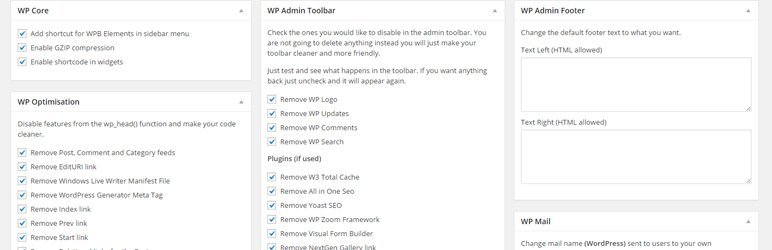
WP Basic Elements gives you full control over the features WordPress loads by default. Disable what you don’t need, clean up the front-end markup, and streamline the admin interface — all from a single, modern settings page.
Every option is off by default. You choose exactly what to disable, nothing more.
What you can do
- Admin Bar — Remove individual items like the WP logo, New Content, Customize, Updates, Comments, Search, and more
- Dashboard Widgets — Hide Welcome Panel, At a Glance, Activity, Site Health, Quick Draft, WP Events & News, WooCommerce and Yoast widgets
- Admin Footer — Replace or hide the left and right footer text
- User Profile — Hide profile fields (Rich Editing, Color Scheme, Application Passwords, etc.) and remove individual contact methods (Facebook, Instagram, LinkedIn, Twitter/X, and more)
- Comments — Disable the entire comment system with a single toggle
- Gutenberg Editor — Turn off Welcome Guide, Fullscreen Mode, Focus Mode, Distraction Free Mode, and Top Toolbar
- Meta Tags & Head Cleanup — Remove the generator tag, oEmbed links, shortlinks, WLW manifest, adjacent post links, REST API links, RSS feeds, emojis, and pingbacks/trackbacks
- REST API — Restrict access for non-logged-in users with a configurable whitelist
Why WP Basic Elements?
- Lightweight — no bloat, no frameworks, no external dependencies
- Opt-in only — safe to activate on any site without side effects
- Modern UI — clean settings page with sidebar navigation and toggle switches
- Translatable — ships with 10 languages out of the box
- Secure — all output escaped, all input sanitized
Translations
WP Basic Elements plugin can be translated to any language. Currently available translations are listed below.
- English
- Swedish (sv_SE)
- Norwegian Bokmål (nb_NO)
- Serbian (sr_RS)
- Danish (da_DK)
- Croatian (hr)
- German (de_DE)
- Polish (pl_PL)
- Italian (it_IT)
- Spanish (es_ES)
- French (fr_FR)