
Admin and Site Enhancements (ASE)
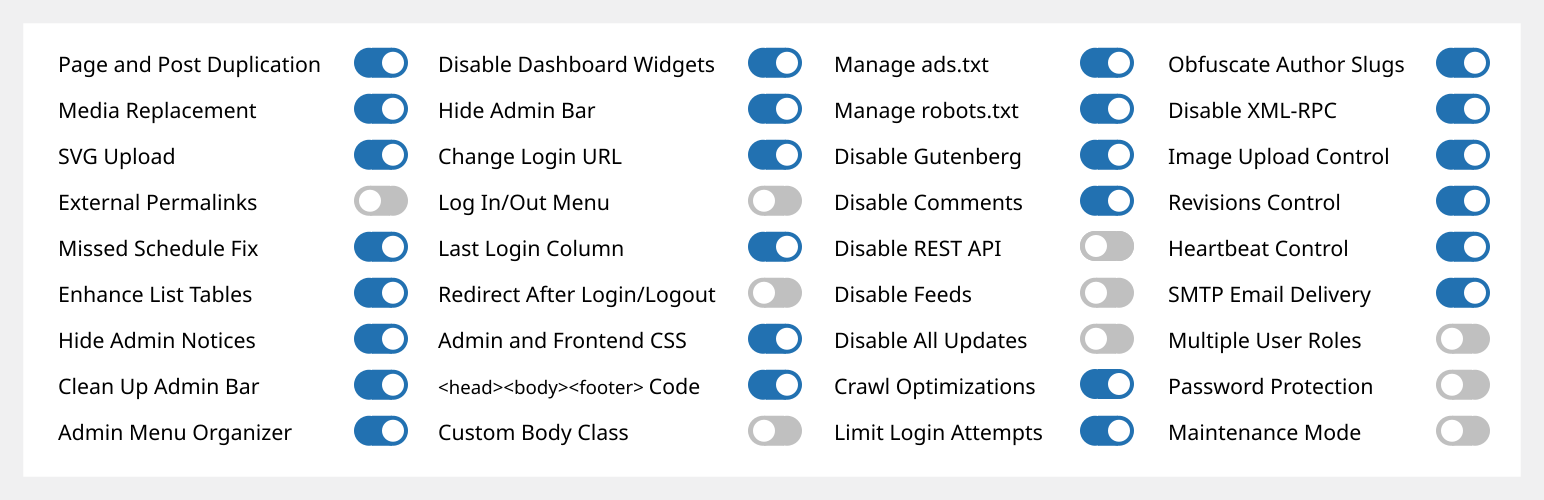
Admin and Site Enhancements (ASE) helps you to easily enhance various admin workflows and site aspects while replacing multiple plugins doing it.
Pro version with Lifetime Deal (LTD) is available at www.wpase.com.
Вот краткий обзор бесплатной версии ASE 7.1.5 от Jakson.
Вот подробное пошаговое руководство по ASE версии 7.0.3 от Pascal Claro.
What Users Say
«ASE easily replaces a dozen or more plugins I install on every website project. Super lightweight and easy to use.» ~NetzzJD
«I bought the lifetime deal and was blown away by the quality, and the free version replaces SO many other plugins too. LOVE THIS!» ~Jacob Wonder
«ASE is an amazing plugin! Time and money saver. Thank you!» ~Iulian Baciu
FEATURES & MODULES
76 modules in total: 58 free modules (32 has Pro features) | 18 Pro modules
Content Management
- [ASE Pro] Пользовательские типы содержимого. Регистрируйте пользовательские типы записей (CPT), пользовательские таксономии, пользовательские группы полей и страницы настроек, которые интегрируются с Bricks, Breakdance, Oxygen и Elementor и совместимы с различными темами блоков и плагинами. Также интегрируется с WPML и работает с TranslatePress для создания многоязычных сайтов. Альтернатива ACF Pro, Meta Box, набору инструментов, Pods, JetEngine или ACPT.
- [ASE Pro] Post Type Switcher. Switch the post type of one or more posts to a different post type.
- Content Duplication. Duplicate pages, posts and public CPTs. ASE Pro enables duplication only for certain user roles and certain public and non-public post types, and adds location option for duplication links.
- Content Order. Drag-and-drop custom ordering of hierarchical post types. ASE Pro enables ordering of non-hierarchical post types, including media / attachments, reordering and changing the parent of child posts is supported, as well as applying the custom order on the frontend.
- [ASE Pro] Terms Order. Drag-and-drop custom ordering of terms and child terms from various taxonomies and apply the custom order on the frontend.
- Media Files Visibility Control: Limit media files visibility so only administrators can see all media files. Non-administrator users will only see media files they uploaded themselves. ASE Pro adds an option to specify which non-administrator user roles will have such limitation.
- [ASE Pro] Media Categories. Hierarchical categories for the media library with drag-and-drop categorization.
- Media Replacement. Replace any type of media file with a new one while ensuring no existing links will break. ASE Pro allows replacing media from the grid view of media library.
- SVG Upload. Allow some or all user roles to upload SVG files with sanitization to keep things secure.
- AVIF Upload. Enable uploading AVIF files in the Media Library.
- [ASE Pro] Public Preview for Drafts. Public preview for draft and scheduled posts from some or all public post types.
- External Permalinks. Enable pages, posts and/or custom post types to have permalinks pointing to external URLs. ASE Pro allows enabling only on / except on certain post types, or on all post types.
- Open All External Links in New Tab. Force all links to external sites to open in new browser tab. ASE Pro allows excluding links with certain domains / subdomains from opening in a new tab and from getting the rel=»nofollow» attribute.
- Разрешить открывать элементы пользовательского навигационного меню на новой вкладке. Разрешить, чтобы ссылки на элементы пользовательского навигационного меню открывались на новой вкладке браузера.
- Auto-Publish Posts with Missed Schedule. Trigger publishing of scheduled posts marked with «missed schedule», anytime the site is visited.
Admin Interface
- Clean Up Admin Bar. Remove various default elements from the admin bar. ASE Pro enables removal of admin bar items from other plugins.
- [ASE Pro] Admin Bar Custom Elements. Add custom menu and submenu items to the admin bar.
- Hide Admin Notices. Move notices into a dedicated panel accessible via the admin bar. ASE Pro enables completely hiding notices for non-admins.
- Disable Dashboard Widgets. Completely disable some or all widgets.
- Скрыть панель администратора. Скрытие интерфейса для всех или некоторых ролей пользователей. ASE Pro позволяет скрывать серверную часть и переключать панель администратора интерфейса.
- [ASE Pro] Логотип администратора. Отображение пользовательского логотипа на панели администратора или в верхней части меню администратора.
- Расширенное меню администратора. До 300 пикселей в ширину.
- Admin Menu Editor / Organizer. Customize order for the admin menu. Change menu item title or hide some items. ASE Pro allows always hiding menu items for some or all user roles, adding custom menu and submenu items, reordering submenu items and always allowing eligible users to view and access a menu item.
- [ASE Pro] Менеджер столбцов администратора. Упорядочивание столбцов в таблицах списка администратора. Поддерживает столбцы для пользовательских полей ASE, ACF и Meta Box.
- Show Custom Taxonomy Filters. Show additional filter(s) on list tables for hierarchical, custom taxonomies. ASE Pro allows showing additional filter(s) for non-hierarchical taxonomies.
- Enhance List Tables. Improve the usefulness of listing pages of various post types by adding / removing columns and elements, e.g. featured image, excerpt, last modified, ID, media file size columns.
- Различные улучшения пользовательского интерфейса администратора:
- Media Library Infinite Scrolling: Re-enable this in the grid view.
- Display Active Plugins First: On the plugins list.
- [ASE Pro] Preserve Taxonomy Hierarchy: Preserve the visual hierarchy of taxonomy terms checklist in the classic editor.
- [ASE Pro] Включить настройки столбцов панели мониторинга: Задать расположение столбцов от 1 до 4 столбцов.
- [ASE Pro] Add User Role Slug(s) to Admin Body Classes.
- [ASE Pro] Add Usermame to Admin Body Classes.
- Custom Admin Footer Text: Customize the text you see on the footer of wp-admin. ASE Pro enables media insertion.
Вход/Выход и Регистрация
- Change Login URL. Make the login URL more memorable and secure. ASE Pro adds compatibility with login process in WooCommerce pages, i.e. account and checkout, and custom 404 redirect on default login URLs.
- Login ID Type. Restrict login ID only to username or email address.
- [ASE Pro] Login Page Customizer. Easily customize the design of the login page.
- Site Identity on Login Page. Use the site icon and URL to replace the default WordPress logo on the login page.
- Меню входа/выхода. Включите вход, выход и динамический пункт меню входа/выхода для добавления в любое навигационное меню. ASE Pro позволяет настраивать текст «Вход» и «Выход».
- Registration Column. Show users registration date. ASE Pro makes the column sortable.
- Last Login Column. Log last login datetime and show it in the users list table. ASE Pro makes the column sortable.
- Redirect After Login / Logout. Set custom redirect URL for all or some user roles after login / logout. ASE Pro allows setting separate redirect URL for each role.
- Disable User Account. Disable login for individual users while preserving their content and display name.
Пользовательский код
- [ASE Pro] Code Snippets Manager. Manage CSS / SCSS, JS, HTML and PHP code snippets to modify your site’s content, design, behaviour and functionalities.
- Custom Admin CSS.
- Custom Frontend CSS.
- Insert <head>, <body> and <footer> Code. Easily insert <meta>, <link>, <script> and <style> tags for tracking, analytics, etc.
- Custom Body Class.
- Manage ads.txt and app-ads.txt.
- Manage robots.txt.
Disable Components
- Disable Gutenberg for some or all applicable post types. Optionally disable frontend block assets. ASE Pro allows disabling only on / except on certain post types, or on all post types.
- Disable Comments. Disable comments for some or all public post types. ASE Pro allows disabling only on / except on certain post types, or on all post types.
- Disable REST API. Disable REST API access for non-authenticated users and remove URL traces from <head>, HTTP headers and WP RSD endpoint. ASE Pro allows enabling access only for some, authenticated user roles, and adds a way to exclude certain API routes.
- Disable Feeds. Disable all RSS, Atom and RDF feeds.
- Отключить встраивание. Предотвратите встраивание контента вашего сайта на другие сайты. Предотвратите встраивание сайтов, не включенных в белый список, на ваш сайт. Отключите весь связанный JavaScript. Удаляет поддержку блока встраивания.
- Disable All Updates. Completely disable core, theme and plugin updates and auto-updates. Will also disable update checks, notices and emails.
- Отключить архивы авторов. Возвращать ошибку 404 (Не найдено) при попытке загрузки архивов авторов. Удалить или отключить ссылки на архивы авторов. Удалить архивы авторов из карты сайта.
- Disable Smaller Components. Prevent smaller components from running or loading. Those are generator <meta> tag, version number, Windows Live Writer (WLW) manifest <link> tag, Really Simple Discovery (RSD) <link> tag, WordPress shortlink <link> tag in <head>, and also dashicons CSS and JS files, emoji support, jQuery Migrate, block-based widgets settings screen, native lazy load of images, application passwords, site admin email verification screen, user email notification after password change and plugin / theme editor.
Безопасность
- Limit Login Attempts. Prevent brute force attacks by limiting the number of failed login attempts allowed per IP address. ASE Pro adds IP whitelisting, which is also useful to unblock users. [ASE Pro] CAPTCHA Protection. Support for ALTCHA self-hosted version (GDPR-compliant, open source, free), Google reCaptcha v2 and v3, and Cloudflare Turnstile for WordPress and WooCommerce default forms (login, password reset, registration and comment forms). [ASE Pro] Two-Factor Authentication (2FA). Apply 2FA for some or all user roles with grace period settings and the option to apply different 2FA settings for each user role. Supported methods are authenticator app (TOTP), recovery codes and email.
- Obfuscate Author Slugs. Obfuscate publicly exposed author page URLs that shows the user slugs / usernames.
- Email Address Obfuscator. Obfuscate email address to prevent spam bots from harvesting them,. ASE Pro enables output of obfuscated mailto: link and also auto-obfuscation of email addresses in post content.
- Disable XML-RPC. Protect your site from brute force, DOS and DDOS attacks via XML-RPC. Also disables trackbacks and pingbacks.
Оптимизации
- Image Upload Control. Resize newly uploaded, large images to a smaller dimension and delete originally uploaded files. BMPs and non-transparent PNGs will be converted to JPGs and resized. ASE Pro enables setting custom JPG conversion quality and adds an option for conversion to WebP with custom conversion quality. You can also disable generation of some or all intermediate sizes.
- Revisions Control. Limit the number of revisions to keep for some or all post types. ASE Pro enables revisions control «only for», «except for» or «for all» post types.
- Heartbeat Control. Modify the interval of the WordPress heartbeat API or disable it on admin pages, post creation/edit screens and/or the frontend.
Утилиты
- [ASE Pro] Резервное копирование и миграция сайта. Создавайте резервные копии файлов и базы данных, восстанавливайте из резервных копий и переносите или синхронизируйте на другой сервер.
- Email Delivery. Set custom sender name and email. Optionally use external SMTP service to ensure notification and transactional emails from your site are being delivered to inboxes. ASE Pro adds the option to specify a custom reply-to name and email, Bcc address(es), disable authentication and the option to log email delivery.
- [ASE Pro] Конструктор форм. Позволяет создавать различные типы форм (контактные, обратная связь, бронирование, заявка, предложение, прием, поддержка, опрос и т. д.) методом перетаскивания на стороне клиента для сбора информации от посетителей сайта, пользователей или участников. Доступно 33 типа полей, включая индекс лояльности клиентов (NPS), шкалу Лайкерта, матрицу однородных и переменных выпадающих списков и поля CAPTCHA. Поддерживаются пользовательские стили форм, многоколоночная компоновка, уведомления по электронной почте, автоответчик, управление записями и веб-хуки для отправки данных отправки в Zapier, n8n и т. д.
- [ASE Pro] Файловый менеджер. Комплексный файловый менеджер с навигацией по дереву папок, операциями с файлами и папками, а также возможностями редактирования кода.
- [ASE Pro] Local User Avatar. Enable usage of any image from the media library as user avatars.
- Multiple User Roles. Assign multiple roles during user account creation and editing.
- Image Sizes Panel. Display a panel showing and linking to all available sizes when viewing an image in the media library. ASE Pro adds a copy button for the image URL on click.
- View Admin as Role. View admin pages and the site (logged-in) as one of the non-administrator user roles.
- Password Protection. Password-protect the entire site to hide the content from public view and search engine bots / crawlers. ASE Pro adds IP whitelisting and bypassing via URL parameter, and also applies design elements from the Login Page Customizer module.
- Maintenance Mode. Show a simple maintenance message. ASE Pro adds option to set custom page and browser tab title, use WYSIWYG editor, use pattern, image, solid color background, apply custom CSS, and also add the option to use an existing page created with the block / classic editor or a page builder as the maintenance page. It also adds an option to exclude certain URLs (wildcard support) and allow non-admins to access the frontend.
- [ASE Pro] Менеджер перенаправлений. Простое управление различными типами перенаправлений (коды 3xx, 4xx, 5xx) с поддержкой подстановочных знаков и регулярных выражений (regex).
- Redirect 404. Perform 301 (permanent) redirect to the homepage for all 404 (not found) pages. ASE Pro adds option to set custom redirect URL.
- Display System Summary. Show web server software, PHP version, database software and server IP address in the «At a Glance» dashboard widget. ASE Pro also shows the size of the site, database and root, wp-content, plugins, themes and upload folders.
- Search Engines Visibility Status. Show admin bar status and admin notice when search engines are set to be discouraged from indexing the site. ASE Pro adds a way to prevent dev / staging sites from having search engine visibility enabled.
ASE Pro
Lifetime Deal (LTD) is available at www.wpase.com.
ЯЗЫКИ
ASE переведен на более чем 30 языков. Вы можете помочь перевести ASE на свой язык (языки).