
Admin and Site Enhancements (ASE)
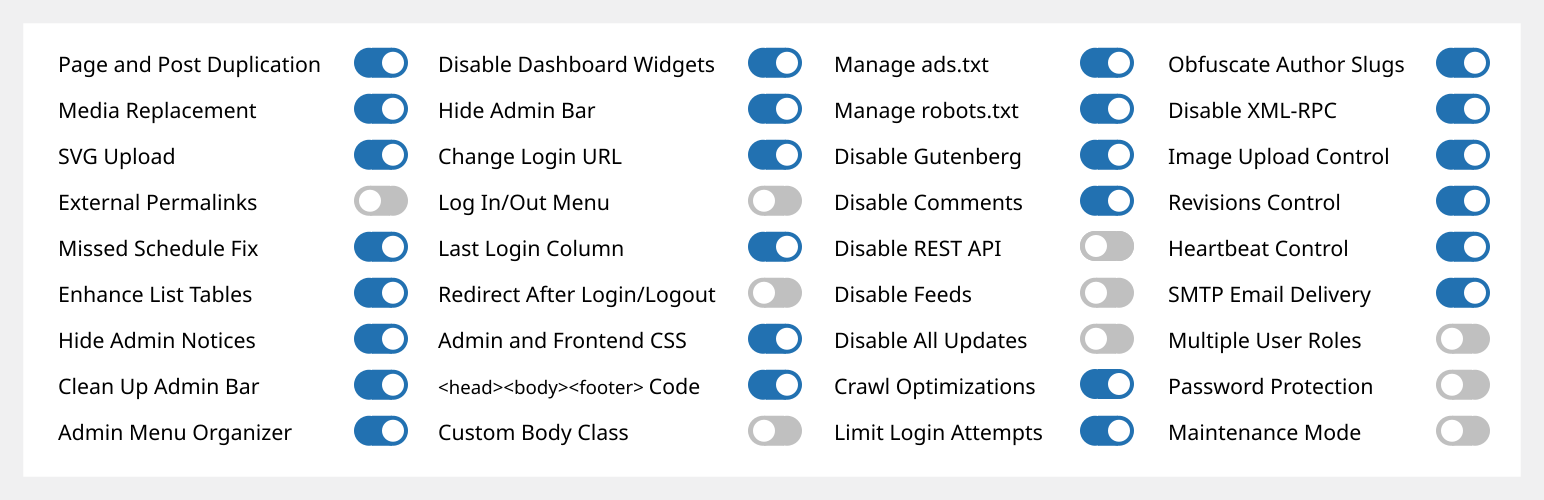
Admin and Site Enhancements (ASE) gör det enkelt att förbättra olika administrativa arbetsflöden och aspekter av webbplatsen och ersätter flera olika tillägg som gör samma saker.
Pro version med livstidslicens (LTD) är tillgånglig via www.wpase.com.
Här är en snabbgenomgång av ASE Free version 7.1.5 av Jakson.
Här är en detaljerad genomgång av ASE Free version 7.0.3 av Pascal Claro.
Vad andra användare säger
”ASE ersätter lätt ett dussin eller fler tillägg jag installerar i varje webbprojekt. Supersmidigt och enkelt att använda.” ~NetzzJD
”I bought the lifetime deal and was blown away by the quality, and the free version replaces SO many other plugins too. LOVE THIS!” ~Jacob Wonder
”ASE är en fantastisk tillägg! Sparar tid och pengar. Tack!” ~Iulian Baciu
FUNKTIONALITET & MODULER
76 modules in total: 58 free modules (32 has Pro features) | 18 Pro modules
Innehållshantering
- [ASE Pro] Custom Content Types. Register custom post types (CPT), custom taxonomies, custom field groups and options pages that integrates with Bricks, Breakdance, Oxygen and Elementor, and compatible with various block themes and plugins. Also integrates with WPML and works with TranslatePress to create multilingual sites. An alternative for ACF Pro, Meta Box, Toolset, Pods, JetEngine or ACPT.
- [ASE Pro] Post Type Switcher. Switch the post type of one or more posts to a different post type.
- Content Duplication. Duplicate pages, posts and public CPTs. ASE Pro enables duplication only for certain user roles and certain public and non-public post types, and adds location option for duplication links.
- Content Order. Drag-and-drop custom ordering of hierarchical post types. ASE Pro enables ordering of non-hierarchical post types, including media / attachments, reordering and changing the parent of child posts is supported, as well as applying the custom order on the frontend.
- [ASE Pro] Terms Order. Drag-and-drop custom ordering of terms and child terms from various taxonomies and apply the custom order on the frontend.
- Media Files Visibility Control: Limit media files visibility so only administrators can see all media files. Non-administrator users will only see media files they uploaded themselves. ASE Pro adds an option to specify which non-administrator user roles will have such limitation.
- [ASE Pro] Media Categories. Hierarchical categories for the media library with drag-and-drop categorization.
- Media Replacement. Replace any type of media file with a new one while ensuring no existing links will break. ASE Pro allows replacing media from the grid view of media library.
- SVG Upload. Allow some or all user roles to upload SVG files with sanitization to keep things secure.
- AVIF-uppladdning. Aktivera uppladdning av AVIF-filer till mediebiblioteket.
- [ASE Pro] Public Preview for Drafts. Public preview for draft and scheduled posts from some or all public post types.
- External Permalinks. Enable pages, posts and/or custom post types to have permalinks pointing to external URLs. ASE Pro allows enabling only on / except on certain post types, or on all post types.
- Open All External Links in New Tab. Force all links to external sites to open in new browser tab. ASE Pro allows excluding links with certain domains / subdomains from opening in a new tab and from getting the rel=”nofollow” attribute.
- Allow Custom Navigation Menu Items to Open in New Tab. Allow custom navigation menu items to have links that open in a new browser tab.
- Auto-Publish Posts with Missed Schedule. Trigger publishing of scheduled posts marked with ”missed schedule”, anytime the site is visited.
Administratörsgränssnitt
- Rensa Adminfältet: Ta bort olika standardelement från adminfältet. ASE Pro möjliggör borttagning av menyval och objekt, som lagts till av andra plugins, från adminfältet.
- [ASE Pro] Admin Bar Custom Elements. Add custom menu and submenu items to the admin bar.
- Hide Admin Notices. Move notices into a dedicated panel accessible via the admin bar. ASE Pro enables completely hiding notices for non-admins.
- Disable Dashboard Widgets. Completely disable some or all widgets.
- Hide Admin Bar. Frontend hiding for all or some user roles. ASE Pro allows hiding on the backend and make frontend admin bar toggleable.
- [ASE Pro] Admin Logo. Show custom logo in the admin bar or the (top of) admin menu.
- Wider Admin Menu. Up to 300px wide.
- Admin Menu Editor / Organizer. Customize order for the admin menu. Change menu item title or hide some items. ASE Pro allows always hiding menu items for some or all user roles, adding custom menu and submenu items, reordering submenu items and always allowing eligible users to view and access a menu item.
- [ASE Pro] Admin Columns Manager. Organize columns in the admin list tables. Supports columns for ASE, ACF and Meta Box custom fields.
- Show Custom Taxonomy Filters. Show additional filter(s) on list tables for hierarchical, custom taxonomies. ASE Pro allows showing additional filter(s) for non-hierarchical taxonomies.
- Enhance List Tables. Improve the usefulness of listing pages of various post types by adding / removing columns and elements, e.g. featured image, excerpt, last modified, ID, media file size columns.
- Various Admin UI Enhancements:
- Media Library Infinite Scrolling: Re-enable this in the grid view.
- Display Active Plugins First: On the plugins list.
- [ASE Pro] Bevara taxonomihierarkin: Bevara den visuella hierarkin för taxonomitermer i den klassiska redigeraren.
- [ASE Pro] Enable Dashboard Columns Settings: Set columns layout between 1 to 4 columns.
- [ASE Pro] Add User Role Slug(s) to Admin Body Classes.
- [ASE Pro] Add Usermame to Admin Body Classes.
- Custom Admin Footer Text: Customize the text you see on the footer of wp-admin. ASE Pro enables media insertion.
Logga in/ut & Registrera
- Change Login URL. Make the login URL more memorable and secure. ASE Pro adds compatibility with login process in WooCommerce pages, i.e. account and checkout, and custom 404 redirect on default login URLs.
- Login ID Type. Restrict login ID only to username or email address.
- [ASE Pro] Anpassa inloggningssidan. Anpassa enkelt designen på inloggningssidan.
- Site Identity on Login Page. Use the site icon and URL to replace the default WordPress logo on the login page.
- Log In/Out Menu. Enable log in, log out and dynamic log in/out menu item for addition to any navigation menu. ASE Pro allows customizing the ”Log In” and ”Log Out” text.
- Registreringskolumn. Visa användarens registreringsdatum. ASE Pro gör kolumnen sorterbar.
- Last Login Column. Log last login datetime and show it in the users list table. ASE Pro makes the column sortable.
- Redirect After Login / Logout. Set custom redirect URL for all or some user roles after login / logout. ASE Pro allows setting separate redirect URL for each role.
- Disable User Account. Disable login for individual users while preserving their content and display name.
Anpassad kod
- [ASE Pro] Code Snippets Manager. Manage CSS / SCSS, JS, HTML and PHP code snippets to modify your site’s content, design, behaviour and functionalities.
- Anpassa CSS och styling för admindelen.
- Anpassa CSS och styling för besökare.
- Infoga kod i <head>, <body> och <footer>: Infoga smidigt <meta>, <link>, <script> och <style>-taggar för spårning, analys, etc.
- Anpassa klasser på body-taggen.
- Hantera innehållet i ads.txt och app-ads.txt.
- Hantera innehållet i robots.txt.
Inaktivera komponenter
- Disable Gutenberg for some or all applicable post types. Optionally disable frontend block assets. ASE Pro allows disabling only on / except on certain post types, or on all post types.
- Disable Comments. Disable comments for some or all public post types. ASE Pro allows disabling only on / except on certain post types, or on all post types.
- Disable REST API. Disable REST API access for non-authenticated users and remove URL traces from <head>, HTTP headers and WP RSD endpoint. ASE Pro allows enabling access only for some, authenticated user roles, and adds a way to exclude certain API routes.
- Inaktivera flöden: Inaktivera alla RSS-, Atom- och RDF-flöden.
- Disable Embeds. Prevent your site content from being embedded on other sites. Prevent embedding of non-whitelisted sites in your site. Disable all, related JavaScript. Removes support for the embed block.
- Inaktivera alla uppdateringar: Inaktivera helt och hållet alla manuella och automatiska uppdateringar för WordPress kärna, teman och tillägg. Kommer även att inaktivera uppdateringskontroller, aviseringar och e-postmeddelanden.
- Disable Author Archives. Return 404 (Not Found) error when trying to load author archives. Remove or disable links to author archives. Remove authors archives from the sitemap.
- Disable Smaller Components. Prevent smaller components from running or loading. Those are generator <meta> tag, version number, Windows Live Writer (WLW) manifest <link> tag, Really Simple Discovery (RSD) <link> tag, WordPress shortlink <link> tag in <head>, and also dashicons CSS and JS files, emoji support, jQuery Migrate, block-based widgets settings screen, native lazy load of images, application passwords, site admin email verification screen, user email notification after password change and plugin / theme editor.
Säkerhet
- Limit Login Attempts. Prevent brute force attacks by limiting the number of failed login attempts allowed per IP address. ASE Pro adds IP whitelisting, which is also useful to unblock users. [ASE Pro] CAPTCHA Protection. Support for ALTCHA self-hosted version (GDPR-compliant, open source, free), Google reCaptcha v2 and v3, and Cloudflare Turnstile for WordPress and WooCommerce default forms (login, password reset, registration and comment forms). [ASE Pro] Two-Factor Authentication (2FA). Apply 2FA for some or all user roles with grace period settings and the option to apply different 2FA settings for each user role. Supported methods are authenticator app (TOTP), recovery codes and email.
- Förvräng slugger för författare: Förvräng offentligt exponerade URL:er till författarsidor som visar användarslugger eller användarnamn.
- Förvräng e-postadress: Förvärng e-postadresser för att förhindra att spambotar samlar in dem. ASE Pro möjliggör förvrängning av mailto-länkar samt automatisk förvrängning av e-postadresser som är del av innehållet i inlägg.
- Inaktivera XML-RPC: Skydda din webbplats mot bruteforce-, DOS- och DDOS-attacker som sker via XML-RPC. Inaktiverar också trackbacks och pingbacks.
Optimeringar
- Image Upload Control. Resize newly uploaded, large images to a smaller dimension and delete originally uploaded files. BMPs and non-transparent PNGs will be converted to JPGs and resized. ASE Pro enables setting custom JPG conversion quality and adds an option for conversion to WebP with custom conversion quality. You can also disable generation of some or all intermediate sizes.
- Revisions Control. Limit the number of revisions to keep for some or all post types. ASE Pro enables revisions control ”only for”, ”except for” or ”for all” post types.
- Heartbeat-kontroll: Ändra intervallet för WordPress heartbeat API eller inaktivera helt på administrationsidor, sidor för skapande/redigering av inlägg och/eller för besökare.
Verktyg
- [ASE Pro] Site Backup and Migration. Backup files and database, restore from backups, and migrate or sync to another server.
- Email Delivery. Set custom sender name and email. Optionally use external SMTP service to ensure notification and transactional emails from your site are being delivered to inboxes. ASE Pro adds the option to specify a custom reply-to name and email, Bcc address(es), disable authentication and the option to log email delivery.
- [ASE Pro] Form Builder. Enable the drag-and-drop creation of various types of forms (contact, feedback, booking, application, proposal, admission, support, survey, etc.) on the frontend to collect information from site visitors or users or members. 33 field types are available, including Net Promoter Score (NPS), Likert, Matrix of Uniform and Variable Dropdowns and CAPTCHA fields. Support custom form styles, multi-columns layout, email notification, auto responder, entries management and webhooks for sending submission data to Zapier, n8n, etc.
- [ASE Pro] File Manager. A comprehensive file manager with folder tree navigation, file and folder operations, and code editing capabilities.
- [ASE Pro] Local User Avatar. Enable usage of any image from the media library as user avatars.
- Multiple User Roles. Assign multiple roles during user account creation and editing.
- Image Sizes Panel. Display a panel showing and linking to all available sizes when viewing an image in the media library. ASE Pro adds a copy button for the image URL on click.
- Visa admin som roll: Visa admin-sidor och webbplatsen (inloggad) som en användare utan administratörsrättigheter.
- Lösenordsskydd. Lösenordsskydda hela webbplatsen för att dölja innehållet från allmänheten och sökmotorernas botar/crawlers. ASE Pro lägger till möjligheten att kringgå lösenordskyddet baserat på IP-adress eller via URL-parameter, samt tillämpar designelement från modulen Login Page Customizer.
- Maintenance Mode. Show a simple maintenance message. ASE Pro adds option to set custom page and browser tab title, use WYSIWYG editor, use pattern, image, solid color background, apply custom CSS, and also add the option to use an existing page created with the block / classic editor or a page builder as the maintenance page. It also adds an option to exclude certain URLs (wildcard support) and allow non-admins to access the frontend.
- [ASE Pro] Redirect Manager. Easily manage various types of redirects / redirections (3xx, 4xx, 5xx codes) with support for wildcards and regular expressions (regex).
- Omdirigera 404: Utför 301 (permanent) omdirigering till startsidan för alla sidor med 404 (inte funna). ASE Pro lägger till inställningar för att anpassa URL för omdirigering.
- Visa systemöversikt. Visa webbserverprogramvara, PHP-version, databasprogramvara och serverns IP-adress i widgeten ”Översikt”. ASE Pro visar även mängden utrymme som tas upp av webbplatsen, databasen och rot-, wp-content-, tillägg-, teman- och uppladdningsmapparna.
- Synlighetsstatus för sökmotorer. Visa status i adminfältet och adminmeddelande när sökmotorer avråds från att indexera webbplatsen. ASE Pro lägger till ett sätt att förhindra att utvecklings- och staging-sajter har sökmotorsynlighet aktiverad.
ASE Pro
Livstidslicens (LTD) är tillgänglig via www.wpase.com.
LANGUAGES
ASE has been translated into 30+ languages. You can help translate ASE into your language(s).