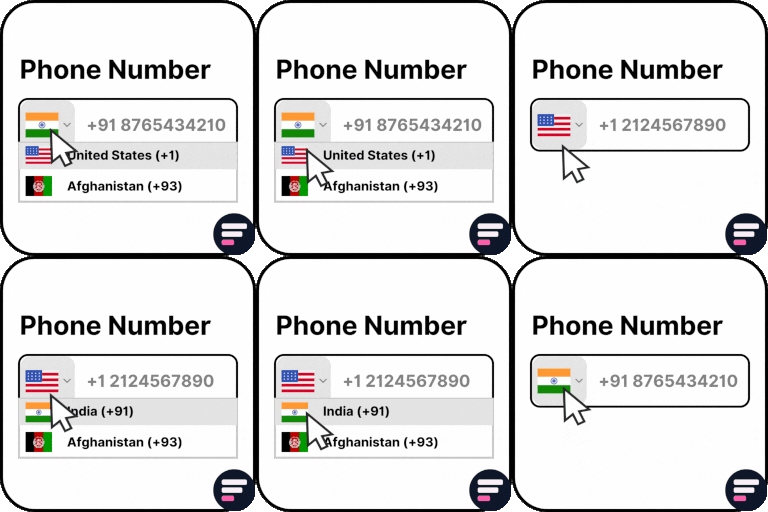
Country Code For Elementor Form Telephone Field

Use Country Code for Elementor Form Telephone Field plugin to easily add an international country code dropdown with flags inside the phone field of your Elementor form.
👉 VIEW FREE DEMO – COUNTRY CODE FOR ELEMENTOR FORM
Upgrade to Cool FormKit to unlock more advanced features for Elementor forms – including range slider, signature field, conditional logic, calculator & more. Start building smarter forms with coolformkit today!
Free Plugin Features:
-
Seamless Integration with Elementor Forms: This ultimate Elementor addon helps users enter valid mobile numbers by selecting the correct country dial code before typing their phone number. It ensures properly formatted data, improves form validation, and reduces errors in contact forms, booking forms, registration forms, and more.
-
Show Only Selected Countries: Limit the dropdown to display only specific countries. For example, if you only want to show Canada, India, United States, and United Kingdom, simply enter their alpha-2 codes in the Tel field settings like:
ca,in,us,gb. -
Exclude Specific Countries: Show all countries but hide a few by entering their alpha-2 codes (e.g.,
af,pkremoves Afghanistan and Pakistan). -
Set a Default Country: Preselect a default country code when the form loads.
-
Control Dial Code Visibility: Show or hide the dial code while users type their phone number.
-
Strict Mode Validation: Enable strict mode to block invalid numbers or extra digits based on the selected country.
-
Compatibility with Hello Plus: This addon also works with the Hello Plus form lite widget. If you are creating forms using Elementor Free with Hello Plus, you can still add an international dial code dropdown to the phone field using this ultimate addon.
Upgrade for More Features
-
Auto Detect Country Code by User IP Automatically select the user’s country code in the phone field based on their IP address. You can enable this feature inside your Elementor form by using CoolFormKit pro version.
-
Show Preferred Countries at Top By default, the dropdown lists countries alphabetically (A–Z). With this feature, you can pin specific countries (like India, US, UK) at the top for faster user selection.
-
Show or Hide Country Flags Choose whether to display country flags alongside dial codes. For faster form loading, you can disable flags and only show the country dial codes.
-
Country & State Field for Elementor Form Go beyond phone fields! With Cool FormKit Pro, you can add a Country + State dropdown field. Users first select a country, and then the state field updates dynamically with available states.
More Essential Addons for Elementor Form
-
Conditional Fields for Elementor Form Add conditional logic to Elementor form fields to show or hide inputs dynamically based on user choices. Make your forms smarter, cleaner, and easier to use.
-
Form Input Masks for Elementor Forms Apply input masks so users enter properly formatted data like phone numbers, dates, credit cards, and more. Improves accuracy and reduces validation errors.
-
Cool FormKit A complete form builder addon for Elementor Free & Pro. It extends Elementor Pro forms with advanced fields or provides a dedicated form builder widget if you’re on Elementor Free. Popular features include:
Other Popular Addons for Elementor
Enhance your website-building workflow with these other ultimate Elementor addons by Cool Plugins:
-
Loop Grid Extender for Elementor Pro Add ACF Repeater fields & advanced taxonomy filters inside Elementor Pro loop grids.
-
AutoPoly – AI Translation for Polylang Instantly auto-translate Elementor pages using AI. Build multilingual websites faster with Polylang + AutoPoly.
-
Timeline Widget for Elementor Display history, events, or milestones in beautiful vertical or horizontal timelines inside Elementor pages.
-
Events Widgets for Elementor Add The Events Calendar widgets to Elementor — show events in grid, list, or carousel layouts with ease.
-
LocoAI – Auto Translate for Loco Translate Translate WordPress plugins & themes automatically with AI. One-click string translation inside Loco Translate.
Use of 3rd Party Services: This plugin connects to the Cool Plugins feedback server only for optional usage data sharing and voluntary feedback submission (for example, during plugin deactivation). Data is transmitted solely after explicit user consent. No hidden tracking is performed, and no frontend visitor or site user data is collected. For more details, please review our Data Usage Policy, TOS, and Privacy Policy.It also includes the intl-tel-input library, distributed under the MIT License .