PubExa – Contextual Ads & Website Monetization

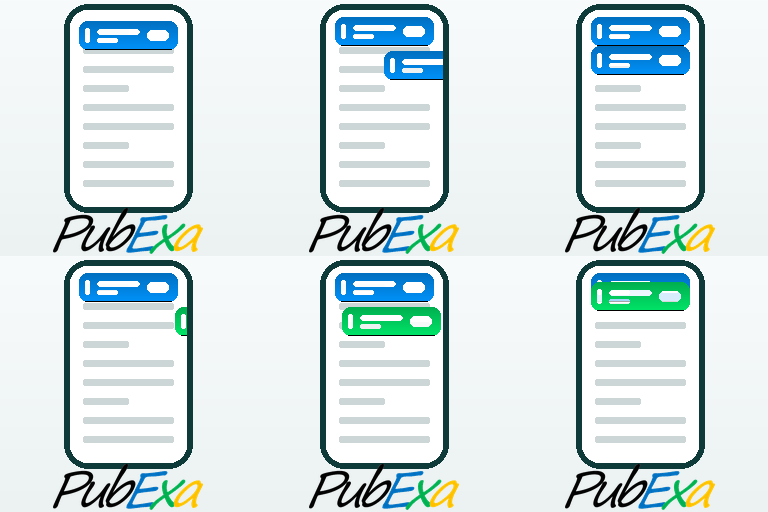
PubExa is built on one number. In a real-world test, its slim scroll-in ad tab earned about 5.2% click-through where a standard display banner earned 0.49% — roughly 10× the clicks. The tab works because it flows with the story and slides in exactly when reader attention peaks, so people engage with it instead of scrolling past. For you that means more revenue from the traffic you already have. And there’s no ad code to paste: PubExa is a contextual ad network that matches ads to each page and pays you a share.
Visit the demo site → — open it on your phone to watch the mobile ad tab slide in. On desktop you’ll see the content cards instead, since the tab is mobile-first by design.
Everything PubExa gives you
Automatic placement — set it once, no shortcodes and no editing pages one by one. Every option here is opt-in: nothing shows until you switch it on, and you decide how many and where.
- Optionally add 1–12 content cards right after the title, before the post body
- Optionally add cards after the second paragraph, in the middle of the article
- Optionally add cards after the content, just before the footer
- Optional automatic desktop ad insertion across your posts — on or off in one click
- Works on Elementor and other page builders, not just the block editor
- Full control: hide ads on the home page or on any specific URL, plus a per-page opt-out
Mobile-first scroll-in ad tabs:
- A slim ad tab that slides in from the top as the reader scrolls
- An optional second tab pinned to the bottom of the screen
- One-tap dismiss; appears only after a scroll distance you choose
- Your own colours, opacity, animation and spacing
Manual placement when you want the control:
- [pubexa_ad] shortcode and an Elementor ”PubExa Ad” widget for in-content units
- [pubexa_column] shortcode and a dedicated Elementor widget for a sidebar card column (up to 12 cards)
Your own ads — no account required:
- Text ads, 320×100 image banners, and image promo cards
- ”Promote an article”: paste any link and PubExa pulls its image, title and summary into the card for you
- Activate, pause, reorder and preview every ad from one screen
Earn with the network when you’re ready:
- Add your Site ID and switch to Hybrid or Remote to fill placements with paid contextual ads
- Ads matched to each page’s real topic, read live from the page headings
- A revenue share on the same placements you already set up
Reporting and controls:
- Built-in analytics: impressions, clicks, CTR and country breakdown
- Consent-ready: a built-in cookie notice, or mark that you run your own
- Owner self-click protection, so your own visits are never counted
PubExa puts modern, good-looking ads on your WordPress site — and lets you run your own promotions right alongside them — without touching a line of code. It’s built mobile-first, it stays out of your readers’ way, and your first ad can be live a few minutes after you activate it.
You’re in control from the very start: show only your own ads, join the PubExa network to earn, or blend both. No account is needed to install the plugin and run your own ads — you connect to the network only when you decide you want to start earning.
Mobile-first ad tabs
The signature format is a slim ad ”tab” that slides in from the top of the screen as your reader scrolls, shows a single clean ad, and can be dismissed with one tap. It never covers your content, it appears only after the reader has scrolled a distance you choose, and you can switch on a second set at the bottom of the screen. On phones — where most of your traffic already is, and where ordinary banners feel heavy — this format stays light, native, and easy on the reader. The colors, opacity, animation, and spacing are all yours to set.
Native content and ad cards, right before the footer
Below your posts, PubExa can show a row or a column of clean image cards — the same kind of ”you might also like” strip you see on large publisher sites. The difference is that you decide what goes in it: feature your own best articles, products, or offers as cards, and in Hybrid mode the network quietly fills the remaining slots with relevant paid ads. Your content and the ads share one natural, on-brand look, so the strip feels like a real part of your site rather than a banner bolted on top. It’s a simple way to keep readers moving through your site and earn at the same time.
Your own ads, no account required
Everything above works with ads you make yourself:
- Text ads — a headline and two short lines, with your link.
- Image banners — a 320×100 image, with your link.
- Promo cards — image cards for the post-row and post-column strips.
Manage them all from a single screen: set each one active or paused, drag to reorder, and preview exactly how it looks before it goes live.
Optional: earn with the PubExa network
When you’re ready to earn, create a free publisher account, add your Site ID, and switch your source to Remote or Hybrid. Network ads use the very same placements you already set up — the tabs, the desktop unit, the cards — matched to the topic of each page, and you earn a revenue share. Everything else keeps working without an account.
What to expect, start to finish
- Install and activate PubExa — a PubExa menu appears in your dashboard.
- Open Local Ads and add your first ad: a text ad, or a 320×100 image, with the link you want.
- (Optional) Open Cards and add a few image cards for the before-footer strip.
- Choose where ads appear and how they look: the scroll-in tabs, the desktop [pubexa_ad] shortcode or Elementor widget, and the post-row / post-column cards.
- Pick your ad source: Local (only your ads), Preview (test the look), Hybrid, or Remote.
- (Optional) Add your Site ID to turn on network ads and start earning.
You’ll know exactly how the plugin looks and behaves before you ever join the network: set it up with your own ads first, then switch earning on whenever you like.
External services
This plugin connects to the PubExa ad network, an external service operated by PubExa LLC, in order to request ads and record ad events. This connection is required for the plugin’s core function of serving network advertising.
What is sent, and when:
- When a page that contains a PubExa ad unit is viewed, the plugin sends an ad request to the PubExa ad server. The request includes: the page URL, page title, page language, the visible page headings (H1–H6), an anonymous first-party visitor identifier (stored in the
pubexa_vidcookie), your site host, and the visitor’s IP address (used for fraud prevention and coarse country reporting). - When an ad is shown, clicked, or dismissed, the plugin sends an event (impression, click, or dismiss) with the associated delivery identifier so the event can be recorded.
- If you choose ”Remove and delete data” when deactivating, and optionally give a reason, the plugin sends a one-time anonymous feedback message to PubExa (
https://pubexa.com/api/plugin-feedback). It includes only: the reason you typed, the plugin/WordPress/PHP versions, whether the site is multisite, and a random anonymous install identifier. No personal data, site URL, or account data is sent. This is optional telemetry and never blocks deactivation.
The ad server endpoint is the URL you configure in the plugin settings (the PubExa ad server). Use of the PubExa service is governed by the PubExa Advertiser and Publisher Terms of Service and Privacy Policy:
- Publisher Terms of Service: https://info.pubexa.com/publisher-terms-of-service/
- Advertiser Terms of Service: https://info.pubexa.com/advertiser-terms-of-service/
- Privacy Policy: https://info.pubexa.com/privacy-policy/
- Cookie Notice: https://info.pubexa.com/cookie-notice/