
Dashify: WooCommerce yönetim paneli teması
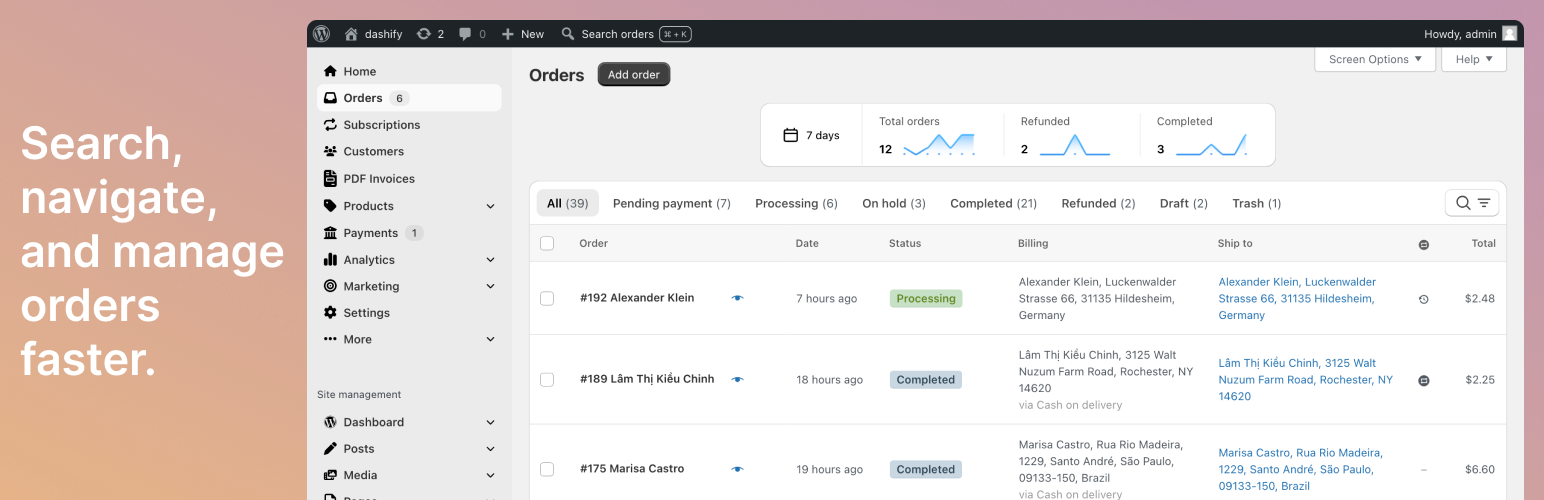
Dashify brings a modern design and UI to the WooCommerce admin. Manage, search, and navigate orders faster.
Sadece Dashify’ı etkinleştirin ve hazırsınız! Mevcut WordPress yönetim paneliniz güzel, e-ticaret odaklı bir yönetici paneline dönüşür. Yapılandırma gerekmez.
Features
Dashify doesn’t just give a fresh look to the WooCommerce admin—it also adds new functionality, marked with a star ⭐ below!
WooCommerce odaklı yönetim menüsü
- WooCommerce menü öğeleri, diğer WordPress menü öğelerinden net bir şekilde ayrıldı.
- “Siparişler” ve diğer WooCommerce alt menü öğeleri ana yönetim menüsüne taşınarak bulunmaları kolaylaştırıldı.
- Gezinti menüsü, diğer popüler uygulamalardan (Shopify, Notion, Stripe) esinlenerek modern bir stile kavuşur.
- Admin Menu Editor ile uyumlu.
- Bir eklenti bir menü öğesi eklerse, bunu Dashify’ın gezinme bölümünde de bulabilirsiniz.
- Mağazanıza uymuyor mu? Dashify’ın geri kalanını etkilemeden kapatabilirsiniz.
⭐ Order trend graphs
- See trends with a graph of total, refunded, and completed orders above the order list.
- For WooCommerce Subscriptions, see subscription revenue, the number of new subscriptions, and the number of cancelled subscriptions.
- Choose between Today, Last 24 hours, 7 and 30 day time periods.
Order list
- Order status filters are big and easy to click.
- Bulk actions appear only when at least one item is selected, and they are sticky as you scroll the order list.
- The search bar and filters are grouped together, only visible when in use, and can be opened with the “F” keyboard shortcut.
- Filters can be cleared all at once, or one at a time.
- Table is fully responsive to screen size and works well on mobile devices.
Order view/edit
- Shopify’dan WooCommerce’e mi geçiyorsunuz? Siparişleri Shopify benzeri bir kullanıcı arayüzünde yönetin.
- ⭐ Klavye kısayollarıyla sonraki ve önceki sipariş düğmeleri.
- ⭐ Jump to orders of the same status. Based on the order status selected in the order list, after clicking into an order, the next and previous buttons will go to the next or previous order of the same status.
- ⭐ Date and time formatted according to region.
- ⭐ Back button to get back to the order list.
- Order number, status, and date are moved to the top for visibility.
- Action and update buttons are grouped together at the top.
- Sipariş notları Zaman Çizelgesi haline gelir.
- Zaman çizelgesi metin kutusu yazdıkça otomatik olarak genişler.
Dashify Pro
Dashify Pro, WooCommerce yönetim arayüzüne daha da fazla iyileştirme getiriyor.
- Daha fazla WooCommerce sayfasında Dashify’ı kullanın. Dashify Pro ile ürün listesi ve WooCommerce ayarları da biçimlendirebilirsiniz. Yakında daha fazla sayfa geliyor! Ayrıntılar için yol haritasına göz atın.
- ⭐ Genel arama ile siparişleri hızla bulun. Dashify Pro, WordPress yönetici araç çubuğuna bir “Siparişleri ara” düğmesi ekleyerek bir siparişin içinde kimlik, müşteri adı, e-posta, telefon veya ürün SKU’suna göre bir sipariş bulmanızı sağlar. Bu AJAX araması, standart WooCommerce sipariş aramasının aksine tam sayfa yeniden yükleme gerektirmediği için daha hızlıdır. Ayrıca son siparişleri gösterir, böylece hızla aradığınızı bulabilirsiniz.
- ⭐ Hide specific custom fields in orders and subscriptions. You can mark custom fields as hidden, and then they won’t show in any order or subscription edit view.
- ⭐ Sort order line items by SKU. When packing orders with many items, this helps you find items faster if they’re also sorted by SKU in your warehouse or fulfillment center.
- ⭐ Ürün menüsü sırasına göre satır öğelerini sıralayın. Bir müşterinin siparişindeki öğeler, yönetici ürün listesi “Sıralama” görünümünde ve Mağaza sayfasında göründükleri gibi sıralanabilir.
Ekran Görüntüleri / Fiyatlandırma
Compatibility
Dashify should work with most plugins for the WooCommerce admin.
Here are the plugins we’ve extensively tested and designed Dashify to be compatible with:
- WooCommerce Subscriptions
- Admin Menu Editor — Janis Elsts
- PDF Invoices & Packing Slips for WooCommerce — WP Overnight
- WooCommerce PDF Invoices, Packing Slips, Delivery Notes and Shipping Labels — WebToffee
- Payment Plugins for Stripe WooCommerce — Payment Plugins
- RD Order Modifier for WooCommerce — Robot Dwarf
- Order Tags — 99w
- PW WooCommerce Gift Cards — Pimwick, LLC
- Smash Balloon Social Photo Feed — Smash Balloon
- FiboSearch — FiboSearch Team
- Ultimate Dashboard — David Vongries
If you find a plugin that’s not compatible, leave a message in the WordPress.org support forum or contact us through the Dashify Help Desk, and we’ll gladly add compatibility for it.
You can turn Dashify on and off quickly through the WordPress screen options in case you have occasional plugins or workflows not currently supported by Dashify.
Troubleshooting
- If the order edit layout doesn’t look right, whether Dashify is on or off, turning it on/off again through the screen options will reset the layout.