Single Product Page Customizer with Variation Swatches for WooCommerce

Best Single Product Page Customizer for WooCommerce to enhance your online store with responsive design, quick checkout, variation swatches, AJAX add to cart, quantity controls, custom product options, and more
Single Product Page Customizer with Variation Swatches for WooCommerce is a comprehensive WordPress plugin that provides eCommerce store owners with complete control over their WooCommerce single product pages. It’s one of the best plugins to customize WooCommerce products intuitively.
No more boring designs on your store’s product page. With our responsive WooCommerce plugin, now you have the freedom to do whatever amazing you want to do to your product display. Our product page customizer offers a simplified approach for editing WooCommerce product pages with responsive functionality.
Apart from tons of custom product options, the key component of our WordPress plugin is the advanced WooCommerce Variation Swatches and Quick Checkout features. It enables custom product fields and product variations to be displayed using radio buttons, images, colors, or buttons, alongside instant AJAX add-to-cart and streamlined checkout workflows.
Whether the goal is to improve user experience, create stunning product fields to increase sales, or integrate custom elements, this plugin acts as an effortless WooCommerce product customizer.
Compatible Themes
Our plugin is tested and fully compatible with these popular WordPress themes:
- Twenty Twenty-Four – Latest default WordPress theme
- Twenty Twenty-Five – Modern default WordPress theme
- Astra – Fast, lightweight WooCommerce theme
- Futurio Storefront – Official WooCommerce theme
- Hello Elementor – Minimal theme for Elementor
- Kadence – Modern customizable theme
- OceanWP – Feature-rich eCommerce theme
Useful Links
- Single Product Page Customizer Features
- Live Demo of Single Product Customizer
- How to Use (video) the Single Page Customizer on WooCommerce
- How to Use (documentation) the Single Page Customizer on WooCommerce
- Get Help & Free Support 24/7
What Our Single Product Customizer Plugin Offers
Single Product Page Customizer with variation swatches provides a comprehensive suite of tools designed to enhance the functionality, responsiveness, aesthetics, and user experience of your WooCommerce product pages.
From advanced variation displays to streamlined quick checkout options, here’s what this WooCommerce single product addon offers:
Quick Checkout for WooCommerce
Reduce purchase friction and let customers complete their orders rapidly right from the product detail page.
Enable Quick Checkout (Free & Pro)
Enable the Quick Checkout feature to streamline product purchases without driving customers through unnecessary navigation steps. The Free version includes access to Template 1 (Modern Horizontal Layout) for instant checkout actions.
Quick Checkout Pro Advanced Features
The Pro version elevates the Quick Checkout experience with: * Multiple Layout Templates: Select from Template 2 (Classic Vertical) and Template 3 (Split Layout) to match your theme’s aesthetic. * Component Display Controls: Easily toggle the display of Product Title, Ratings & Reviews, and Short Description within the Quick Checkout view. * Full Inline Checkout Form: Embed direct WooCommerce Billing and Shipping address fields with seamless AJAX order placement directly on the product detail page.
Cart & Quantity Management
Optimizing product fields and purchasing flow is essential for converting casual browsers into committed buyers on your WooCommerce store.
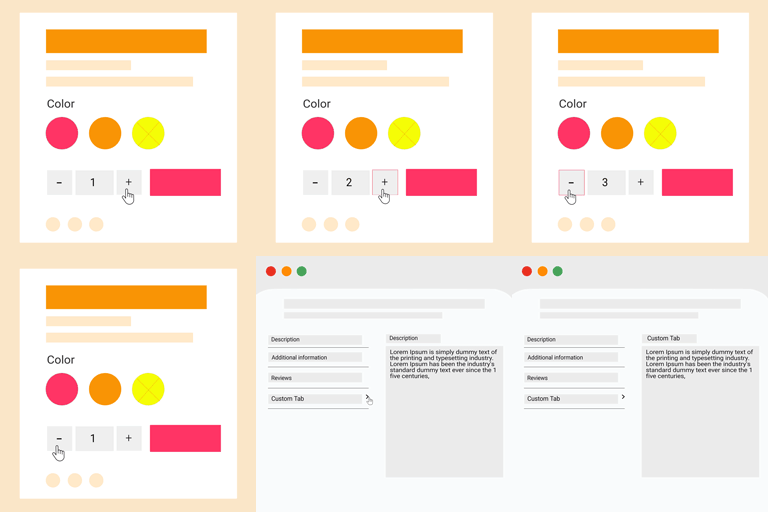
Enable Plus, Minus Buttons for Quantity
Adds distinct Plus (+) and Minus (-) buttons next to the quantity input field, allowing users to adjust quantities effortlessly on mobile devices and desktop screens alike.
Live Demo of Plus Minus Button | Documentation
Enable Ajax Add to Cart Button in Single Product Page
Allow customers to add items to their cart instantly without forcing full page reloads, dramatically speeding up shopping sessions and improving conversion rates.
Live Demo of Ajax Add to Cart | Documentation
Change “Add to Cart” Button Text
Flexibility to rename the standard “Add to Cart” button to high-converting calls-to-action such as “Buy Now”, “Get Yours Today”, or “Reserve Item”.
Hide “Add to Cart” Button
Completely remove the purchasing button for catalog-mode stores, upcoming releases, or inquiry-only product pages.
Enable Min/Max Quantity Limits (Pro Feature)
Set precise minimum and maximum purchase quantities per product to enforce bulk order rules or protect limited inventory.
Your suggestions are the most important factors that will make this plugin even better. So, please let us know your valuable opinion on our plugin.
Product Variation Swatches & Tables
Replace plain dropdown menus with interactive variation swatches for WooCommerce product pages.
Product Variation Swatches
Display product variations as Colors, Images, Radio Buttons, or Text Buttons for a modern visual shopping experience.
Variation Table Display
List available product variations in a structured tabular format, making it effortless for shoppers to compare attributes and options side-by-side.
Variation Reset Text Change
Customize the “Clear selection” reset link text to something more user-friendly like “Reset Options” or “Clear Choice”.
Layout & Visibility Control
Clean up cluttered product layouts by toggling individual meta sections or restructuring page elements.
Remove Product SKU, Category, Tag Name & Rating
Easily hide SKU tags, category lists, meta tags, and star ratings for a cleaner product design.
Remove Related Product Section
Disable default WooCommerce related products to eliminate exit distractions on single product pages.
Hide Price & Short Description
Hide product prices for catalog/inquiry-only items, or hide short descriptions to bring purchasing buttons above the fold on mobile screens.
Move Image Section to Right Side (Pro Feature)
Swap the standard WooCommerce layout by shifting the main product gallery to the right side of the detail page.
Display Related Product Categories Grid (Pro Feature)
Show related product categories in a clean grid view to guide customers toward broader store exploration.
Text & Label Customization
Customize messaging across badges, stock statuses, titles, and tabs.
Sales Badge, Out of Stock & Backorder Text Changes
Replace standard WooCommerce labels with custom text like “20% OFF”, “Restocking Soon”, or “Pre-Order Now”.
Customize Related Product Title
Rename “Related Products” to engaging titles like “You May Also Like” or “Pairs Well With”.
WooCommerce Default Tab Label Change
Rename standard WooCommerce product tabs (Description, Additional Information, Reviews) to match your custom brand voice.
Advanced Content & Custom Tabs
Custom Message Display
Insert custom notification banners (e.g. shipping alerts or store announcements) directly onto product pages.
Attach Custom Tabs & Additional Content (Pro Features)
Create custom product tabs (e.g., Size Guides, FAQs, Specs) positioned relative to standard tabs, or inject additional custom HTML content anywhere on the product page.
Product & Category-Level Customization (Pro Feature)
Take full control over product page rules by targeting specific products or entire product categories instead of applying blanket store-wide rules.
Product-Specific Customization
Enable or disable customizer rules on an individual product basis. Easily override global settings for specific products to create tailored landing experiences, unique min/max quantity rules, or specialized custom tabs.
Category-Based Customization
Apply distinct customization rules per product category. Define category-wide defaults for apparel, electronics, digital goods, or sale items to automatically format product detail pages based on their category assignment.
Key Features Summary
Basic Features (Free)
- Enable Plus, Minus Quantity Buttons
- Enable Quick Checkout (Modern Horizontal Template)
- Enable Ajax Add to Cart Button
- Change “Add to Cart” Button Text
- Hide Add to Cart Button
- WooCommerce Default Tab Label Change
- Sale Badge Text Change
- Out of Stock Text Change
- On Backorder Text Change
- Remove Related Product Section
- Remove Product SKU, Category, Tag & Rating
- Hide Price & Short Description
- Custom Message Display
- Variation Table Display
- Variation Swatches for WooCommerce
- Customize Related Product Title
- Variation Reset Text Change
Pro Features
- Individual Product & Category-Level Customization:
- Product-Specific Customization (Override global settings for individual products)
- Category-Based Customization (Apply distinct customization rules per product category)
- Quick Checkout Pro Capabilities:
- Selectable Layout Templates (Classic Vertical & Split Layout)
- Display Toggles for Product Title, Ratings/Reviews, and Short Description
- Full Inline Billing & Shipping Checkout Form with direct AJAX order placement
- Enable Min/Max Quantity Limits
- Attach Custom Tabs (Position before or after standard tabs)
- Attach Additional Custom Content via Display Hooks
- Display Related Product Categories in Grid Format
- Move Product Image Section to Right Side
Privacy Policy
Single Product Page Customizer with Variation Swatches for WooCommerce uses Appsero SDK to collect some telemetry data upon user’s confirmation. This helps us to troubleshoot problems faster & make product improvements. Appsero SDK does not gather any data by default. The SDK only starts gathering basic telemetry data when a user allows it via the admin notice. We collect the data to ensure a great user experience for all our users. Integrating Appsero SDK DOES NOT IMMEDIATELY start gathering data, without confirmation from users in any case. Learn more about how Appsero collects and uses this data.