
Multicollab: Content Team Collaboration and Editorial Workflow
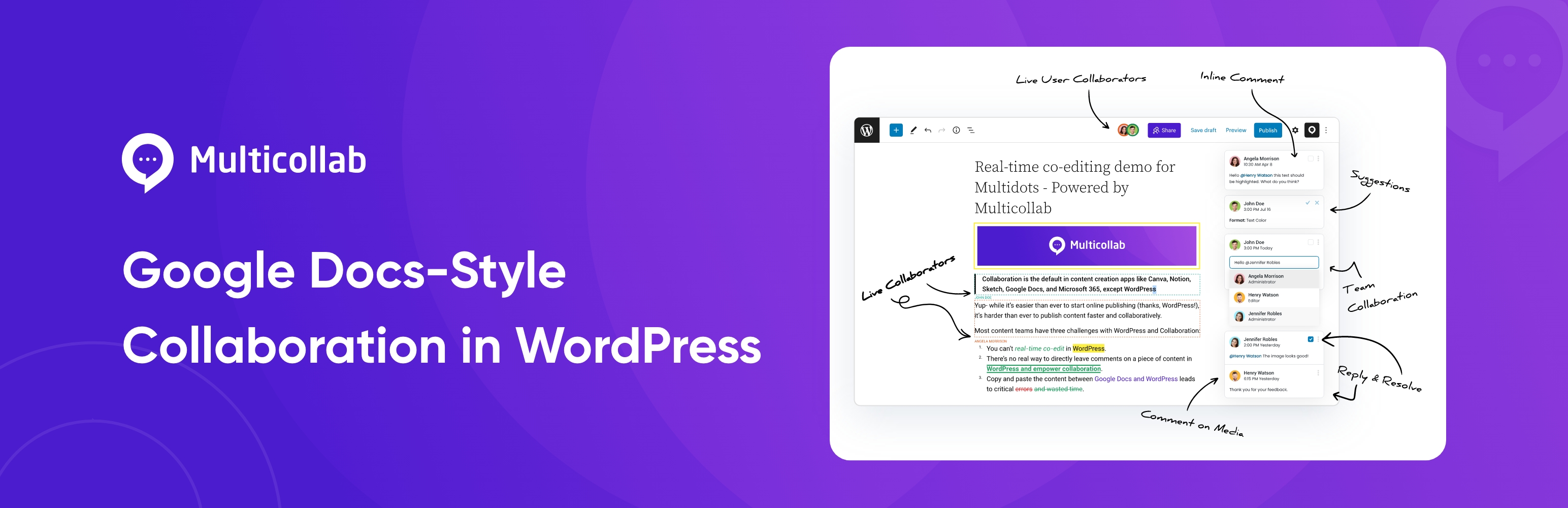
Power up your editorial workflow
In a content editorial workflow, reviewing and providing feedback should be reasonably easy parts of the process.
While external collaboration tools like Google Docs are an option, online collaboration within the WordPress dashboard isn’t well set up by default.
Copy-pasting between Google Docs and WordPress can get frustrating and time-consuming. Also, being unable to leave direct comments on a post’s draft during the editorial process is a deal-breaker.
So, what should WordPress-focused content teams do to improve their collaborative output?
We bring to you – Multicollab: a WordPress collaboration plugin for inline comments and team feedback in the block editor, without switching to external documents. You can share editorial feedback directly in WordPress, including commenting, tagging, replying, and more.
The Multicollab WordPress plugin is a versatile WordPress collaboration plugin designed to streamline editorial collaboration and content feedback. It allows WordPress content creators to collaborate on articles, blog posts, and other editorial content directly within WordPress.
Install Multicollab, and you’ll instantly unlock collaboration functionality you’re familiar with from applications such as Google Docs in just a few simple clicks!
Multicollab brings Google Docs–style commenting into the WordPress editor.
This plugin adds inline commenting functionality to Gutenberg directly, making commenting a single click of a button away. Users can add comments on text as well as Media.
This an easy-to-use plugin—the best one I’m aware of—for those who have an editorial process. My wife is a blogger and I’m her editor. We’ve only begun taking advantage of it but I wanted to offer a positive shout out. – Mario T. Lanza – Sr. Web Developer
Content collaboration in Gutenberg made simple
Whether your editorial workflow consists of just two people or fifty, gathering feedback and recommending changes to WordPress content has always meant you need to take that content elsewhere, such as Google Docs or any other editing suite.
This complicates your way of work unnecessarily, makes collaboration difficult, and can even lead to severe errors going live because things fall through the cracks between applications.
It’s also inefficient and wastes a lot of your editorial time!
Multicollab solves it once and for all.
Offering a seamless editorial workflow for teams, Multicollab is one of the best editorial collaboration tools in WordPress. With a focused collaboration feature set for the block editor, the plugin helps keep feedback and review organized inside WordPress.
Installing the plugin enables the following key editorial features instantly:
- Inline Commenting – Users can add comments on text and Media blocks to mark their feedback.
- Team Collaboration – Invite editorial users to collaborate and comment by mentioning them, ensuring quick email notifications and seamless engagement in the conversation.
- Reports and Activities – Track progress across all pages and posts with easy filtering to view by user, content categories, and time stamps.
- Email Notifications – Instant email notifications make collaborations with your team easier and foster intra-group connectivity.
Multicollab offers a comprehensive editorial content management system, enabling users to oversee content production and ensure high-quality output. Whether you’re seeking a WordPress workflow plugin or a team collaboration plugin in WordPress, Multicollab provides the tools needed to enhance productivity and streamline the content creation process.
Awesome plugin! This is exactly what I was looking for. This plugin works flawlessly. Great job. – Ivan Ružević – WordPress Team Lead
Built specifically for Gutenberg
Multicollab was designed to work with Gutenberg natively, so there’s no need to change your workflow! Fully compatible with Gutenberg versions 14.2 to 16.7, it works right out of the box!
The Arrival of Gutenberg Phase 3: A Comprehensive Overview
Need support? You’ve got it!
Multicollab is built to work effortlessly the minute you install it, with zero setup time: just add it, and start commenting on your pages or posts within Gutenberg within seconds.
If you do have specific questions about the plugin, our extensive support centre documentation is available here and should help you in most cases.
If you do need more help or have a specific question, we’re always happy to support!
Simply open a ticket directly on the WordPress.org forum here, and we’ll get back to you within as short a time as possible.
The plug-in is awesome! It works fantastically. – Charudatta Mondale Co-Founder at QuickDraft LLP
We just introduced a brand new Lite Plan! Priced at $249/year, the Lite plan offers the following features:
- Inline Commenting
- Team Collaboration
- Custom Permissions
- Attach a document to comment
- Multilingual
- Reports and Activity
- Email Notifications
- Email Support
We are excited to see smaller teams reinvent their WordPress editorial collaboration with WordPress.
The free WordPress.org build of Multicollab focuses on inline commenting, permissions, activity reporting, and email notifications in the block editor.
Paid plans on multicollab.com add a broader feature set (for example advanced workflows, integrations, and priority support). See the site for current plan details and demos.
The team behind Multicollab is Multidots — a full-service WordPress development agency and WordPress VIP Gold Agency Partner.
External services
The plugin relies on the following third-party services. For each, we summarize what is sent, why it is needed, and link to the provider’s terms and privacy documentation (reviewers: please verify that these pages remain current).
1. IP-API (ip-api.com)
When an administrator uses the free user setup wizard, the plugin may call the IP-API JSON geolocation API with the current visitor’s public IP address (or a test IP when the request appears to come from localhost) to obtain an approximate country name for the wizard UI. The request is made with wp_remote_get to the ip-api.com endpoint documented by that service. The free API tier uses HTTP; commercial use and HTTPS access are subject to IP-API’s own licensing.
2. Gravatar (Automattic)
In the admin dashboard, activity views, and similar screens, the plugin may display user avatars using WordPress core get_avatar_url() (and related avatar helpers). Depending on the user’s email and site settings, the browser may load images from the Gravatar service operated by Automattic.
3. Multicollab (www.multicollab.com)
The plugin connects to Multicollab’s website and JSON REST API to deliver in-dashboard experiences that cannot be fully bundled in the plugin ZIP: for example getting-started content, an optional promotional banner payload, onboarding and help videos (including poster images) loaded from multicollab.com URLs, and (where applicable) contact or free-signup data submitted to Multicollab’s EDD-related endpoints. These requests are initiated from wp-admin. Data transmitted is limited to what those endpoints require for the described features.
⚠️ Important: Maintenance Update
Due to limited resources, we are no longer maintaining the free version of this plugin. For an updated, fully supported version with the latest features—including advanced workflows, integrations, and priority support—please check out our premium plugin on our official website: Multicollab .