
Manual Image Crop
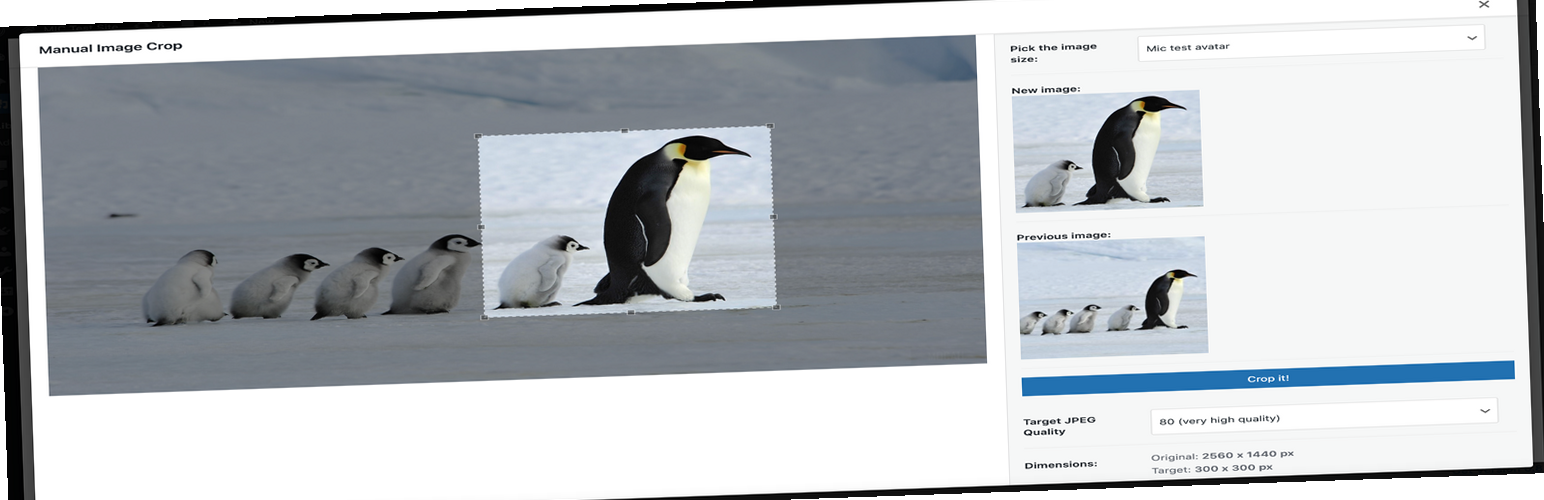
Plugin allows you to manually crop all the image sizes registered in your WordPress theme (in particular featured image). Simply click on the “Crop” link next to any image in your media library. The WordPress Media Modal interface will be brought up and you are ready to go. Whole cropping process is really intuitive and simple.
Apart from media library list, the plugin adds links in few more places: * Below featured image box (“Crop featured image”) * In the media insert modal window (once you select an image)
Settings
The plugin includes a settings page where you can configure: * Image quality settings * Visibility of crop options * Custom labels for image sizes
GitHub Repository
https://github.com/tomaszsita/wp-manual-image-crop
Translations
- Czech (AI Generated)
- Dutch (Bernardo Hulsman)
- French (Gabriel Féron)
- German (Bertram Greenhough)
- Hungarian (Roland Kal)
- Italian (Alessandro Curci)
- Japanese (AI Generated)
- Korean (AI Generated)
- Polish (myself)
- Portuguese (Brazil) (AI Generated)
- Russian (Andrey Hohlov)
- Spanish (Andrew Kurtis)
- Swedish (Karl Oskar Mattsson)
- Turkish (AI Generated)
Please contact me if you want to add a translation (or submit a pull request on GitHub)