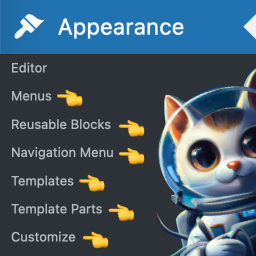
Menus for Block Theme

Menus for Block Theme add a setting page in the WordPress dashboard (Settings > MFBT Settings) which allows managing the following options :
1 – Add classic menus in block themes (Add menus to theme supports)
Support menus in WordPress provide users with an easy way to create and manage menus directly from the WordPress dashboard. This is very useful if your block-based theme doesn’t support classic menus.
Appearance -> Menus
2 – Display shortcut to the reusable blocks management screen
Add a link in the WordPress dashboard to access quickly the Reusable Blocks Screen. This is very useful if you want to manage your reusable blocks without editing a post
Appearance > Reusable Blocks
3 – Display shortcut to menu list
Add a link in the WordPress dashboard to access the Navigation Menus sceen. This is very useful only if you want to delete some menus
Appearance > Navigation menus
4 – Display shortcut to templates list
Add a link in the WordPress dashboard to access quickly the Template list screen. This is very useful if you want to add or manage a template and you don’t want to have many click to access
Appearance > Templates
5 – Display shortcut to template parts list
Add a link in the WordPress dashboard to access quickly the Template Parts list screen. This is very useful if you want to add or manage a Template Part and you don’t want to have many click to access
Appearance > Template Parts
6 – Display the customizer in admin menu
Add a link in the WordPress dashboard to access the customizer. A space to configure the site identity (Site title, Tagline, Site icon), The menus (Add new, Menus locations, Menus Options), the Homepage Settings (display latest posts or static page) and add additional CSS. This is very useful if your block-based theme does not display the tab that allows you to add your custom CSS styles
Appearance -> Customize
7 – Disable files editor for plugins and themes
Improve security and reduce the risk of potential vulnerabilities. By disabling the file editor, WordPress administrators are forced to make changes to the code using a more secure method, such as editing the files locally and then uploading them to the server via FTP, or using a plugin to manage code changes.
Tools -> Theme file editor and Tools -> Plugin file editor